
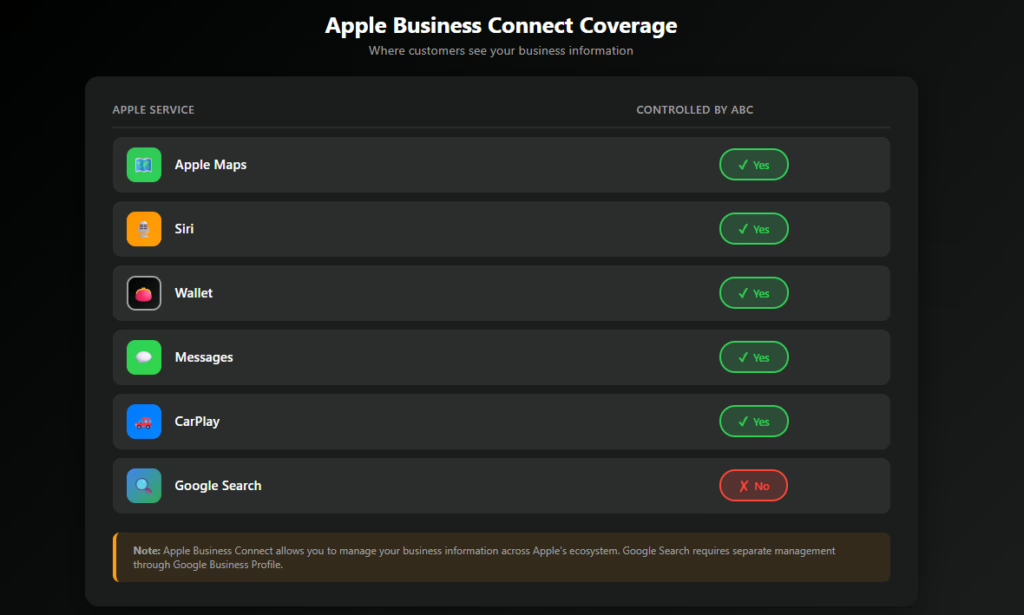
Apple Business Connect is Apple’s (the company’s) officially designated platform for managing your business presence across all Apple services (Maps, Siri, Wallet, etc.). When customers look for your business in Maps, ask Siri for directions to it, etc., Apple Business Connect controls what they see.
Many businesses view Apple Business Connect as being the Apple version of Google Business Profiles. While that comparison proves useful, it falls short in certain aspects. Apple Business Connect is not merely a listing – it is claiming ownership of your presence within Apple’s ecosystem.
This guide will detail how to use Apple Business Connect (how it functions), why it is beneficial to your business, and how to use it step-by-step without extra complication.
Important Highlights
- Apple Business Connect enables you to have total control of your official “place card” across Apple Maps, Siri, Wallet, and Messages.
- To fully manage and/or update your listing, verification will be required.
- Properly optimized images, categories, descriptions, and showcases enhance your visibility and customer interactions.
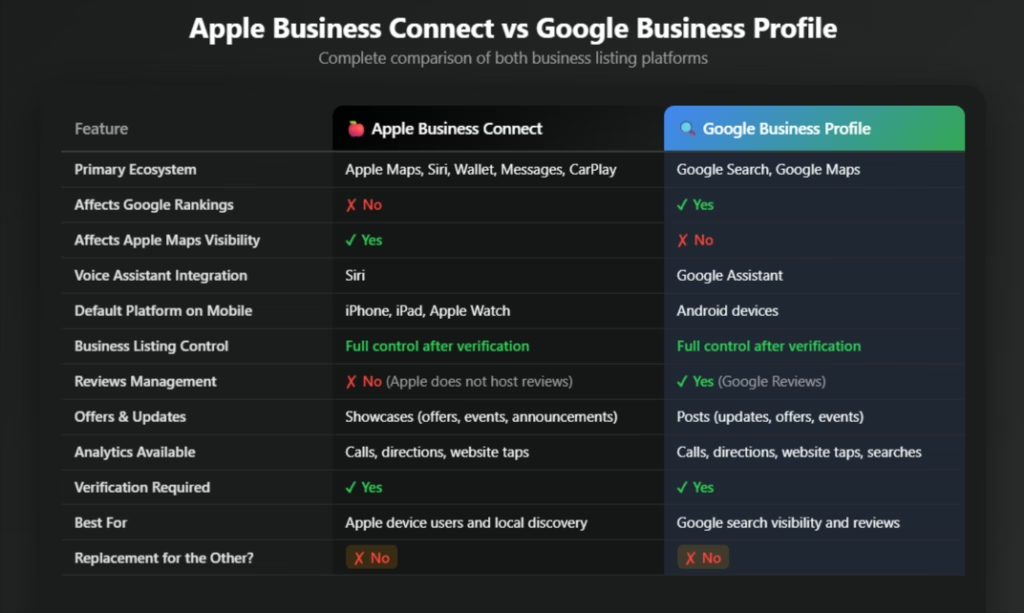
- While Apple Business Connect does not affect Google rankings, it has a significant positive impact on Apple Maps customer discovery and behavior.
What Is Apple Business Connect?
Apple Business Connect is a free service provided by Apple to enable businesses to control their official business listing across Apple’s various products and services. The main function is your “place card,” which is the profile customers see when they search for your business in Apple Maps or interact with it via Siri.
Your “place card” includes your business name, location, hours of operation, phone number, categories, description, images, and promotional items (offers, events, etc.). Unlike scraped listings or third-party directories, Apple Business Connect provides the business with complete control over this data.
Simply stated, it is how you inform Apple of your business identity, what type of business you are, and how your customers can contact you.
Why Apple Business Connect Matters
Apple Maps is the native mapping application on iPhones, iPads, Apple Watches, and CarPlay. When customers ask Siri questions regarding businesses, Siri searches Apple’s database for answers. If you have not verified your business and ensured it is properly updated or optimized, Apple may display outdated or incomplete data.
As mentioned earlier, Apple Business Connect matters because it gives the business the opportunity to control that data.
Having a complete and accurate “place card” establishes trust, minimizes confusion, and increases the likelihood that customers will call, obtain directions, or visit your location. Additionally, having an accurate “place card” will allow you to promote offers and updates directly to where your customers are currently searching.
Unlike search engine optimization (SEO) in the Google context, Apple Business Connect is focused on establishing visibility and credibility within Apple’s ecosystem.
Getting Started With Apple Business Connect
Using Apple Business Connect is relatively simple; however, accuracy must be maintained at each stage.
Logging Into Your Account and Registering Your Business
Begin by logging into your Apple ID account at businessconnect.apple.com. As you are setting up Apple Business Connect, you can log into your account using either a personal Apple ID or a work Apple ID associated with your business, if your business has an Apple ID.
If you use a work Apple ID, your organization can restrict access to Apple Business Connect.
Following logging into your Apple ID account, select “Register Company/Organization.” Upon registering your company or organization, you will be prompted to input your official business name, address, website, and other general business information.
It is recommended that you attempt to maintain consistency with your business’s other listings and official documents, as inconsistencies could create challenges during the verification process.
Searching for and Adding or Claiming Locations
After registration, search for your business location. If Apple has created a listing for your business previously, you can claim the existing listing. However, if Apple does not have a listing for your business, you can create a new location.
When creating a new location, you must validate it on the map.
Incorrect validation of the map pin can create problems for your customers as they try to receive directions to your location.
Next, you will be required to enter the necessary contact information, such as your phone number, business categories, and hours of operation.
The contact information you enter determines the search results displayed in Apple Maps and the response you receive from Siri; therefore, accuracy is critical.
Verifying Your Business
Before you can fully manage and update your listing, your business must complete a verification process. Apple may verify your business through a telephone call to confirm your identity or request documentation (such as a valid government-issued ID).
Depending on the verification method chosen, it may take several days to complete. Once completed, you will have total management and control over your listing (including photos, descriptions, showcases, and updates).
Prior to completion of the verification process, you may be unable to make changes to the listing.
Managing Your Listing Following Verification
Following completion of the verification process, Apple Business Connect transforms from a simple directory entry into a brand-building and communication tool.
Visual Branding and Assets
Your “place card” should visually, clearly, and professionally depict your business.
You may post a square logo with a minimum dimension of 1,024 × 1,024 pixels. The logo you post should be consistent with your business’s overall branding, as it appears at the top of your listing.
You may also upload a cover photo with a minimum dimension of 1,600 × 1,040 pixels. The cover photo will set the atmosphere for your listing and influence the initial impression visitors have.
Images matter. Clear, high-quality images build trust and help potential customers visualize what to expect before their visit.
Description of Your Business and Essential Information
Apple permits up to 500 characters in the description of your business. The description should outline what your business offers, whom you serve, and what differentiates your business from others.
Write naturally. Do not fill your description with keywords or too much promotional language. View it as a brief introduction to a customer unfamiliar with your business.
Verify Hours of Operation Accurately
Hours of operation should be reviewed carefully, including holidays or special hours. Incorrect hours of operation are among the most common reasons for poor customer experiences.
Review Contact Information Regularly
Contact information should also be reviewed periodically to ensure there are no missed calls or customer communications.
Categories and Attributes
Selecting relevant categories will help Apple determine when and where to display your business in search results.
First, select the most relevant primary category for your business. Next, select secondary categories that reflect other services or offerings you provide. Do not select categories that do not accurately represent your business, as this could negatively affect the relevance of your business.
Attributes such as accessibility and parking may also be added to your business. These details will help customers make rapid decisions and clarify expectations.
Use Showcases to Engage Customers
One of the most effective aspects of Apple Business Connect is showcases. A showcase is a post on your “place card” that lets you draw attention to current, timely information.
Showcases may be utilized to advertise special offers, seasonal promotions, events, or new services. Each showcase may include a call to action, such as “Call Now,” “Get Directions,” or “Learn More.”
This enables you to influence customer behavior at the precise moment customers are searching for or attempting to locate your business. It creates an active engagement tool out of your static “place card.”
Understanding Insights and Performance Metrics
Within Apple Business Connect, there is an Insights area that shows how customers interact with your “place card.”
You can observe customer actions, such as calls, directions requests, and tapping your business’s website.
The insights are not as thorough as full analytical platforms, but they will show your visibility and engagement with your business.
Over time, insights will reveal the updates or showcases that generate the most customer interactions and identify areas for optimization.
Managing Team Access
If multiple individuals are responsible for managing your business’s presence, Apple Business Connect enables you to assign specific responsibilities to team members.
This simplifies delegating duties such as posting photos, managing showcases, or monitoring insights, while restricting full administrative access.
Team member access is particularly beneficial for companies with multiple locations and or dedicated marketing support.
The Three Main Purposes of Apple Business Connect
There are three main purposes of Apple Business Connect:
- First, it enhances visibility by ensuring your business appears correctly across Apple Maps, Siri, and other Apple products and services.
- Second, it empowers the business to dictate how it is represented, rather than relying on third-party data sources.
- Third, it increases engagement by giving customers the ability to easily call, navigate, or take action based on offers and updates.
Mistakes to Avoid
Many businesses set up Apple Business Connect once and fail to return to it. This severely limits the potential benefits.
Incomplete or inaccurate “place cards,” incorrect hours of operation, substandard photos, or unoriginal descriptions decrease both trust and customer engagement.
Treating Apple Business Connect as a secondary or optional function is a second common mistake for many businesses, especially those reliant on local traffic.
Your business presence on Apple merits the same level of focus as on other major platforms.
Conclusion
Apple Business Connect is not difficult to use; however, it is a powerful tool when utilized intentionally.
It empowers you to have complete control of how your business is portrayed in Apple’s ecosystem at the exact time customers are searching, navigating, or asking for recommendations.
By verifying your business, optimizing your “place card,” and using features like showcases and insights, you turn a simple listing into a real-time customer conversion channel.
If you disregard Apple Business Connect, you are leaving the first impression of your business to chance.
If you use Apple Business Connect effectively, you are shaping that first impression before your customers arrive at your front door.

West Virginia alumni with a background in marketing and sales for both established companies and startups.