If you have ever wondered who you sent a Facebook friend request to or want to cancel pending requests, Facebook lets you view them. The option is not always obvious, but once you know where to look, it only takes a few seconds.
This guide explains how to see your Facebook friend requests sent on both the mobile app and the desktop website.
How to See Sent Friend Requests on Facebook (Mobile App)
You can view sent friend requests on either an Apple or Android-based mobile device through the Facebook mobile application; however, the location of the menus to get there may look a little different depending on the type of phone you have.
First, open the Facebook app and tap the Menu icon. On iPhones, this usually appears in the bottom-right corner, while on Android devices it is typically in the top-right corner.
From there, tap Friends. If you do not see it immediately, scroll and select See more to find it.
Tap the Friend requests button at the top of the screen once you’re on the Friends page. Tap the three dots (…) menu in the top corner. From the options that appear, select View sent requests.
You will now see a list of all pending friend requests you have sent. Next to each name, you can tap Cancel to withdraw the request if you no longer want it pending.
How to See Sent Friend Requests on Facebook (Desktop)
You can also view sent friend requests using the Facebook website on a desktop or laptop computer.
Start by going to facebook.com and logging into your account. At the top of the page, click the Friends icon, which looks like two people.

In the left sidebar, click Friend requests. Then, look for the three dots (…) in the top right corner of the Friend Requests section. Click it and choose View sent requests.
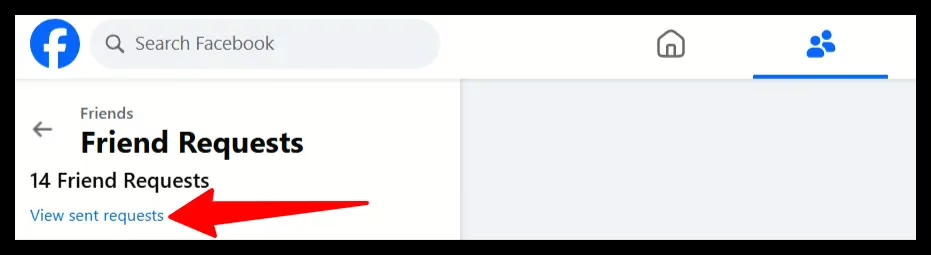
This will open a list of all pending outgoing friend requests. You can cancel any request by clicking Cancel next to the person’s name.
Why You Might Want to Check Sent Friend Requests
Some users lose track of their pending friend requests because they are active until the recipient accepts or rejects the request. It’s not uncommon for users to review their previously sent requests to remove unwanted or outdated connections from their accounts.
Reasons to review sent friend requests include:
1) Realizing a friend request was sent accidentally
2) Removing friend requests that were never accepted years ago
3) Maintaining a more intentional friends list
Important Things to Know
1) Once a friend request is canceled, the recipient will NOT receive a notification of cancellation.
2) Facebook will enforce a waiting period between sending a second request to the same person after a first request has been canceled.
3) After a request is rejected, it will no longer appear on the sent requests list.
Final Thoughts
Although viewing your previously sent friend requests is difficult to find via Facebook’s user interface, it is possible to do so. In fact, you can view and manage your sent friend requests quickly and efficiently, whether you are using the mobile app or the desktop version of Facebook.