You post something you feel good about. Maybe it’s a new blog, a product page, or a signup link. You drop the link in your Instagram bio and wait.
A few hours later, you start wondering.
Did anyone actually click it?
And more importantly… who clicked it?
If you’ve ever refreshed your own account and asked that same question, then you’re part of a crowd. Many people think that Instagram will tell them who has clicked their bio links. It won’t. However, Instagram will give you enough information to help you determine what’s working as long as you know where to look.
Let’s walk through this clearly, without guesswork.
The Short Answer First
You cannot see which specific people clicked your Instagram bio link.
Instagram does not display names, usernames, or profiles when linking to individual profiles. That data remains private.
However, you do get to know how many people have clicked on your link. Plus, you can also find out more about where those clicks originated, when they occurred and what those people did next.
This insight can be very valuable.
Why Instagram Does Not Show Individual Clickers
Instagram focuses on privacy. Even if someone views your profile, taps your link, and visits your site, Instagram does not reveal their identity to you.
This applies to:
- Bio link clicks
- Story link taps
- Profile visits
Instagram shares behavior trends, not personal identities.
That may feel limiting at first. But it also keeps expectations realistic. Instead of chasing names, you focus on patterns.
How to Track Bio Link Clicks Using Instagram Insights
If you have a professional account, Instagram already gives you basic data. It just hides it a bit.
Start by opening your profile. Then follow these steps carefully.
- Tap Insights near the top of your profile
- Look for Profile Activity
- Find Website Clicks
That number shows how many times people clicked the link in your bio during a specific time range.
You can also check Accounts Reached to see general information about the people interacting with your profile. This includes age ranges, locations, and gender breakdowns.
Instagram keeps this data anonymous, but it still helps answer an important question. Are people paying attention or not?
What Instagram Insights Does Not Tell You
This part matters.
Instagram Insights will not show:
- Names or usernames of clickers
- Which post led someone to click
- What someone did after leaving Instagram
So if you want deeper insight, you need to bring in outside tools.
That is normal. Most creators and businesses do the same thing.
Using Link Shorteners for Better Tracking
Link shorteners are one of the easiest tracking tools you can utilize.
Instead of putting your full website link in your bio, you create a shortened link and use that instead. When someone clicks it, the tool tracks the activity.
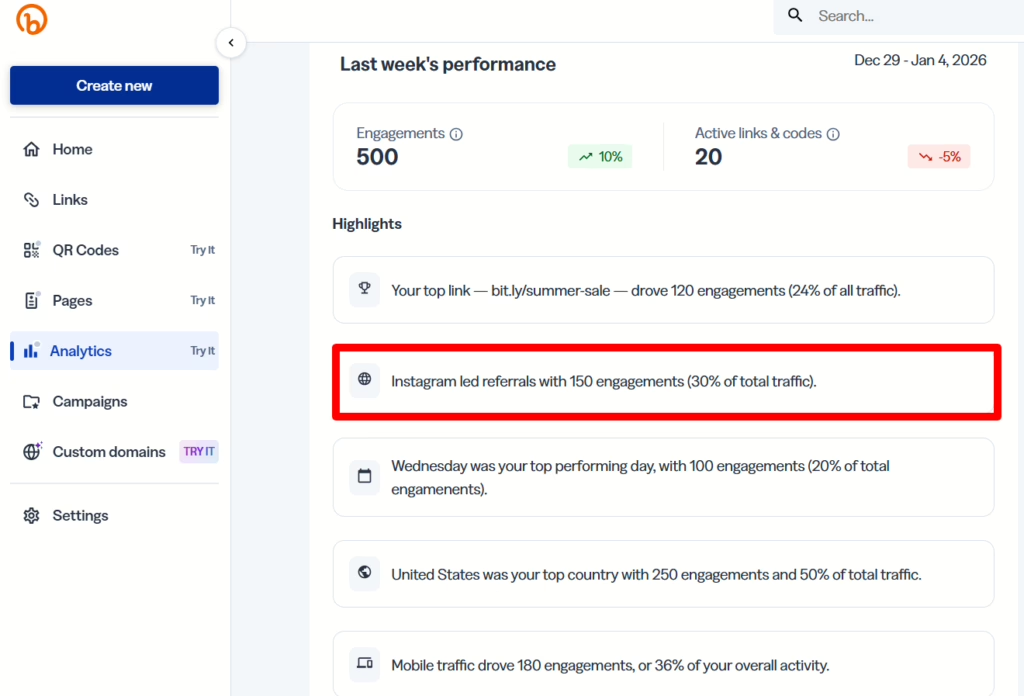
For example, tools like Bitly show:
- Total number of clicks
- When clicks happened
- General location of users
- Devices used
You still will not see names. But now you can answer questions like:
Did people click after my post went live?
Did traffic spike at a certain time of day?
That kind of clarity helps you adjust your content instead of guessing.
Using Link-in-Bio Tools for Even More Detail
If you want more control, link-in-bio tools work well.
These tools let you create a simple landing page with multiple links. You place one link in your bio, and visitors choose where to go next.
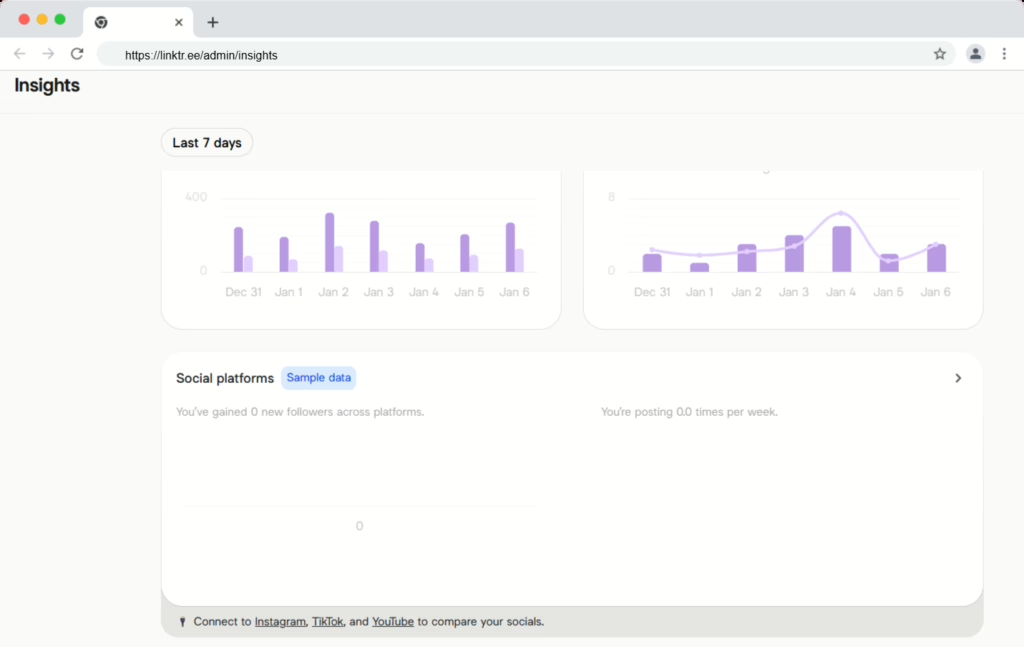
Tools like Linktree or Later show:
- Which link people clicked
- How often each link gets tapped
- Where traffic is coming from
This setup works especially well if you promote different things throughout the week. Instead of swapping your bio link constantly, you track performance in one place.
Tracking Behavior on Your Website With Google Analytics
Instagram tells you how many people clicked. External tools tell you when and from where. But your website tells you what happened next.
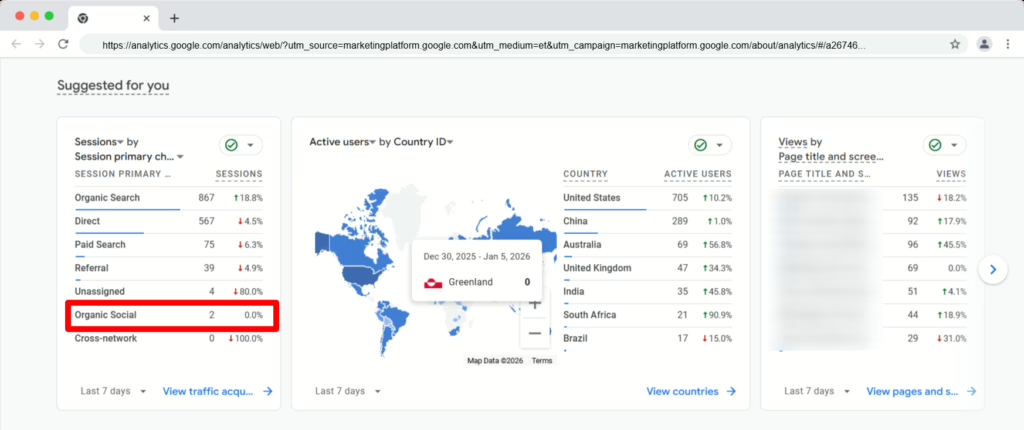
If you add UTM parameters to your bio link, Google Analytics can track:
- Visitors coming from Instagram
- Pages they viewed
- Time spent on your site
- Actions taken, like signups or purchases
This is where things start to connect.
You may not know who clicked, but you learn what worked. And that is far more useful.
A Common Mistake People Make
Many people spend too much time trying to identify individual users.
That approach leads nowhere.
Instead, focus on patterns:
- Which posts drive clicks
- What type of content performs best
- When people engage
Over time, those patterns tell you how to improve results without invading privacy or chasing data Instagram will never give you.
Key Takeaway
Instagram does not show who clicked your bio link. It never has.
What it does show is how many people clicked. And with the right tools, you can understand timing, behavior, and performance well enough to make smart decisions.
That is the real goal.
One Final Thought
Whether you are promoting yourself or a business, brand, etc. via Instagram, link tracking is not a preference it is a necessity for understanding how you exist in reality vs. based on assumption.
Expert help can also help you when you have doubts about how your online reputation exists, which paths link searches take you to, or how your brand is being viewed and engaged across platforms to help save you both time and stress.
For expert reputation and visibility guidance, NewReputation offers free consultations to help you understand what people see, click, and trust online.