
Last Updated on 4 months ago by Admin
Fake Google reviews are a real and growing problem. The FTC’s August 2024 rule update specifically targets businesses that buy, generate, or facilitate fake reviews, with fines of up to $51,744 per violation. That enforcement pressure has not stopped bad actors from using fake reviews against competitors. It has just shifted who is creating them.
If your business is being targeted by fake reviews, whether from a competitor, a disgruntled ex-employee, or a coordinated attack, there is a process for getting them removed. It is not simple and Google does not remove every review that gets flagged. But when you know what qualifies for removal, how to report it correctly, and what to do when Google does not act, your success rate improves significantly.
This guide covers all of it.
Table of Contents
How to Spot a Fake Review
Not every review that feels unfair is fake, and not every fake review is obvious. The signals that most reliably indicate a review is not from a genuine customer:
The reviewer’s profile has no history or only one review. Genuine Yelp and Google users tend to have reviewed multiple businesses. An account created recently, with one review that targets you, is a strong signal. Click through to the reviewer’s profile and check their review history.
The language does not match a real customer experience. Fake reviews often use vague, generic language that does not reference any specific visit, product, or interaction. Real customers tend to describe something specific: a staff member by name, a specific dish, a date, or a particular issue. A review that could have been written about any business in your category is suspicious.
The timing is suspicious. A cluster of negative reviews arriving over a short period, particularly following a known conflict with a competitor or after a termination, warrants scrutiny. Look at the dates of recent negative reviews and check whether they coincide with any event that might have motivated a coordinated attack.
The reviewer’s other reviews follow a pattern. Some fake review accounts review only competitors in a specific industry or geography. If you can see that the same reviewer has left negative reviews for multiple businesses that compete with the same company, that is evidence of a coordinated effort that is worth documenting before you report.
The review references something that did not happen. If a review describes a product you do not sell, a staff member who was not present, or an incident that has no corresponding record in your own systems, you have a basis for a factual dispute in your report.
A harsh review from a real customer who had a genuinely bad experience is not a fake review, even if their description feels exaggerated or one-sided. Google will not remove it on that basis and attempting to report it as fake when it is not wastes your flagging credibility. Reserve reports for reviews that genuinely violate Google’s policies, not ones that you simply disagree with.
What Actually Qualifies for Removal
Google removes reviews that violate its content policies. Understanding which violations apply to your situation helps you write a more effective report and set realistic expectations.
| Violation type | What it covers | Removal likelihood |
|---|---|---|
| Spam and fake content | Paid reviews, reviews from bots, coordinated inauthentic behavior, reviews from people who were never customers | High if you can document the inauthenticity |
| Conflict of interest | Reviews from current or former employees, reviews from the business owner or their associates, competitor reviews | High if you can provide evidence of the relationship |
| Off-topic content | Reviews about a different business, reviews referencing a location that is not yours, reviews about issues unrelated to your business | Moderate to high |
| Harassment and hate speech | Personal attacks on staff or owners, slurs, threatening language, discriminatory content | High for clear violations |
| Deceptive content | Reviews containing demonstrably false statements of fact, impersonation, misleading claims | Moderate; requires documentation of the falsehood |
| Illegal content | Reviews containing copyrighted material, personal identifying information of others, content that facilitates illegal activity | High for clear violations |
| Negative but genuine review | A real customer’s honest negative experience, even if harsh | Does not qualify; will not be removed |
How to Report a Fake Google Review: Step by Step
The reporting process is straightforward but the quality of your report determines whether Google acts. A vague report is unlikely to produce a removal. A specific, policy-focused report with supporting detail is more likely to succeed.
Step 1: Log into your Google Business Profile. Go to business.google.com and sign in with the account associated with your listing. Navigate to the “Reviews” section.
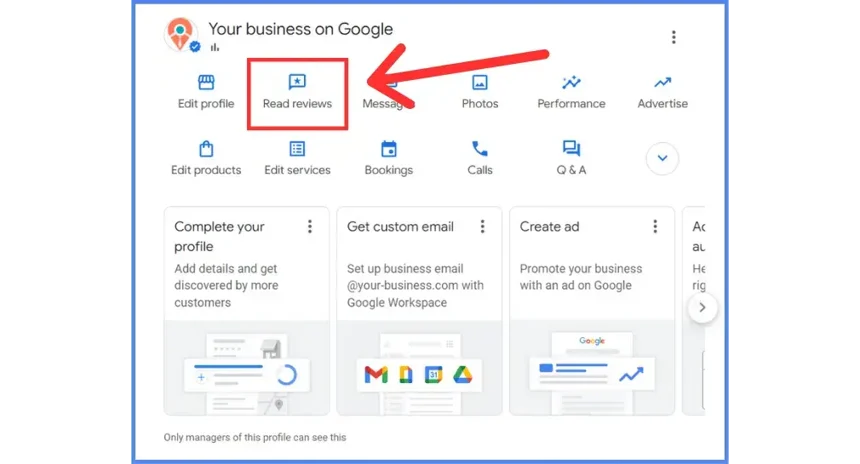
Step 2: Find the review you want to report. Locate the specific review. Before you flag it, take a screenshot of the full review including the reviewer’s name, profile photo, date, and your listing name. Also screenshot the reviewer’s profile page showing their review history. This documentation matters if you need to escalate later.
Step 3: Click the three-dot menu next to the review. Select “Report review” from the dropdown menu.
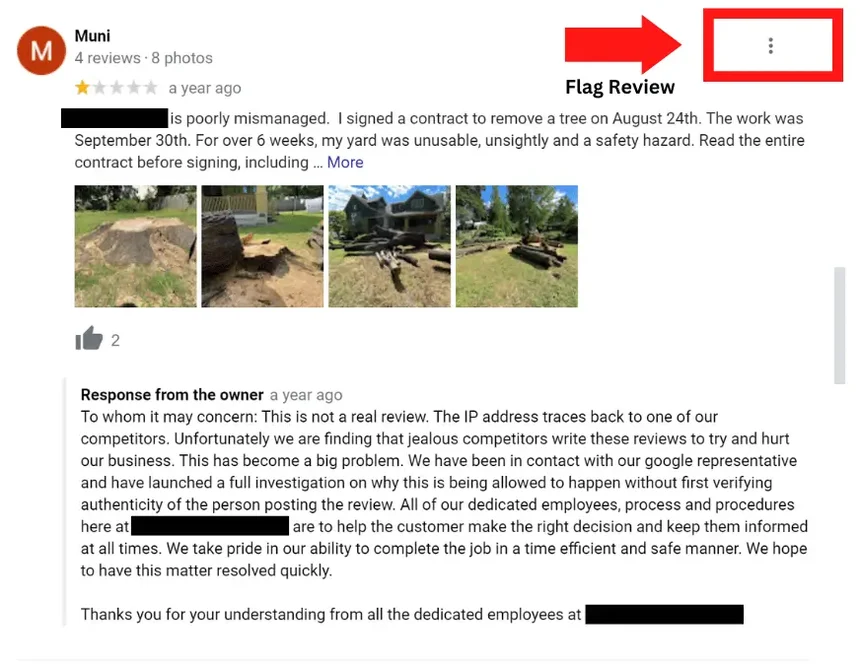
Step 4: Select the violation category. Choose the policy violation that most accurately describes the problem. The categories Google provides are: spam or fake, off topic, conflict of interest, profanity, bullying or harassment, discrimination or hate speech, personal information, and not helpful. Pick the one that fits your specific situation. If multiple apply, choose the most serious.
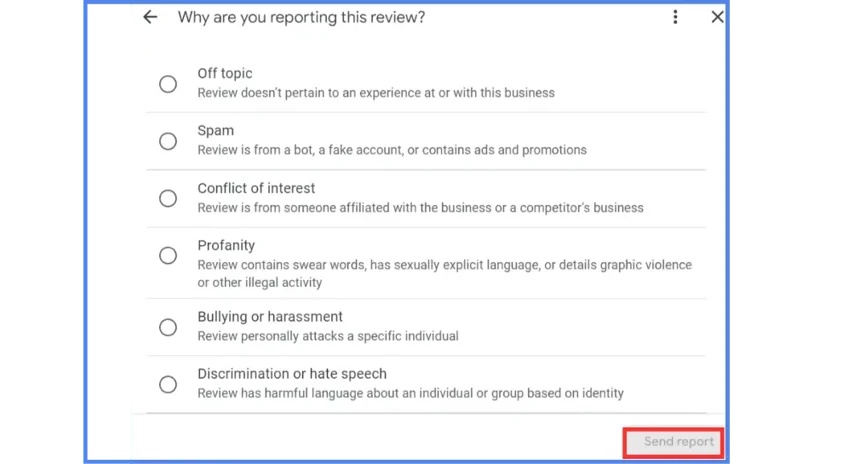
Step 5: Add context in the additional details field. This is where most people lose the opportunity to get the review removed. Do not just say “this is fake.” Be specific. Examples of effective explanations:
- “This reviewer has no record in our system. We checked our customer database for the dates mentioned and found no matching transaction. The review appears to have been posted by someone who was never a customer.”
- “The reviewer’s profile shows they have reviewed seven businesses in our industry across one city, all with one-star ratings, all within the past 30 days. This appears to be a coordinated attack.”
- “We terminated an employee on [date]. This review was posted [date] by an account matching the employee’s name and profile photo. This is a conflict of interest under Google’s content policies.”
Step 6: Submit and wait. Google typically processes flagged reviews within three to seven business days. You will receive an email when a decision is made. If Google finds the review does not violate their policies, you will be notified and the review will remain.
See Your Full Review Profile Before You Start
NewReputation’s free scan shows your current review landscape across Google and other platforms so you have a complete picture before deciding which reviews to report.
- See all your current reviews and average ratings across major platforms
- Identify patterns that may indicate a coordinated review attack
- Free scan, no obligation
What to Do When Google Does Not Remove It
Google denies a significant percentage of removal requests, including some for reviews that clearly violate their policies. When that happens, your options are escalation, legal recourse, and parallel action.
Escalate through Google’s Business Profile support
After a denial, you can escalate through Google Business Profile support rather than re-flagging the same review. Contact support directly and provide your case documentation: the original review, your report, the denial, and the specific policy violation with your evidence. Ask for human review of the case. This process is slower than the automated flagging system but produces better outcomes for clear violations that the automated system missed.
Access Google Business Profile support at support.google.com/business. Choose the contact option and request review of a specific flagged review by providing the URL.
Use the Google Business Profile community forum
Google’s Business Profile Help Community has product experts, some of whom are Google employees, who can escalate cases internally that have stalled in the normal review process. Posting your case with documentation in the appropriate thread sometimes produces action when direct support has not.
Consider legal options for defamatory content
If a fake review contains demonstrably false statements of fact that have damaged your business, you may have grounds for a defamation claim. A cease and desist letter from an attorney can prompt removal both from the reviewer and, if served on Google through proper legal process, can support a court-ordered removal. Our guide on whether you can sue for a bad review covers when legal action is and is not realistic.
Build review volume that dilutes the impact
While pursuing removal through the channels above, run a parallel review generation strategy. A fake review among 200 genuine ones has far less impact than the same review among 12. This does not solve the problem of the fake review, but it meaningfully reduces the damage while you work through the removal process. Our guide on how to get more positive online reviews covers the legitimate approach.
How to Respond in the Meantime
While your removal request is pending, respond to the fake review publicly. Your response serves future readers more than the reviewer and is visible to anyone who finds your listing before the removal is processed.
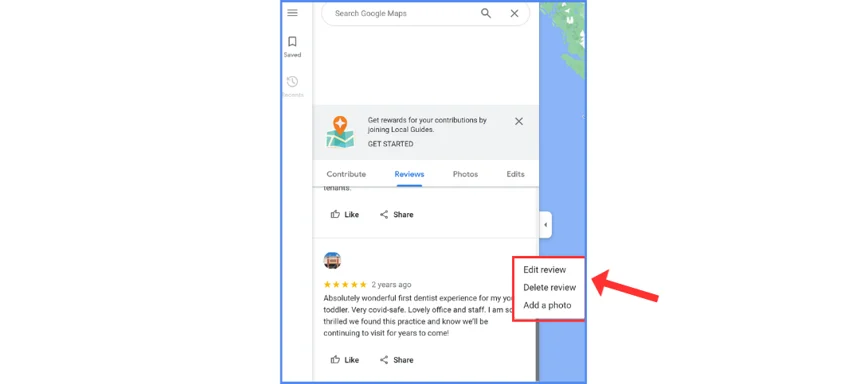
Keep the response brief and professional. Do not accuse the reviewer of being fake in a way that sounds defensive or combative. Something like:
“We have no record of this customer or the experience described. We take all feedback seriously and would welcome the opportunity to speak directly. Please contact us at [email or phone] so we can look into this.”
This response accomplishes three things: it signals to future readers that you are attentive, it plants doubt about the reviewer’s authenticity without making an accusation, and it maintains your professionalism regardless of what the reviewer’s intentions were.
Do not argue with the reviewer. Do not post multiple responses. Do not repeat specific false claims from the review in your response, which amplifies them. One short, professional response is the right move while you pursue removal through proper channels.
For a full response framework covering every type of review situation, our guide on managing negative reviews has templates for each scenario.
Handling a Coordinated Review Attack
A coordinated review attack is when multiple fake reviews arrive in a short period, typically from accounts with no prior review history, targeting your business simultaneously. This is more common than most business owners realize and requires a more systematic response than a single fake review.
When you identify a potential coordinated attack, document everything before reporting anything. Screenshot every suspicious review with the reviewer’s full profile page visible. Note the dates they were posted, the patterns across reviewer profiles, and any commonalities in language or complaint type. This documentation is critical for the reporting process and for any legal escalation that follows.
Report each review separately with individual, policy-specific explanations rather than submitting bulk reports with the same explanation. Google’s moderation system treats each report as a separate case. A thoughtful individual report for each review produces better results than a batch report.
Contact Google Business Profile support directly and explain that you are experiencing a coordinated attack. Provide the full documentation. In cases of clear coordinated inauthentic behavior, Google has tools to investigate at the account level rather than the individual review level, which can produce more complete removals than the standard flagging process.
If you believe the attack is coming from a specific competitor, document the evidence carefully. Coordinated fake review campaigns can violate FTC regulations and may also give rise to tortious interference or unfair competition claims depending on your state. Consult an attorney if the attack is causing measurable business harm.
Frequently Asked Questions
Can you remove a fake Google review?
You can request removal of reviews that violate Google’s content policies, and Google may remove them after review. You cannot remove a review simply by asking. The review must qualify under one of Google’s violation categories: spam or fake content, conflict of interest, off-topic content, harassment, hate speech, deceptive content, or illegal content. Genuine negative reviews from real customers do not qualify for removal regardless of how unfair they feel.
How long does it take Google to remove a fake review?
Google typically processes flagged reviews within three to seven business days and notifies you by email when a decision is made. In some cases, particularly for complex coordinated attacks or cases that require human review, the process can take two to three weeks. If your initial report is denied and you escalate through Google Business Profile support, expect an additional one to two weeks for the escalation review.
What do I do if Google refuses to remove a fake review?
Escalate through Google Business Profile support with detailed documentation rather than re-flagging the same review. Post in the Google Business Profile Help Community where product experts can sometimes escalate stalled cases. If the review contains demonstrably false statements of fact, consult an attorney about defamation options. In parallel, focus on building genuine review volume so the fake review loses its relative impact on your overall rating.
How do you write an effective Google review removal report?
Be specific rather than general. Instead of “this review is fake,” explain exactly why: the reviewer is not in your customer records, the reviewer has reviewed only competitors in your area, the reviewer matches a former employee who was terminated on a specific date, or the review references products or locations that do not exist at your business. The more specific and policy-grounded your explanation, the higher your chance of removal.
Can a competitor leave fake reviews on my Google listing?
Yes, and it happens regularly. Reviews from competitors are a conflict of interest violation under Google’s content policies. The challenge is proving the connection. Look for reviewer profiles that have left negative reviews only for businesses in your category, particularly those that compete with the same company. Document the evidence before reporting. If you can establish a pattern, you have a strong case for removal and potentially for legal action under unfair competition or the FTC’s fake review rule.
Does responding to a fake review help or hurt?
A single brief, professional response helps by signaling to future readers that you are engaged and by casting appropriate doubt on the review without accusations. Multiple responses, emotional responses, or responses that repeat the fake review’s specific claims all hurt. The goal is to reassure future readers, not to win an argument with the reviewer.
Dealing With Fake Reviews That Are Hurting Your Business?
NewReputation handles Google review removal requests, escalation when Google does not act, and the review generation strategy that reduces the impact of fake reviews while you work through the removal process.
- Removal requests filed with policy-specific documentation that improves success rates
- Escalation through Google support for cases that standard flagging did not resolve
- Review generation strategy to dilute the impact while removal is in process