
Your digital footprint is built by all the traces you leave online. From each of your searches, to every post you’ve ever written, to every single purchase you’ve ever made, and to every single account you’ve created, each time you engage with an application, service or platform, another piece of information is added about you. As the years go by, that information spreads to other platforms, to advertisers, to data brokers, etc.
While there’s no way to completely remove every bit of information about you from the world wide web, you can make your footprint smaller. You can control what strangers see; you can control what businesses collect from you; you can close old accounts, and ask to have removed outdated or sensitive information about you removed. Most importantly, you can have control over what appears next.
This article explains how to remove your digital footprint, how to manage it, and which habits will help you protect your long-term privacy. In addition, we will explain how digital footprint tools can make the entire process easier and how advanced clean-up features will assist you with more difficult removal processes.
You Can’t Completely Erase Your Digital Footprint
Before you begin managing your digital footprint, it is essential to be transparent about what you can and cannot do. Once information is posted, shared, or indexed, it may remain available somewhere online indefinitely. There are screenshots, backup files, archived sites and cached pages that may contain older versions of information.
That said, you don’t have to keep everything that exists.
You can delete accounts.
You can limit who can view your personal details.
You can ask search engines and data brokers to remove your information from their listings.
You can establish boundaries as to what data collectors can collect from you going forward.
Your goal is not to disappear. Your goal is to control your digital footprint.
Control comes from understanding where your information resides, and knowing how to remove or minimize it.
Mapping Your Digital Footprint
To minimize your digital footprint, you first need to know what already exists. The process of identifying what already exists is known as mapping your digital footprint. When you map your digital footprint, you’ll gain insight into where your data is stored, exposed or shared.
Begin by performing a simple search of your name. Review:
Image search results
News results
Any references related to your email or phone number
You may find old profiles, forgotten blogs, unused social accounts, and entries on people-search sites that have compiled and published your information.
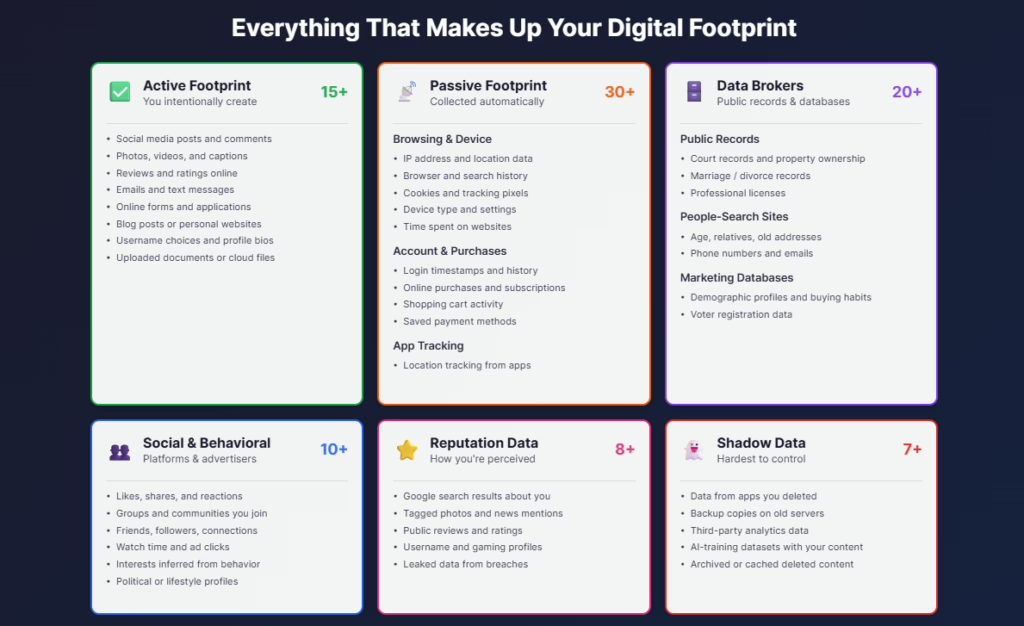
Next, review the major data brokers. These organizations collect and sell your personal information including your location history, phone numbers, age, relatives, work history and sometimes even device data. Many modern privacy tools now include a dark web scanner that checks whether any of your information has been involved in a data breach. If your email, password, or phone number is listed, act immediately. Reducing the visibility of your personal data helps to reduce the risk of identity theft, and decreases the distance your personal data travels.
Additionally, spend some time reviewing the privacy policies of the websites and applications you use. The majority of businesses rely on online tracking to build behavioral profiles for advertising and/or analytics purposes. By understanding what data they collect, you will gain greater clarity regarding how your digital footprint grows.
As you collect results, compile a list of all sites, applications, and platforms that contain your data. Creating a list will help organize the cleanup process, and ensure that none of the sites are overlooked. Mapping your footprint is the first step to taking back control, as online tracking and sharing practices continually evolve.
Immediate Free Actions You Can Take Today
The following free actions reduce the amount of publicly available information associated with your identity and help limit future tracking:
Delete Old Accounts
When you delete accounts you no longer use, you reduce a potential source of data exposure.
You can delete:
Old social media profiles
Old shopping or membership accounts
Unused Apps
Old service accounts tied to outdated email addresses
Each time you delete an account, you’re shrinking your digital footprint.
Adjust Privacy Settings
Make sure your social media profile is private. Reduce the amount of information accessible to strangers on your profile. Restrict who can see your posts, your friend list, and your activity. Disable features that display your location or expose your search history.
Making this one adjustment significantly reduces how much strangers can learn about you.
Clear Browser Data
Removing cookies, cache, and browser history helps break tracking patterns. You can also use private browsing or incognito mode to reduce data collection from here forward.
This reduces the amount of information advertisers can collect about your behavior.
Review Older Posts
Your older posts may not accurately represent who you are today. Delete any older posts that are too personal, outdated or embarrassing. Cleaning up these types of posts will improve the overall health of your online presence.
Disable Unnecessary Tracking
Applications and platforms such as Google and Facebook track movements, search activities, and device data. Review your activity logs and disable tracking capabilities that aren’t required.
Each small change, taken collectively, reduces the total amount of information available to the public.
Utilizing Digital Footprint Management Tools
Using tools specifically designed to manage digital footprints can greatly simplify monitoring and protecting your privacy. Digital footprint management tools help identify people search sites, old accounts, and pages you may not even remember creating. They also help monitor for new data being created about you, and provide you with guidance and support in protecting your privacy long-term.
One of the most valuable features of digital footprint management tools is the ability to discover one’s digital footprint. Digital footprint checkers perform searches on people search sites, old accounts, and pages you may not even remember creating, allowing you to discover where personal information about you still remains, and where potential dangers may lurk.
Tools that specialize in password security are also extremely beneficial. Password managers allow you to securely save complex passwords, avoid using the same password on multiple sites, and automatically update weak passwords. Protecting your login credentials is a fundamental component of protecting your identity and minimizing your digital footprint. Many accounts become compromised due to weak or reused passwords.
Advanced digital footprint management tools focus on digital footprint cleaning. Advanced tools continuously monitor for new information appearing about you online, send you alerts when information is leaked, and provide instructions for securing accounts that may be compromised. Additionally, many of these tools will help you opt-out of data broker sites, reduce online tracking, and identify situations in which you may be exposing too much information about yourself.
Using these tools in combination will give you a comprehensive view of your online presence, and will make maintaining your ongoing privacy management much simpler.
Be Mindful of What You Post Online
Developing good habits online is one of the best ways to minimize your digital footprint.
Don’t over-share in your public posts.
Are wary of clicking on links sent to you via messaging services.
Recognize when you’re providing personally identifiable information on social media.
Be mindful of when you’re accessing public WiFi, especially without a virtual private network.
Good habits help prevent big problems.
Create a Secondary Email Address
Establish a secondary email address for creating new accounts, signing up for newsletters, or making one-off purchases. Establishing a secondary email address helps protect your primary email from receiving spam. Using a secondary email address also helps separate sensitive accounts from casual ones.
Using a secondary email address immediately reduces the amount of personal data associated with you that follows you across the web.
Advanced Methods for More Comprehensive Removal
After completing the initial phases of your digital footprint management plan, you can proceed with more focused efforts to remove existing information from the Internet.
Contact Site Administrators
If your name, photo, or personal details are displayed on a website, contact the administrator of that website. Many administrators will remove outdated, personal, or private information upon request, especially if the information affects your personal privacy.
Request Google to Remove Sensitive Search Results
Google offers removal options for:
Exposure of personal information
Doxxing
False Content
Personal Identifiable Information (PII) that is identifiable without your consent
Outdated results that no longer accurately portray your current situation
Remember, requesting Google to remove a search result does not delete the original webpage. Rather, it prevents others from finding the webpage via search.
Regularly Monitor Your Information
Your digital footprint evolves over time. Consistently monitoring your online presence is key to protecting your long-term privacy.
Perform regular searches for your name
Regularly check whether you have been listed on people search sites.
Review your privacy settings across all of your devices and applications.
Consistency is key to protecting you for the long haul.
Conclusion
While you may not be able to completely eliminate your digital footprint, you can control your online presence. Begin with the easiest methods, create good habits to protect your digital footprint, use tools to monitor your data, and take immediate action when unwanted information about you appears online.
With each small improvement, you will reduce your digital footprint, and enhance your own personal privacy.

Kevin Curran is the founder and CEO of NewReputation, a renowned online reputation management firm. He is also the co-founder of ReputationPrivacy, a platform designed to help individuals manage their digital footprint effectively. Kevin has worked with diverse clients, including Fortune 500 companies, high-profile executives, and small business owners, to establish an authentic online presence that accurately represents their brand.