If you run ads on Google, trust matters more than almost anything else.
People do not just click ads.
They judge them.
That is where Google seller ratings come in.
These small star ratings can make the difference between a skipped ad and a sale. They serve as instant proof that your business delivers on its promises.
This guide explains exactly how Google Seller Ratings work, how to qualify for them, where they appear, and how to manage them correctly.
What Are Google Seller Ratings?
Google Seller Ratings are automated star ratings that appear on Google Ads and Google Shopping results.
They show your business’s overall customer satisfaction.
Not a single product.
Not one review.
Your store as a whole.
The rating is based on verified customer reviews, collected from Google and approved third-party partners.
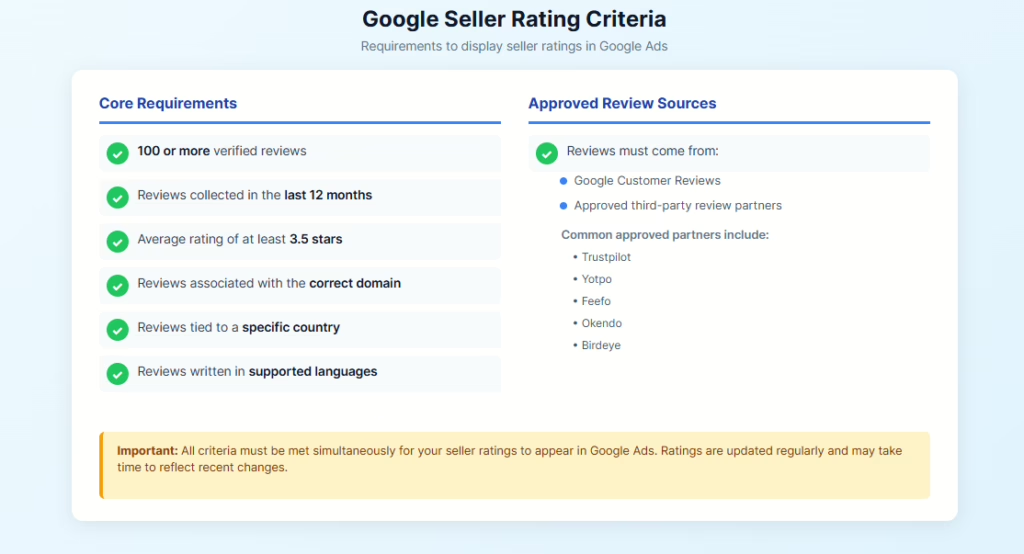
To qualify, a business must meet clear standards:
- At least 100 verified reviews
- Reviews collected within the last 12 months
- An average rating of 3.5 stars or higher
- Reviews tied to a specific country and domain
Once these conditions are met, Google automatically displays your rating when eligible.
No manual setup, toggles, or design work.
Seller Ratings vs Other Google Ratings
Google uses multiple rating systems, and they are often confused.
Here is the difference.
Seller Ratings focus on:
- Customer service
- Shipping experience
- Returns
- Overall shopping experience
Product Ratings focus on:
- Individual items
- Features and quality
- Product-specific feedback
Google Business Profile reviews focus on:
- Local presence
- In-person experiences
- Maps and local search
Seller Ratings are store-level trust signals, designed specifically for ads and commerce.
How Google Seller Ratings Work Behind the Scenes
Google aggregates data from multiple approved sources.
These include:
- Google Customer Reviews
- Trusted third-party review platforms
- Google Shopping transaction data
Reviews are verified and tied to real purchase events.
Fake reviews do not count.
Unverified feedback is excluded.
Google continuously recalculates your average rating as new reviews come in.
If your rating drops below 3.5 stars, the stars disappear automatically.
Where Google Seller Ratings Appear
Seller Ratings appear across several high-visibility areas.
Google Ads
Stars show beneath your ad headline, directly below the URL.
They display:
- Star rating
- Review count
- Source attribution
This applies to both Search ads and Shopping ads.
Google Shopping Listings
Seller Ratings appear next to your store name in paid and free listings.
This is especially important for competitive product categories.
Search Results and Knowledge Panels
In some cases, ratings appear in business panels when users search your brand.
Visibility depends on eligibility, ad format, and user context.
Why Google Seller Ratings Matter
Seller Ratings are not cosmetic.
They directly impact performance.
Trust and Social Proof
Stars immediately communicate credibility.
Users trust businesses with visible proof of satisfied customers.
Higher Click-Through Rates
Ads with Seller Ratings consistently outperform ads without them.
More clicks.
Same ad position.
Lower Cost-Per-Click
Higher engagement improves Ad Quality Score, which can reduce CPC over time.
Better Conversion Rates
People who click ads with trust signals convert at higher rates.
Seller Ratings attract more qualified traffic.
Eligibility Requirements for Google Seller Ratings
Google applies strict criteria.
You must meet all of the following.
- 100 or more verified reviews
- Reviews collected in the last 12 months
- Average rating of at least 3.5 stars
- Reviews associated with the correct domain
- Reviews tied to a specific country
- Reviews written in supported languages
Reviews must come from:
- Google Customer Reviews
- Approved third-party review partners
Reviews from unsupported platforms do not count.
Approved Review Sources and Partners
Google works with trusted platforms that meet its verification standards.
Common approved partners include:
- Trustpilot
- Yotpo
- Feefo
- Okendo
- Birdeye
Each partner has its own pricing, features, and integration methods.
Google Customer Reviews is free, but limited in customization.
How to Get Google Seller Ratings
There are two primary paths.
Option One: Google Customer Reviews
This is Google’s free review program.
You add a short survey opt-in at checkout.
After purchase, Google emails customers asking for feedback.
Reviews are verified automatically.
Option Two: Third-Party Review Platforms
Many businesses prefer third-party tools.
These platforms offer:
- Automated post-purchase emails
- Review moderation tools
- Analytics and reporting
- Multi-channel review management
The key requirement is proper integration with Google Merchant Center.
Connecting Seller Ratings to Your Account
To enable Seller Ratings, your systems must align.
This includes:
- Matching business names across platforms
- Matching domain URLs
- Correct Merchant Center configuration
- Accurate country targeting
Seller Ratings are account-level automated assets.
You do not turn them on manually.
Once eligible, Google automatically displays them.
How to Check Your Google Seller Ratings
Google provides a public lookup tool.
You can check eligibility here:
https://www.google.com/shopping/ratings/account/lookup?q=yourdomain.com
Replace “yourdomain.com” with your actual website URL.
If your rating does not appear, the tool will explain why.
Cost Considerations and Review Partners
Google does not charge for Seller Ratings.
However, review collection may cost money depending on your approach.
Third-party platforms often charge based on:
- Order volume
- Feature tiers
- Automation level
Costs vary widely.
Some platforms charge monthly fees.
Others charge per review request.
The key factor is ROI.
Better ratings improve ad efficiency and long-term performance.
Managing and Improving Seller Ratings
Seller Ratings reflect reality.
You cannot game them.
But you can improve them.
Focus on Customer Experience
Fast shipping.
Clear communication.
Simple returns.
These matter more than any marketing tactic.
Respond to Negative Reviews
Engage respectfully.
Solve the issue.
Demonstrate accountability.
Google values response behavior.
Monitor Review Trends
Watch for recurring complaints.
Shipping delays and fulfillment errors often drive ratings down.
Avoid Incentivized Reviews
Incentivized or manipulated reviews violate Google policy.
They can invalidate your entire rating profile.
Performance Monitoring and Reporting
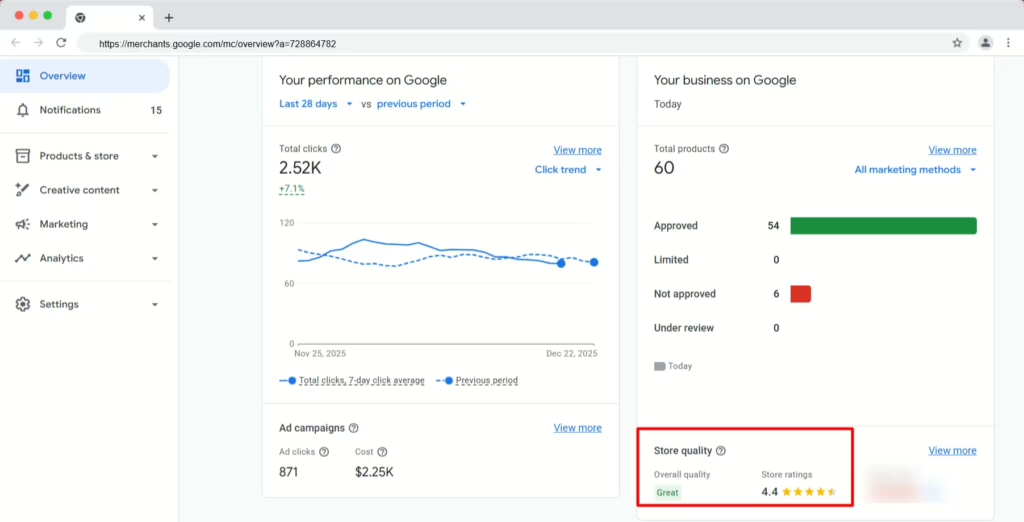
Seller Ratings performance can be tracked through Google Ads and Merchant Center.
You can review:
- Click-through rate changes
- Conversion rate improvements
- CPC shifts
- Asset-level performance reports
Seller Ratings influence the ad auction indirectly through engagement metrics.
They do not guarantee placement, but they improve competitiveness.
Common Problems and Troubleshooting
Seller Ratings sometimes fail to appear.
Common causes include:
- Insufficient review count
- Average rating below 3.5
- Mismatched domain URLs
- Unsupported review source
- Country eligibility issues
- Delayed review processing
Google updates Seller Ratings periodically, not instantly.
Changes may take weeks to reflect.
Seller Ratings and Online Reputation
Seller Ratings are not just ad assets.
They are reputation signals.
They influence how customers perceive your brand before they ever visit your site.
Strong Seller Ratings reinforce trust built through:
- Search results
- Reviews
- Content
- Brand presence
Weak ratings expose operational issues quickly.
Final Thoughts
Google Seller Ratings are among the most powerful trust signals in paid search.
They work automatically, scale with your business, and reward strong customer experiences.
If your ads drive revenue, Google seller ratings should be part of your strategy.
At NewReputation, we help businesses align reviews, trust signals, and visibility so that what customers see online matches the experience you deliver.
Because reputation is not optional. It is measurable.