

Last Updated on 4 months ago by Admin
In 2026, your online reputation will determine if you are hired by an employer, a client closes a deal with you, or a partner decides to collaborate with you. That one negative search result may chase you or your company for years. A negative search result could be a dated news story, a negative or false review, an older social media posting, or even just information from your past showing up in Google searches.
The data is clear: 93% of consumers say online reviews influence their decisions, 87% read reviews before choosing a business, and nearly 75% never look beyond the first page of Google.
If there is one negative result on the first page of Google, it can significantly affect you. Fortunately, today you have more options available than ever. With recent expansions from Google specifically related to the “Results About You” hub and strict enforcement from other platforms, you can remove issues faster than was previously possible using targeted removal combined with effective suppression techniques. As a reputation management professional, I have used each strategy outlined here multiple times. This document outlines nine successful strategies for removing negative content. Most negative content can be either completely removed, or at least suppressed. Removing negative content effectively helps protect your future opportunities, leads and reputation.
1. Ask the Website Owner to Remove It
This first step is often the fastest and most cost-effective: ask the website owner to remove or update the content. Many overlook this option, but it is frequently successful, especially with smaller blogs, local news sites, and forums.
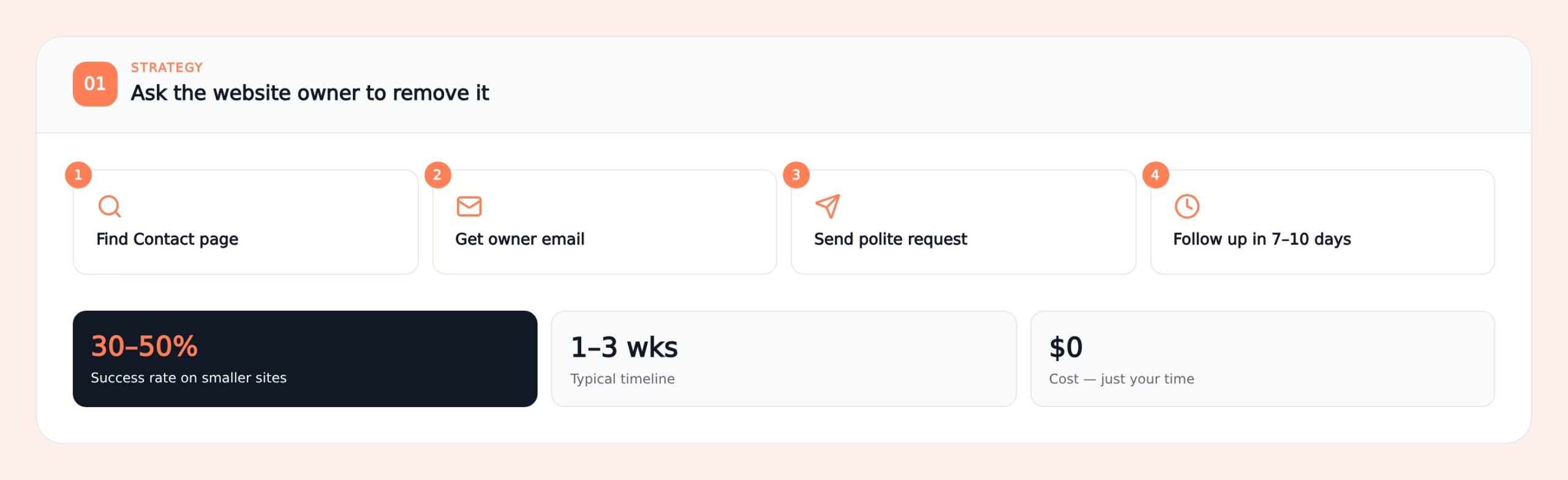
This approach is most effective when the content is outdated, factually incorrect, or clearly harmful, such as causing lost business or harassment. Smaller sites are often more receptive to requests, as they seek to avoid issues and value fairness.
Here is a simple process you can follow:
- Find the “Contact” or “About” page on the website.
- Look for an email address for the owner, editor, or support.
- Send a short, polite email.
- If you do not hear back, follow up once after 7 to 10 days.
You can use a message like this and customize it:
Subject: Request to Review or Remove Outdated Post – [Your Name or Business]
Hi [Owner or Editor Name],
I am reaching out about the post titled “[Exact Title]” published on [Date] at this URL: [Insert URL]. Some of the information is now outdated and is causing real harm to my business and reputation.
I would appreciate it if you could review the post for possible removal or correction. I can provide additional context or documentation if that helps.
Thank you,
[Your Full Name]
[Your Phone and Email][Optional: One sentence on impact, such as “It currently ranks third for my name and has led to multiple lost client inquiries.”]
Maintain a calm and professional tone. Avoid threats or insults. In my experience, respectful communication encourages site owners to resolve issues discreetly.
Expected timeline: 1 to 3 weeks. For non-news sites, this method succeeds 30% to 50% of the time when requests are reasonable and clear.
2. Contact the Author or Editor Directly
If the content appears on a news site, magazine, or large blog, consider contacting the writer or editor directly. I often use this approach when articles are opinion-based or contain clear errors.
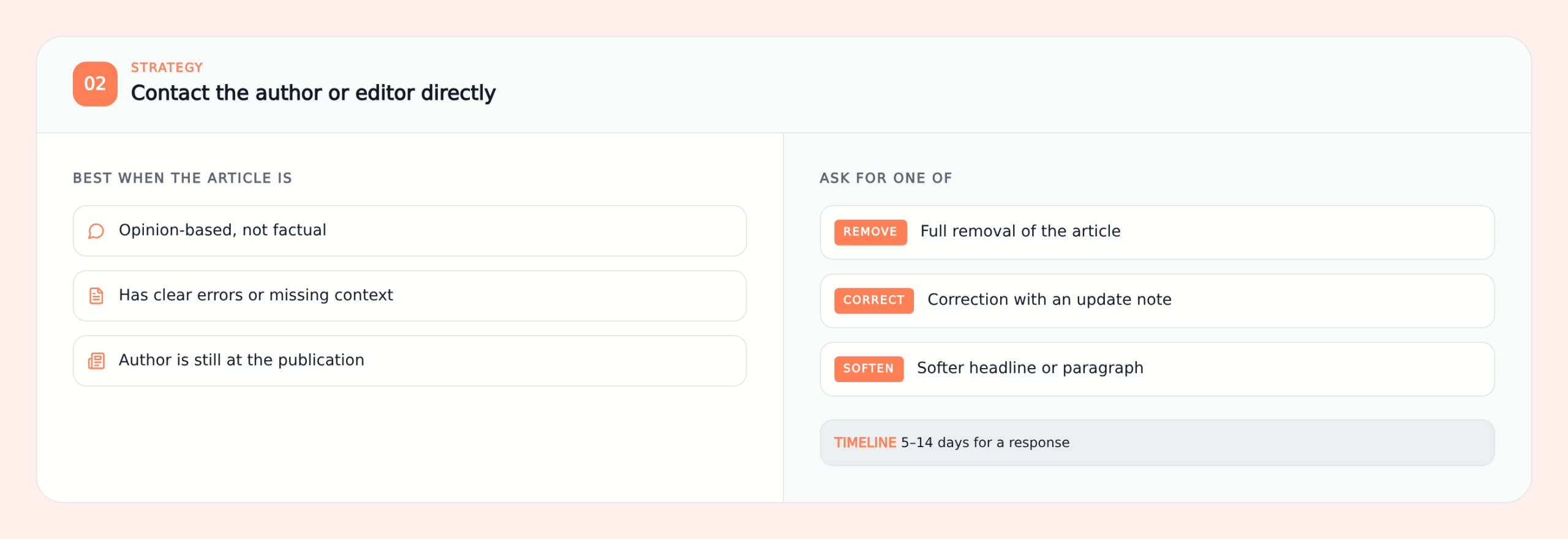
This approach can work well when the article:
- Is based on opinion rather than hard facts.
- Has clear mistakes or missing context.
- Was written by someone who is still active at the publication.
Many publications also have a formal corrections policy. They want to avoid publishing information that is wrong or misleading.
You can:
- Look up the author on LinkedIn or on the publication’s “Team” or “Masthead” page.
- Find their email or a general editor’s email.
- Refer to their corrections policy or style guide. This shows you took time to understand their standards.
- Ask for a specific outcome. You can ask for a full removal, a correction with an update note, or a softer headline or paragraph.
Sometimes, even a small edit can reduce the damage in search. For example, changing a harsh headline or adding context can make the result less alarming. If you are dealing with media coverage, read our guide on whether you can remove negative news articles from the internet.
Expected timeline: 5 to 14 days for a response. Actual changes may take longer, as editors often review requests.
In my experience, clear and factual requests are far more effective than emotional messages. Respect for their work and a focus on accuracy often encourage writers and editors to assist.
3. Use Google’s Removal Tools
Google does not own most of the content you see. It only displays links to other sites. Still, Google can remove or limit certain results from search, especially when they contain sensitive personal data or break Google’s policies.
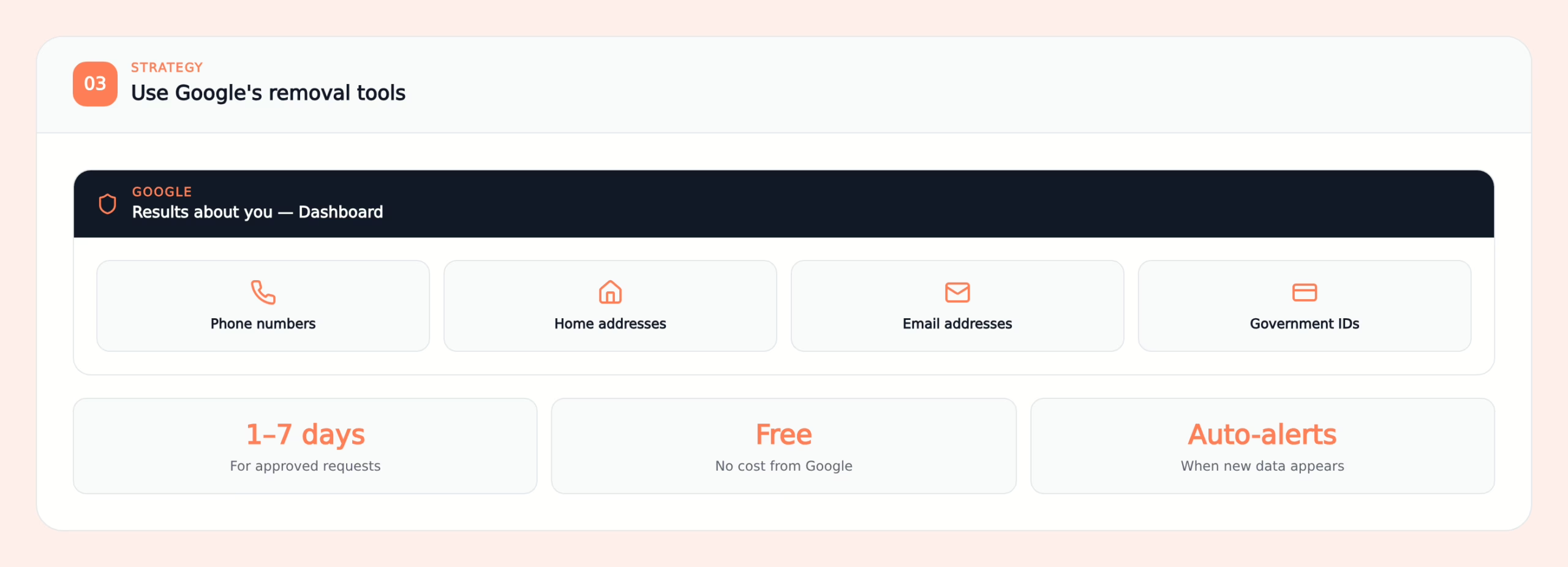
In 2026, the key tools include:
- The expanded “Results about you” hub.
- The “Remove outdated content” tool.
- Special forms for doxxing-level personal data and some legal issues.
The “Results about you” hub helps you find and remove:
- Phone numbers.
- Home addresses.
- Email addresses.
- Government IDs like driver’s licenses, passports, or Social Security numbers.
Here is how to use it:
- Go to myactivity.google.com/results-about-you or open the Google app and look under your account settings.
- Verify your identity and confirm your information.
- Turn on notifications so Google can alert you when it finds your personal data online.
- Review the results Google finds and choose which ones you want to remove.
- Submit removal requests from the dashboard.
- Check the status in the same place.
This method often handles personal data issues quickly. For more details, read our guide on how to remove your personal information from Google.
Expected timeline: usually 1 to 7 days for approved requests.
In my work, I see this tool make a big difference for people whose phone numbers or addresses have been exposed. It does not fix every problem, but it is one of the easiest wins you have.
4. Report Content That Breaks Platform Rules
Many negative results originate from platforms outside your control, such as Google Reviews, Yelp, Facebook, Instagram, or Glassdoor. Each platform has its own rules, and content that violates these can often be removed.
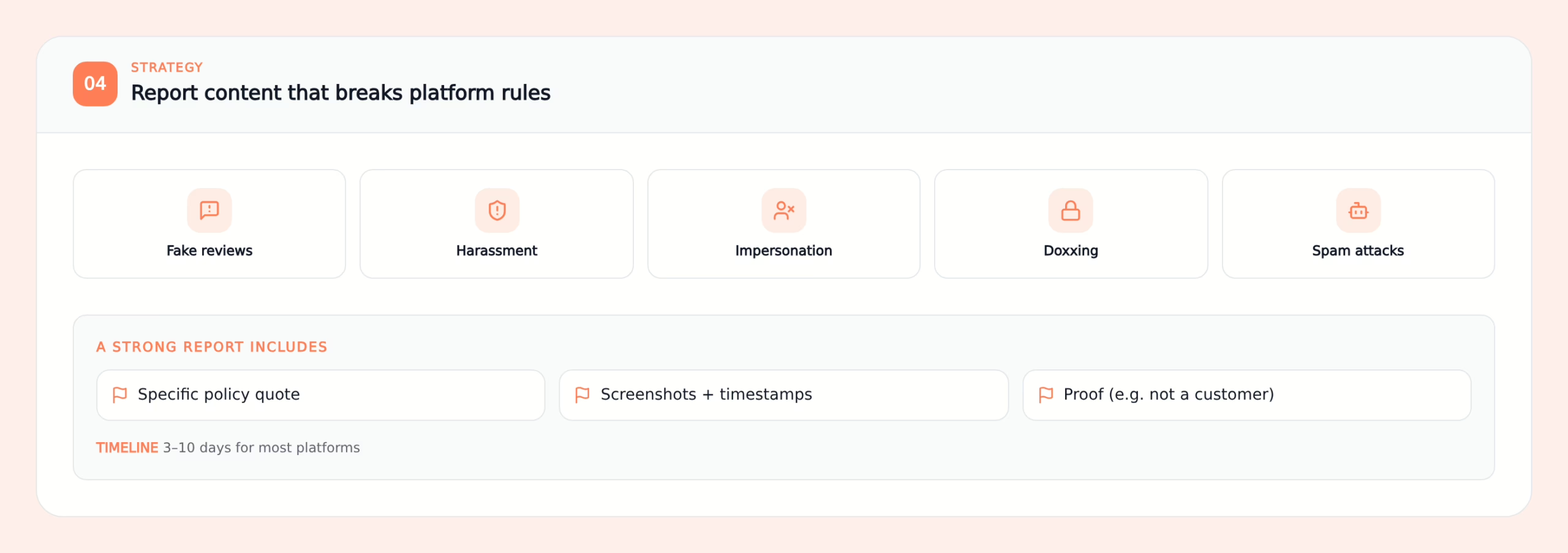
Common violations include:
- Fake reviews from people who were never customers.
- Harassment or threats.
- Impersonation accounts.
- Doxxing and sharing of private information.
- Spam or coordinated attacks.
When I help clients, I always start by reading the platform’s policies closely. Then I connect the problem review or post to specific policy language.
To do this yourself:
- Click on the “Report” or “Flag” option next to the review or post.
- Choose the category that best fits the issue.
- Take screenshots and note dates and times.
- If it is a fake review, show proof that the person never bought from you or never used your service.
- In the report form, explain briefly how the content breaks the rules.
Be specific and factual. Avoid long emotional stories. Review teams respond better when you keep it clear and direct.
Expected timeline: 3 to 10 days for most platforms.
In my experience, thorough reports with proof have a much higher success rate than simple “this is unfair” complaints.
5. Request De-Indexing
If content remains online, you can reduce its impact by preventing it from appearing in Google search results. This process is called de-indexing.
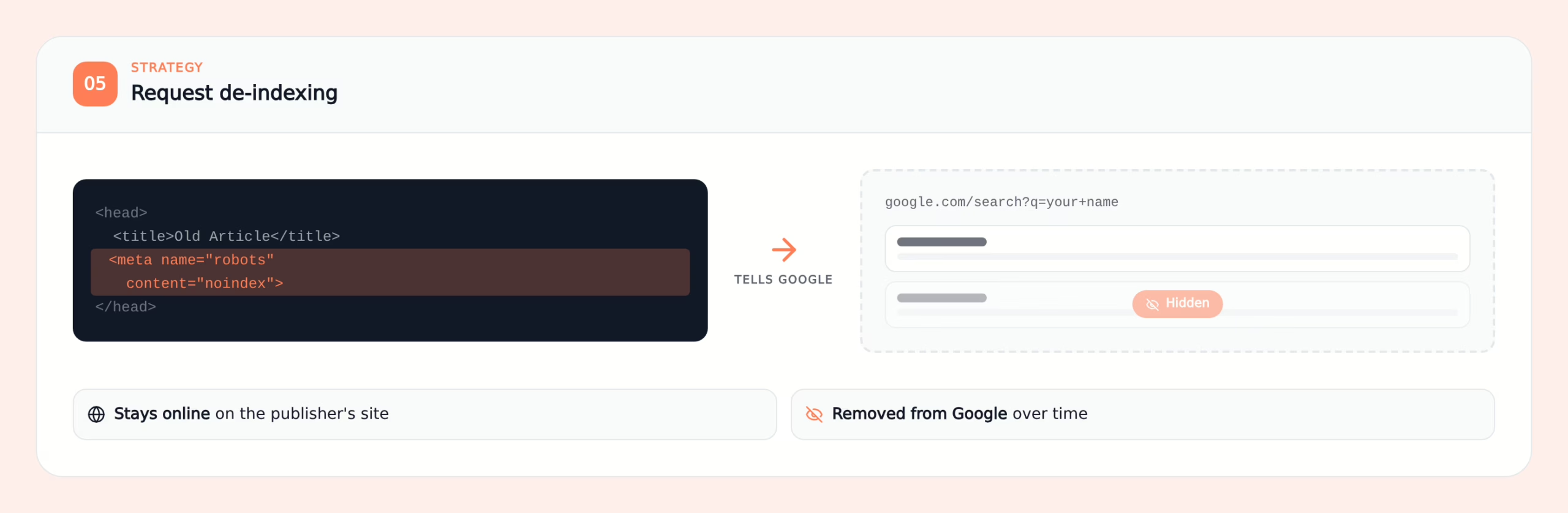
There are three main options:
- Ask the site owner to add a “noindex” meta tag.
- Use Google’s “Remove outdated content” tool when the page no longer exists.
- Use Google’s legal removal forms in special cases.
When a website manager puts an “index” tag on their website, search engines will start removing that webpage from search engine listings. However, the content is still available for viewing online. Most users will be unable to locate the content if they use a search query using their name.
A legal request to delete a link to a non-existent (404) webpage may also require removal of a link. Once the link has been removed, users will be able to view a 404 error message rather than being sent to another website.
De-indexing can be quite successful for websites that have already removed the content or when the website owner agrees to de-index the content. De-indexing may have limited success when the content remains active and/or there are no policies or laws supporting the removal of that content. At those times, I normally recommend combining de-indexing with search engine optimization (SEO) suppression, which will be discussed later. You can also read more about removing content online from Google search.
6. Use Legal Takedown Options
Legal tools are not for every case. They can be slow and costly. But when the damage is serious, they may be necessary.
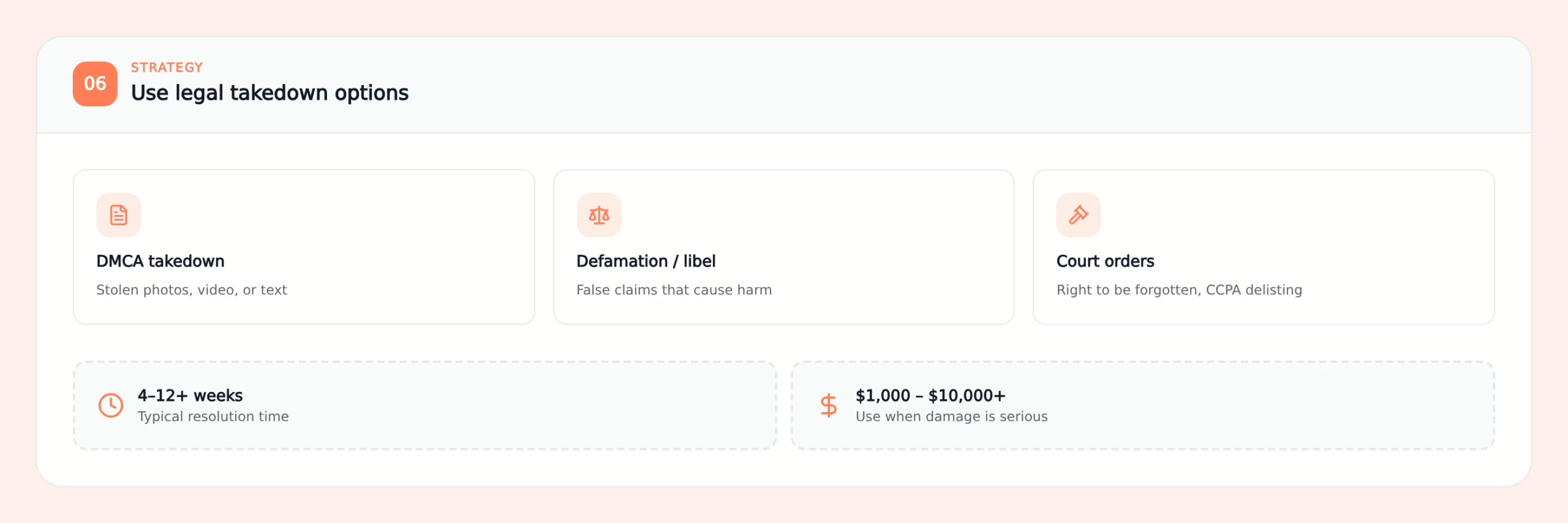
You might consider legal help when the content:
- Is clearly false and harmful to your reputation.
- Uses your copyrighted photos, videos, or text without permission.
- Includes threats, blackmail, or other illegal material.
- Falls under regional privacy laws such as the Right to Be Forgotten in the EU or CCPA in California.
Common legal paths include:
- DMCA takedown notices for unauthorized use of your content.
- Defamation or libel claims for false statements that cause real harm.
- Court orders or regional delisting requests.
Expected timeline: often 4 to 12 weeks or more.
Expected cost: typically $1,000 to $10,000 or more, depending on the case and the lawyer.
From what I have seen, legal action makes the most sense when ongoing damage is large. For example, if you are losing major deals, job offers, or partnerships. It is not a first step. It is a strong option when other methods are not enough.
Important note: this article is not legal advice. Always speak to a qualified attorney for legal questions.
7. Push Negative Content Down With SEO Suppression
Not all negative results can be eliminated. That is particularly true of high-profile stories in the media and government documents that are publicly available. For many types of negative results, suppression, as opposed to removal, will be the most effective method of reducing damage over time.
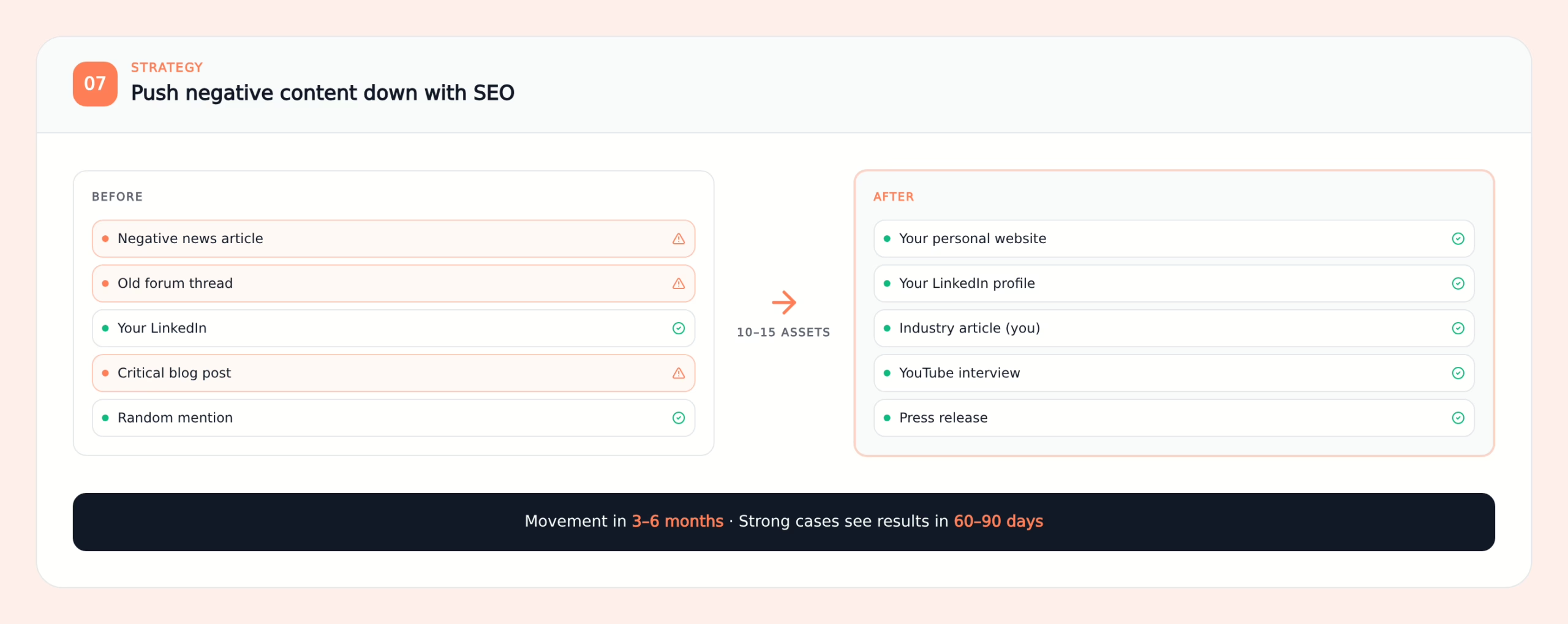
“Suppressing” a search result simply means creating better, more relevant content than the bad information. With most people clicking on what they see at the top of their list of options, “pushing down” negative results below page one will significantly reduce exposure. This is a core part of Google reputation management.
I usually aim to help clients create 10 to 15 strong assets. These might be:
- Pages on your personal or company website.
- A full LinkedIn profile with regular posts.
- Articles on respected industry sites.
- Press releases about real news or positive work.
- Guest articles where you share useful insights.
- YouTube videos under your name or brand.
- Active social profiles with professional content.
In 2026, Google rewards fresh, helpful, and trustworthy content. That means you should:
- Publish new content on a regular schedule.
- Use your name or brand name naturally in titles and headings.
- Get links from other trusted sites when possible.
Most cases start to show movement in 3 to 6 months. With strong content and a few quality backlinks, some people see results in 60 to 90 days. If you want more practical steps, read these tips to get rid of unwanted Google search results.
From my own work, I can say this. Suppression is not instant, but it is one of the most reliable ways to take back control over time.
8. Build and Manage Your Reviews Proactively
A single bad review can hurt. But it has much less power if you have many recent, positive reviews around it.
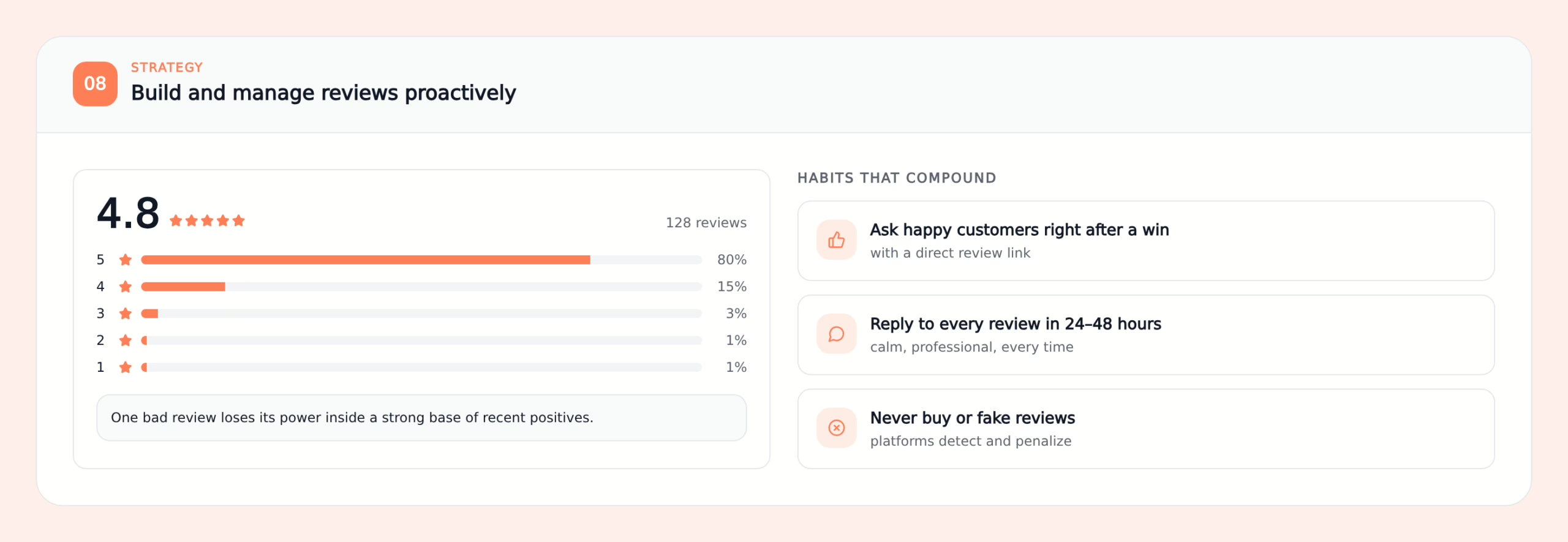
In 2026, about 94% of consumers say a negative review has led them to avoid a business. That makes review management a key part of your reputation plan.
Here are simple habits that I recommend:
- Ask happy customers for reviews soon after a good experience. Send them a direct link so it is easy.
- Respond to every review within 24 to 48 hours. Thank people for positive feedback. For negative reviews, stay calm and professional.
- Never buy or fake reviews. Platforms are better than ever at spotting patterns and can penalize your profile.
Over time, your goal is to build a strong base of honest, positive reviews. Then, when a bad one appears, it is just one voice among many. People see the full picture instead of only one angry comment.
9. Create Strong Profiles That Rank for Your Name
One of the fastest ways to improve what people see about you is to build profiles that you own and control. Well-optimized profiles often rank very high for your name or brand.
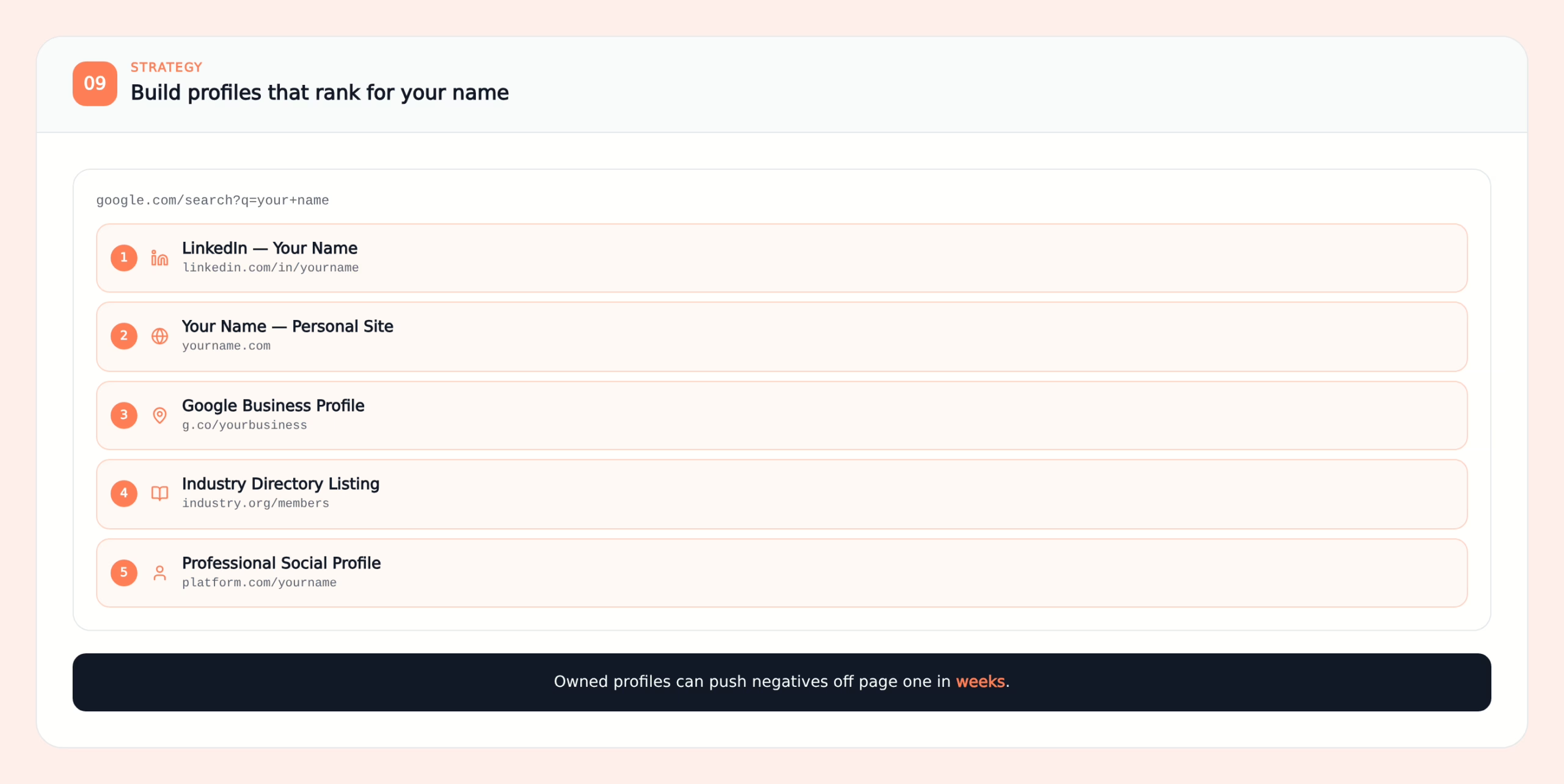
The priority assets I build with clients are:
- A complete LinkedIn profile with a clear headline, an “About” section, and featured content.
- A Google Business Profile for businesses or professionals who serve a location or area.
- A simple personal website or landing page that uses your name.
- Listings in relevant industry directories.
- Professional profiles on major social platforms.
When you fill these profiles with accurate, helpful information and keep them active, they often move onto page one quickly. In some cases, they can push negative results off the first page within weeks. This is also one of the most practical ways to clean up your online presence.
What to Expect in 2026
It is important to know what is realistic. Some types of content almost never disappear completely. These include:
- Major news articles from big media outlets.
- Court records and official documents.
- Large, high-authority complaint sites.
This is normal. The real goal is not perfect deletion. It is control.
The best results usually come from combining different methods. Remove what you can. Suppress what you cannot remove. Build strong, positive assets that tell your side of the story.
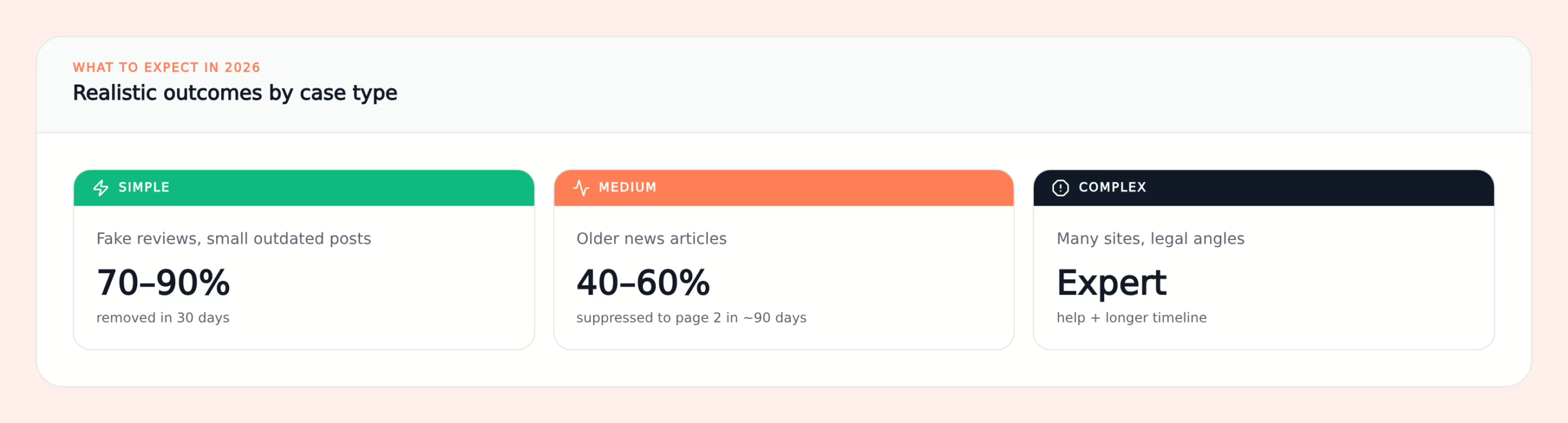
Typical outcomes I see include:
- Simple cases, like fake reviews or small outdated posts, often reach 70% to 90% removal within 30 days.
- Medium cases, like older news articles, often reach 40% to 60% suppression to page two or lower within about 90 days.
- Complex cases that involve many sites or legal issues often need expert help and a longer timeline.
When to Seek Expert Help
Doing it yourself is a great start. You should try the basics first. This includes contacting site owners, using Google’s tools, reporting clear rule-breaking content, and improving your profiles and reviews.
However, expert help becomes very useful when:
- A negative result is stuck on page one for your name or business.
- The issue spreads across many sites or platforms.
- You can see clear loss of revenue, job offers, or partnerships.
- Your first attempts hit dead ends or denials.
I have seen trial-and-error make things worse at this stage. For example, people draw more attention to a negative story or trigger new coverage. A specialist can help you choose the right order of actions and avoid these traps. If you need support, working with experienced reputation management consultants can help you build a clearer plan.
Final Thoughts
Most of the time, negative content will never go away by itself. If ignored, this can create a negative impression of you for years to come.
There are two things that I tell all my clients. The first is that you are not locked into what others say about you. In 2026, there are many ways to address your online presence.
Begin at the bottom rung. Start by asking sites to remove the information you do not want to be visible. Take advantage of Google’s “Results about you” feature. Report any fake or abusive content. After doing these basic steps, begin creating a longer term strategy. Establish good profiles about yourself, create useful content, monitor reviews of you, and continually check out how your names appears in search engines.
If you start now and continue with a plan, you can control what shows up in a search engine. You are no longer reactive to one bad piece of information but proactive in managing what potential customers think of when they research you. This is what online reputation management in digital marketing is supposed to be about.

West Virginia alumni with a background in marketing and sales for both established companies and startups.