If you no longer want to use Threads, deleting your account is straightforward. The process is handled inside the Threads app and does not delete your Instagram account.
Here is exactly how it works, what to expect, and what happens after you confirm deletion.
Key Takeaways
- You can delete your Threads account directly from the app under Settings > Account
- Deleting Threads does not delete your Instagram account
- Your profile is hidden immediately but kept for 30 days
- Logging back in during the 30-day window cancels deletion
- After 30 days, your Threads account and content are permanently removed
- Individual Threads posts can be deleted without deleting your account
How to Delete Your Threads Account
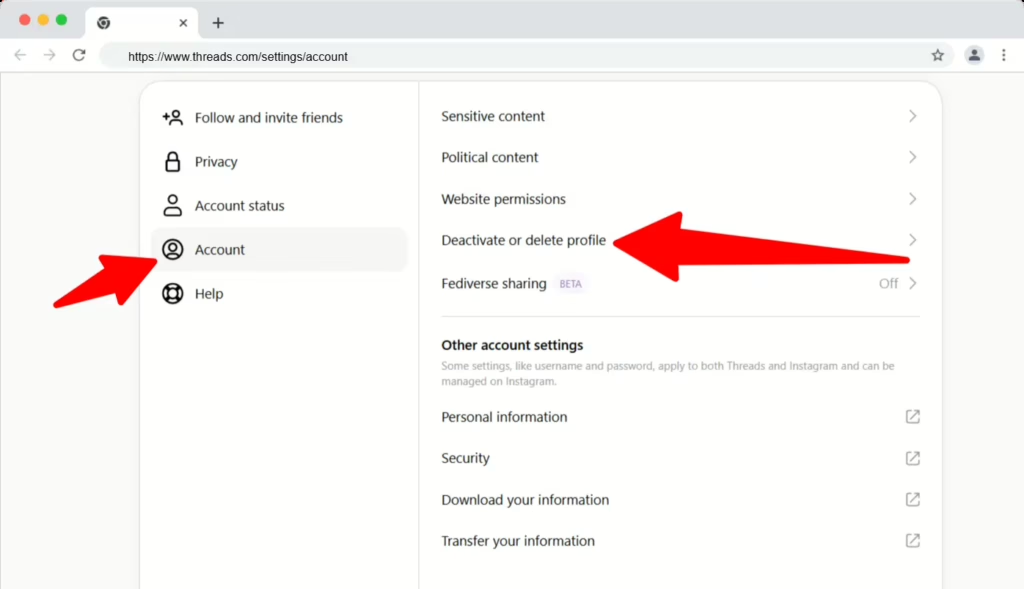
To delete your Threads account, go to Settings > Account > Deactivate or delete profile, then choose Delete profile, enter your password, and confirm.
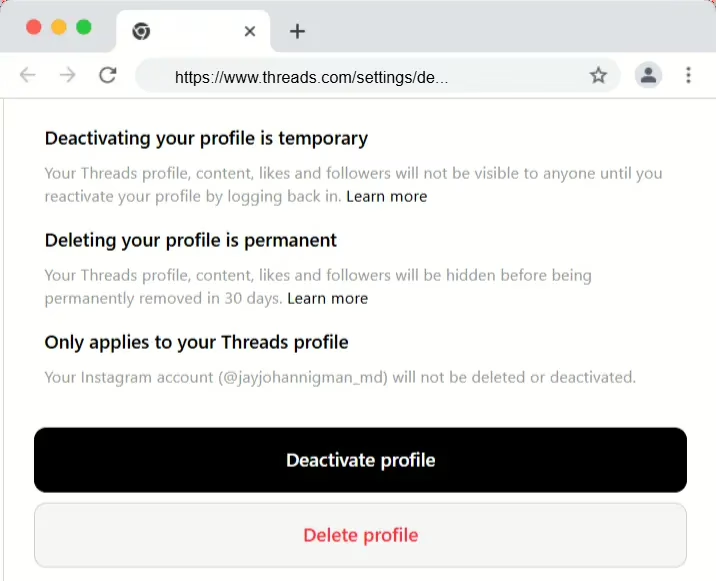
Your Threads profile and content are hidden for 30 days. If you do not log back in during that period, the account is permanently deleted.
This process only deletes your Threads profile. Your linked Instagram account stays active.
Step-by-Step Guide to Delete Your Threads Profile
- Open Threads
Launch the Threads app on your mobile device. - Go to Your Profile
Tap your profile picture in the bottom-right corner. - Open the Menu
Tap the two-line menu icon in the top-right corner. - Access Settings
Select Account from the menu. - Choose Deletion Option
Tap Deactivate or Delete Profile. - Select Delete Profile
Tap Delete profile at the bottom of the screen. - Confirm Deletion
Enter your Instagram password and tap Delete Threads profile to confirm.
Once confirmed, your profile is hidden immediately.
What Happens After You Delete Your Threads Account
Deleting a Threads account is not instant. There is a waiting period.
30-Day Deletion Window
After you confirm deletion, your Threads profile becomes hidden for 30 days.
During this time:
- Your posts are not visible
- Your profile does not appear in search
- Your followers cannot see your content
If you log back in within those 30 days, the deletion is canceled automatically.
Permanent Deletion After 30 Days
If you do not log back in during the 30-day window:
- Your profile is permanently deleted
- All posts, likes, replies, and followers are removed
- The data cannot be recovered
Once this happens, the deletion is final.
Does Deleting Threads Delete Instagram?
No.
Deleting your Threads account does not delete your Instagram account.
Threads and Instagram are linked, but they are separate profiles. Removing Threads only affects your Threads presence.
Your Instagram:
- Account remains active
- Followers are unaffected
- Posts and messages stay intact
How to Delete Text Threads on iPhone
If you are trying to delete individual posts instead of the entire account:
- Open the Threads app on your iPhone
- Go to your profile
- Tap the post you want to remove
- Tap the three-dot menu
- Select Delete
This removes only that specific post, not your account.
How Long Does It Take to Delete a Threads Account?
- Immediate: Your profile is hidden as soon as you confirm deletion
- 30 days: You can cancel deletion by logging back in
- After 30 days: Your account is permanently deleted
There is no way to speed up the 30-day waiting period.
FAQs
Does my Instagram account get deleted with Threads?
No. Deleting Threads does not affect your Instagram account.
How long does it take to fully delete a Threads account?
Your account is fully deleted after 30 days if you do not log back in.
Can I recover my Threads account after deletion?
You can only recover it during the 30-day window. After that, recovery is not possible.
Can I deactivate Threads instead of deleting it?
Yes. Threads offers a deactivate option if you want a temporary break without starting the deletion countdown.
Related Guides:
- See our related guide on how to opt out of LexisNexis
- See our related guide on how to opt out of 411.com
- See our related guide on how to opt out of AnyWho.com
- See our related guide on how to opt out of CheckPeople
- See our related guide on how to opt out of FreePeopleSearch
- See our related guide on how to opt out of Instant Checkmate
Conclusion
Deleting your Threads account is simple and reversible for a short time.
The process happens entirely inside the app, your Instagram account stays intact, and you have a 30-day window to change your mind. After that, the deletion is permanent.
If you are stepping away for privacy reasons, digital cleanup, or a fresh start, knowing exactly how the process works helps you stay in control of your online presence.
Taking a few minutes to manage unused social accounts is a small step that can make a big difference in protecting your reputation and reducing unwanted visibility.