
Last Updated on 2 months ago by Admin
Have you ever seen a photo online and wondered where it came from?
Maybe someone used your photo without permission. Maybe you found a fake profile using your pictures. Or maybe you simply wanted to verify whether an image was real.
That is where reverse image search helps.
A reverse image search lets you upload a photo or paste an image link into Google to find matching images across the internet. Instead of typing words into a search bar, you search using the image itself.
At NewReputation, we regularly use reverse image search to help clients track stolen photos, identify fake profiles, monitor reputation issues, and find where personal images appear online.
In this guide, you will learn exactly how to do a reverse image search on Google, why it matters, and how to use it to protect your online reputation and privacy.
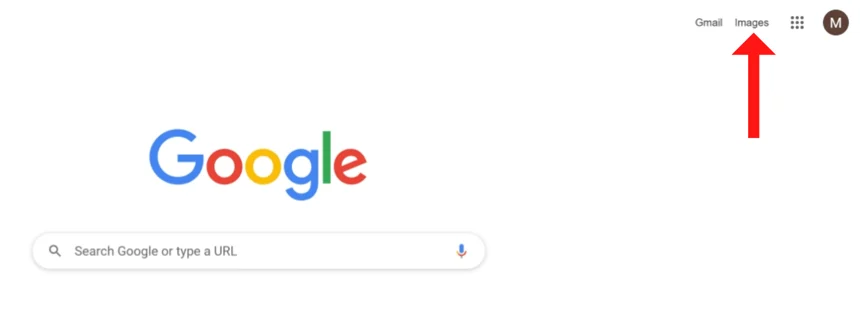
Table of Contents
- What is reverse image search?
- Why people use reverse image search
- How to do a reverse image search on Google
- Reverse image search on desktop
- Reverse image search on mobile
- How to find stolen or copied photos
- How reverse image search affects privacy and reputation
- Other reverse image search tools
- Frequently asked questions
What Is Reverse Image Search?
Reverse image search is a tool that helps you search the internet using a photo instead of text.
You upload an image, paste an image URL, or drag a picture into Google Images. Google then scans the web for:
- Matching images
- Similar photos
- Websites using the image
- Possible original sources
- Related visual content
This helps people identify where an image came from and how it is being used online.
Google Lens now powers much of Google’s reverse image search system, making results faster and more accurate than older image matching tools.
Why People Use Reverse Image Search
Reverse image search has become much more important in recent years.
People use it for:
- Finding fake social media profiles
- Checking if photos were stolen
- Verifying online dating profiles
- Tracking image copyright issues
- Finding the original source of viral photos
- Monitoring online reputation problems
- Researching scams and impersonation
- Checking whether edited images are being reused online
At NewReputation, we often see people discover fake accounts or impersonation scams after running reverse image searches on profile pictures.
That is especially important when dealing with identity theft, online impersonation, or privacy concerns.
If you are concerned about search visibility overall, our guide to Google name searches explains how people research names online today.
How To Do A Reverse Image Search On Google
Google makes reverse image search fairly simple.
You can search using:
- An uploaded image
- A copied image URL
- A screenshot
- A dragged image file
Google will then try to locate visually similar images and webpages using the same photo.
How To Reverse Image Search on Desktop
- Open Google Images.
- Click the camera icon or Google Lens icon in the search bar.
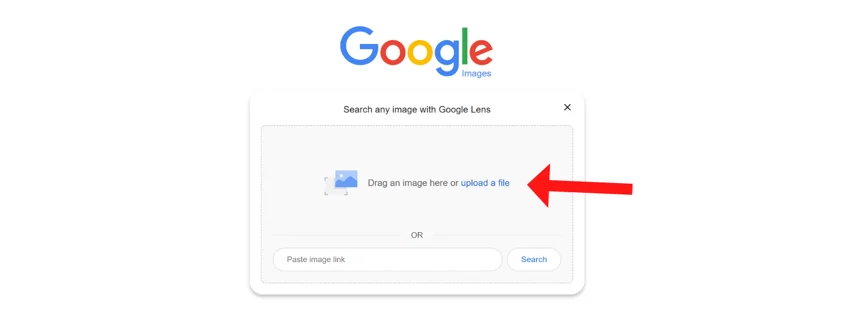
- Choose “Upload a file” or paste an image link.
- Select the image from your computer.
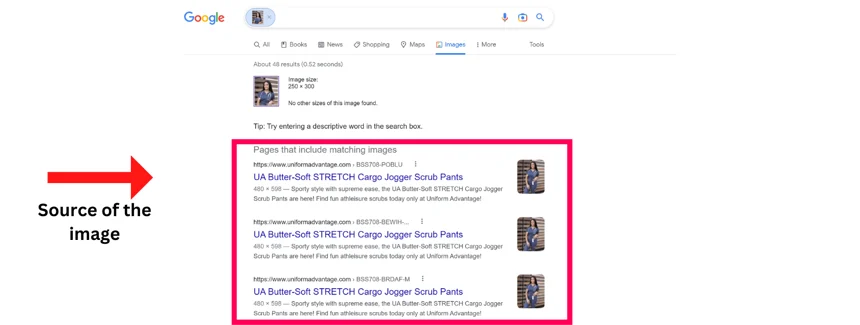
- Review matching search results and websites using the image.
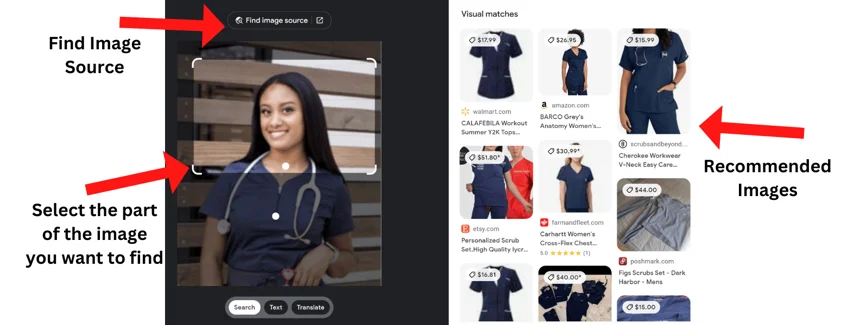
Google may show:
- Exact matches
- Visually similar images
- Products or objects in the image
- Related pages using the photo
If you are trying to identify where a picture first appeared online, this process often helps locate the original source.
How To Reverse Image Search on Mobile
Mobile reverse image search works slightly differently.
Using Google Chrome
- Open Chrome on your phone.
- Find the image online.
- Press and hold the image.
- Select “Search image with Google Lens.”
Google will scan for matching images and related pages.
Using Google Images App Upload
- Open Google Images.
- Tap the Google Lens icon.
- Upload a photo or take a screenshot.
- Review matching results.
This works well for checking screenshots, profile photos, memes, or suspicious social media images.
How To Find Stolen or Copied Photos
One of the most common uses of reverse image search is finding stolen photos.
People often discover:
- Fake dating profiles
- Impersonation accounts
- Unauthorized business use
- Scam websites
- Reposted social media content
If someone is using your images without permission, reverse image search helps you locate where the photos appear.
Once you find the copied image, you may be able to:
- Report fake accounts
- Request image removal
- File copyright complaints
- Monitor reputation risks
- Remove images from Google search
If your photos appear in Google search results and you want them removed, this guide explains how to remove images from Google search.
How Reverse Image Search Affects Privacy and Reputation
Most people do not realize how easily photos spread online.
A single public image can end up on:
- Social media reposts
- Forums
- Fake profiles
- Blogs
- Scam sites
- Background check websites
That is why reverse image search matters for privacy and online reputation management.
At NewReputation, we regularly help clients monitor image visibility tied to:
- Personal branding
- Executive reputation
- Identity theft
- Online harassment
- Impersonation scams
- Search result cleanup
If you want to strengthen your online visibility overall, our guide to Google reputation management explains how search results shape trust online.
Concerned About Images Appearing in Google Search?
Photos, screenshots, and copied images can affect your privacy and online reputation quickly. NewReputation helps individuals and businesses monitor search visibility, remove harmful content, and strengthen their digital presence.
Get Your Free Reputation ScanOther Reverse Image Search Tools
Google is not the only reverse image search tool available.
Other useful tools include:
- TinEye reverse image search
- Bing Visual Search
- Yandex Images
- Google Lens
Some tools are better for finding exact image matches. Others work better for facial similarity or locating older versions of an image.
If you are dealing with video impersonation or copied video content, you may also want to learn about reverse video search.
How Reverse Image Search Helps With SEO
Images now play a larger role in SEO than many people realize.
Google uses visual search more often across:
- Google Images
- Google Lens
- AI search results
- Product search
- Visual shopping results
That means businesses should pay attention to:
- Image file names
- Alt text
- Image originality
- Brand consistency
- Visual search visibility
Our guide to image SEO explains how optimized visuals improve search visibility.
Can Reverse Image Search Help With Fake Profiles?
Yes. Reverse image search is one of the fastest ways to investigate suspicious profiles online.
If a dating profile, social account, or business page feels suspicious:
- Save the profile image
- Run it through Google Images
- Look for duplicate matches
- Check whether the image belongs to someone else
This often exposes fake accounts and impersonation scams quickly.
Can You Remove Images Completely From the Internet?
Sometimes yes. Sometimes no.
It depends on:
- Who owns the image
- Where it appears
- Copyright rights
- Privacy violations
- Platform policies
Some images can be removed directly. Others may continue appearing in search results even after deletion attempts.
That is why monitoring matters.
If you want better privacy control overall, our guide on how to protect your online privacy explains additional steps you can take.
You should also regularly clear browsing activity and search history when managing online privacy. Here is how to delete search history.
Frequently Asked Questions
What is a reverse image search?
A reverse image search lets you upload a photo or image URL to find matching images and webpages online.
Can Google identify someone from a photo?
Google does not officially identify people by name through reverse image search alone. However, matching profiles and public images may help users identify someone.
How do I search using a screenshot?
Save the screenshot, upload it into Google Images or Google Lens, and review matching search results.
Can reverse image search find fake profiles?
Yes. Reverse image search is commonly used to uncover impersonation accounts and romance scams using stolen photos.
Does reverse image search work on mobile?
Yes. Google Lens allows reverse image searching directly from phones and tablets.
Can I remove copied photos from Google?
Sometimes. Removal depends on copyright ownership, privacy violations, and platform policies.
Final Thoughts
Reverse image search is one of the most useful online privacy and reputation tools available today.
It helps people verify images, track stolen photos, uncover fake accounts, and monitor how visual content spreads online.
Most people are surprised by how often their photos appear in unexpected places across the internet.
That is why regular monitoring matters.
Search your images periodically. Review your public profiles. Watch for impersonation. Protect your digital footprint before problems grow larger.
Because today, photos spread across the internet much faster than most people realize.