Last Updated on 4 months ago by Admin
People Also Search For (PASF) is a Google feature that shows a small box of related search terms right after you click a result and return to the results page. Those terms are the next searches other people tried on the same topic, pulled straight from real search behavior. For anyone doing SEO, that makes PASF a free, direct window into what your audience actually wants, and a reliable source of keyword and content ideas that most tools miss.
You have seen it hundreds of times without thinking about it. You search for something, click a result, decide it is not quite right, hit the back button, and a little box appears below that result with a cluster of related queries. This guide explains what PASF is, how it works, how it differs from similar SERP features, and how to turn those keywords into content that ranks.
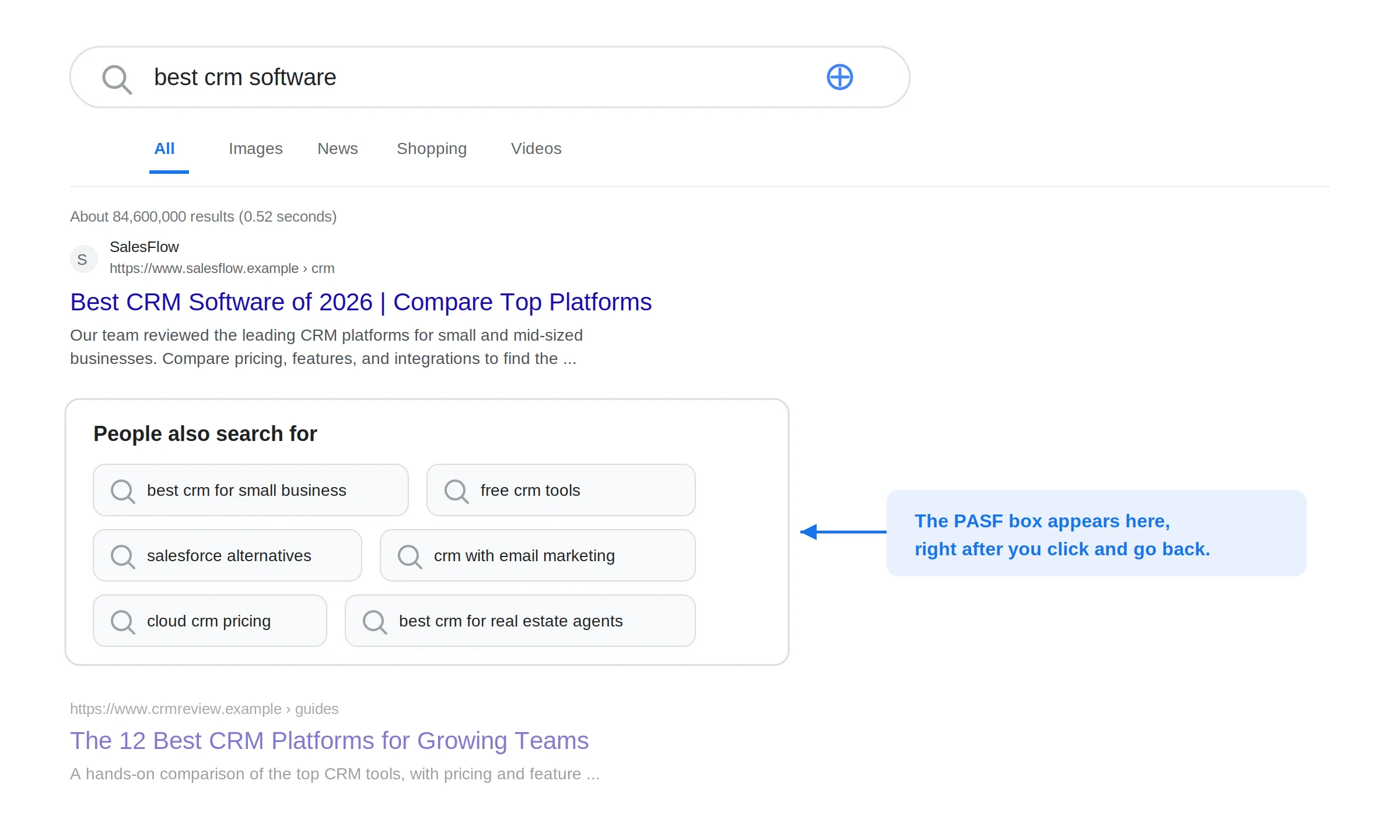
Table of Contents
What Does People Also Search For Mean?
People Also Search For is a Google search feature that displays a cluster of related query suggestions, usually six to eight of them, as clickable chips. Google first rolled it out around 2018. Each suggestion launches a new search for that term, so the box works like a set of signposts pointing you toward closely related topics.
The key thing that sets PASF apart from other SERP features is what triggers it. It does not appear by default. It shows up specifically when a user clicks a result and then returns to the results page, which Google reads as a sign that the result did not fully satisfy the search. In that moment, Google surfaces the searches other people most often tried next in the same situation.
How PASF Works
PASF is behavior-driven, not a simple keyword match. Google processes billions of search sessions, watching which results people click, how quickly they come back, and what they search next. Over time it builds a picture of which queries tend to follow which, and which terms people explore together in a single research session.
When you trigger PASF by clicking a result and bouncing back, Google shows you the most common next searches for people in your situation, based on that aggregate data. A few details worth knowing:
- It is per result, not per query. Different results on the same page can surface different PASF terms, because the box reflects the specific result you just left.
- It updates in real time. The suggestions shift as behavior shifts, so a fast-moving topic can change day to day.
- It looks different on mobile. On phones, PASF often appears as a simple list of tappable suggestions rather than a full box, but the trigger is the same: tap a result, return, and the suggestions appear.
- Personal signals nudge it. Your location, device, and search history can slightly influence which terms show.
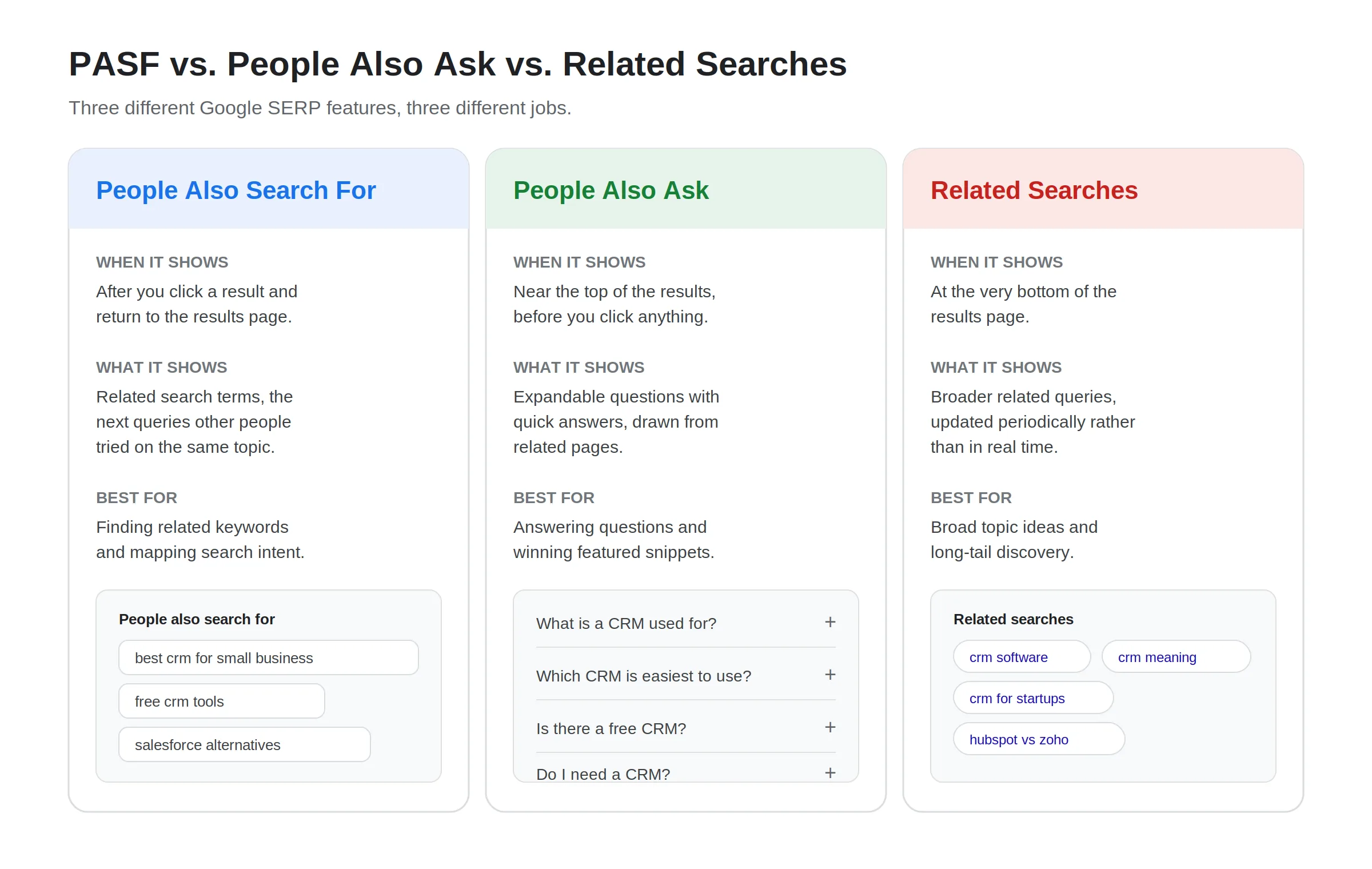
PASF vs. People Also Ask vs. Related Searches
These three SERP features get mixed up constantly, but they do different jobs and appear in different places. Here is how they compare.
| Feature | When it appears | What it shows | Best for |
|---|---|---|---|
| People Also Search For | After you click a result and return to the SERP | Related search terms (the next queries people tried) | Finding related keywords and mapping intent |
| People Also Ask | Near the top, before you click anything | Expandable questions with quick answers | Answering questions and winning featured snippets |
| Related Searches | At the very bottom of the results page | Broader related queries, updated periodically | Broad topic ideas and long-tail discovery |
The short version: People Also Ask shows you questions to answer. People Also Search For shows you what to search next. Related Searches gives you broader, more loosely connected ideas. All three help, but PASF is the sharpest tool for understanding how a searcher’s intent shifts mid-session.
Why PASF Keywords Matter for SEO
PASF keywords come straight from Google’s view of real search behavior, which makes them genuinely useful, not just another list. A few reasons they are worth your attention:
- They reveal true intent. Each PASF term is a next step a real person took, so it tells you what your audience actually wanted after their first search fell short.
- They uncover content gaps. If a PASF term leads to weak or outdated pages, that is an opening to publish something better and take that visibility.
- They surface long-tail opportunities. Many PASF terms show little or no volume in keyword tools, yet they attract people who already know exactly what they want, often with less competition.
- They build topical authority. Covering the related terms around a topic signals to Google that your site addresses the whole search journey, not just one query.
- They map competitors. For commercial queries, PASF often reads like a competitor map, showing the alternatives and comparisons people weigh.
PASF does not directly change your rankings. What it does is point you toward content that satisfies intent, which improves relevance and engagement, and those are the things that support rankings over time. This connects closely to how we think about using SEO for reputation management: cover what people search, and you control more of what they find.
See What People Find When They Search Your Brand
PASF shows what people search next. NewReputation’s free scan shows what actually comes up for your name or business, so you know where to focus your content.
- See your current search results and related searches
- Spot the gaps and content opportunities
- Free scan, no obligation
How to Find PASF Keywords
You can gather PASF keywords by hand or with a tool. Both work, and combining them gives you the most complete picture.
The manual method
This costs nothing and pulls data straight from Google:
- Search your seed keyword in Google.
- Click one of the top results and stay on the page for a moment.
- Hit your browser’s back button to return to the results.
- The People Also Search For box appears beneath the result you just clicked. Copy those terms.
- Repeat with a few different results, since the box is per result and each one can surface different terms.
- Then click a promising PASF term and repeat the whole process to branch out further.
Collect everything in a spreadsheet and group the terms by intent, such as informational, comparison, or how-to. Over time this becomes your own PASF keyword database for your niche, which is often more reliable than generic tools.

The tool method
Pulling PASF one result at a time is slow. Browser extensions like Keywords Everywhere read the PASF terms embedded across all the results at once, remove duplicates, and list them in a single widget alongside search volume. Tools like AlsoAsked, KeywordTool.io, and the major SEO platforms can also help you gather and cross-check related terms at scale. Use tools to move faster, then verify against the live SERP, since the real box is the source of truth.
How to Turn PASF Keywords Into Content
A list of keywords is only useful if it becomes content. The most effective approach is to build a content cluster: one main pillar page on your core topic, supported by focused articles targeting the PASF terms around it.
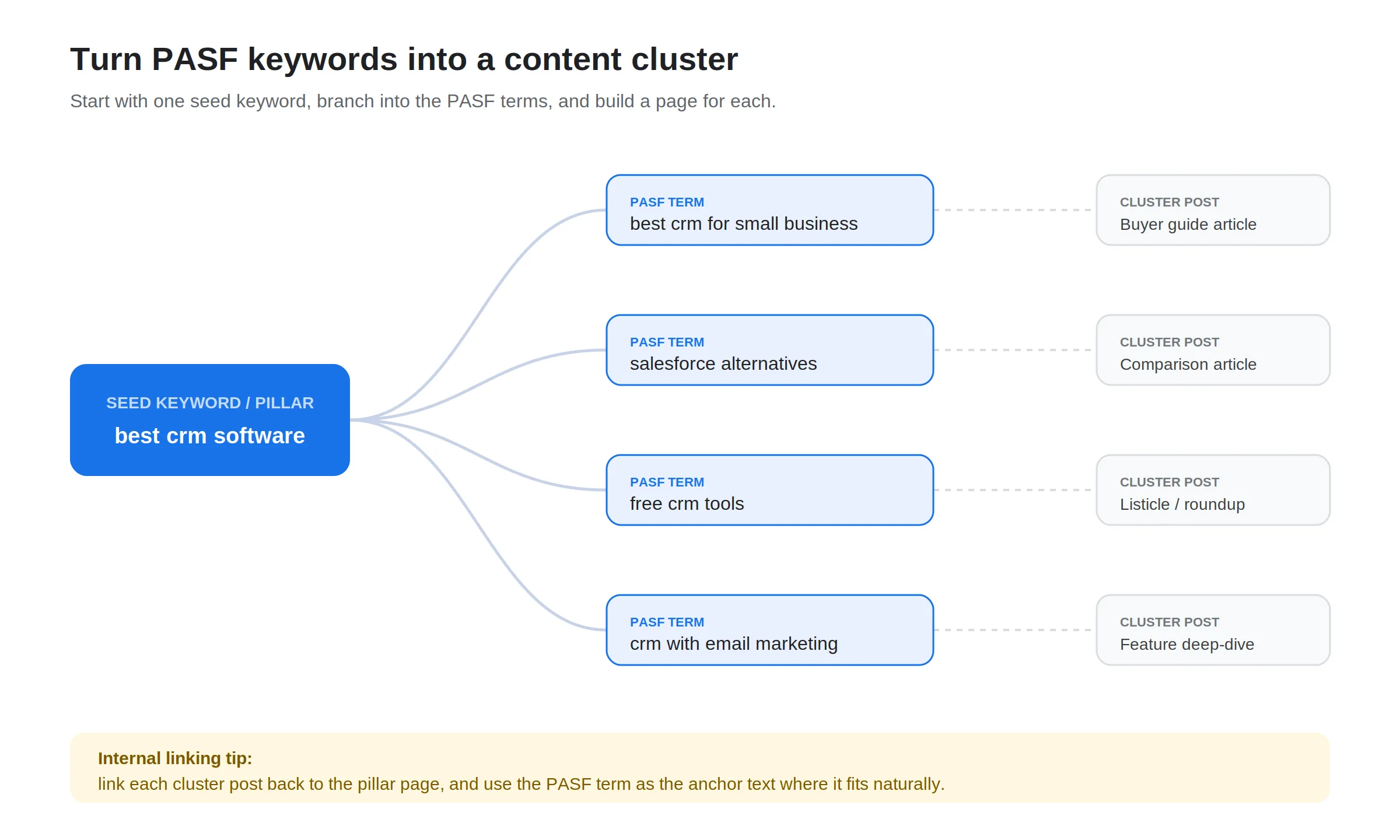
Here is the workflow:
- Start with a seed keyword that matches your core topic, and gather its PASF terms.
- Group the terms into a keyword tree. Cluster related PASF terms under parent topics rather than treating each as a standalone target. Most PASF terms represent a related user journey, not an isolated phrase.
- Match each cluster to a content type. A “best X for small business” term suits a buyer guide, an “X alternatives” term suits a comparison, and a “free X tools” term suits a roundup.
- Prioritize by relevance and opportunity. Favor terms that fit your audience and where existing results are weak, rather than chasing raw volume.
- Build the pillar and spokes. Create the pillar page on the core topic, then a focused page for each strong cluster.
- Link them together. Link each cluster post back to the pillar, and use the PASF term as the anchor text where it reads naturally. This is a core idea in strong internal linking, and it signals to Google that your site covers the whole topic.
This is the same structure behind our own pillar content, like our step-by-step local SEO guide. Covering the full journey around a topic is also how you build the kind of authority that helps you rank, and it pairs well with a reverse SEO approach when you need the right pages to rank higher.
Best Practices for Using PASF Keywords
A few principles keep PASF work productive rather than scattered:
- Prioritize relevance and intent. Choose terms that genuinely fit your topic and your audience, not every term the box shows.
- Never target PASF terms in isolation. Bucket them under parent topics so your content reflects real user journeys, not a pile of disconnected phrases.
- Fully satisfy the intent. PASF appears when a result disappoints someone. Make your page the one that actually answers the refined query, so people do not bounce back from you.
- Refresh regularly. PASF evolves, so revisit your terms every few months, more often in fast-moving niches, and update your content with new insights.
- Combine PASF with PAA and Related Searches. Together they give you fuller topical coverage than any one feature alone.
- Do not over-optimize. Focus on user value. Stuffing PASF terms in unnaturally hurts more than it helps.
PASF has become more valuable, not less, as search shifts toward AI Overviews and AI-driven results. When Google is weighing intent and topical depth more heavily, content that maps to real search journeys holds up better. Understanding how the modern SERP works, including Google’s recent updates and even how other search engines like Bing handle related queries, helps you build content that stays relevant.
Frequently Asked Questions
What is People Also Search For (PASF)?
People Also Search For is a Google search feature that shows a box of related query suggestions, usually six to eight clickable terms, after you click a result and return to the results page. The terms are the searches other people tried next on the same topic, drawn from real search behavior. Google rolled it out around 2018. For SEO, it is a free, direct source of related keywords and content ideas.
How is PASF different from People Also Ask?
They appear in different places and do different jobs. People Also Ask shows expandable questions near the top of the results before you click anything, and is best for answering questions and winning featured snippets. People Also Search For shows related search terms beneath a result after you click it and return to the SERP, and is best for finding related keywords and mapping how a searcher’s intent shifts. In short, PAA gives you questions to answer, PASF gives you what to search next.
How do I find PASF keywords?
Manually, search your keyword in Google, click a top result, then hit the back button. The People Also Search For box appears beneath that result, and you can copy the terms. Repeat with different results and click promising terms to branch out further. To move faster, use a browser extension like Keywords Everywhere, which pulls PASF terms from all results at once with search volume. Verify tool data against the live SERP, since the real box is the source of truth.
Do PASF keywords help my Google rankings?
Not directly. PASF is an organic feature you cannot pay for or submit to. What it does is point you toward content that satisfies real search intent, which improves relevance, engagement, and topical coverage, and those factors indirectly support higher rankings. Building content around well-chosen PASF terms is one of the more reliable ways to expand your visibility around a topic without guessing at what people want.
How often does People Also Search For change?
It updates in real time based on aggregate search behavior, so it can shift day to day for fast-moving or trending topics and more slowly for stable ones. Because the box reflects the specific result you clicked, different results can also show different terms. For content planning, it is worth refreshing your PASF research every few months, or more often in competitive, fast-changing niches, to keep your content aligned with current intent.
Want the Right Content to Rank for Your Brand?
NewReputation builds SEO and content strategies that put accurate, positive pages in front of the people searching for you, and push down what you would rather they did not see.
- Keyword and content strategy built around real search intent
- Content clusters that build topical authority
- Search result monitoring and reputation management