
Last Updated on 3 months ago by Admin
Have you ever searched your name on Google and found your home address, phone number, or email sitting right there in the results for anyone to see?
You are not imagining the risk. Data brokers collect and publish this information, and Google’s search index picks it up. That means anyone, including scammers, stalkers, or telemarketers, can find your contact details with a simple search.
Google has a free tool to help. It is called Results About You, and as of early 2026, it has been significantly expanded. This guide explains what it does, what it can and cannot remove, and how to use it step by step.
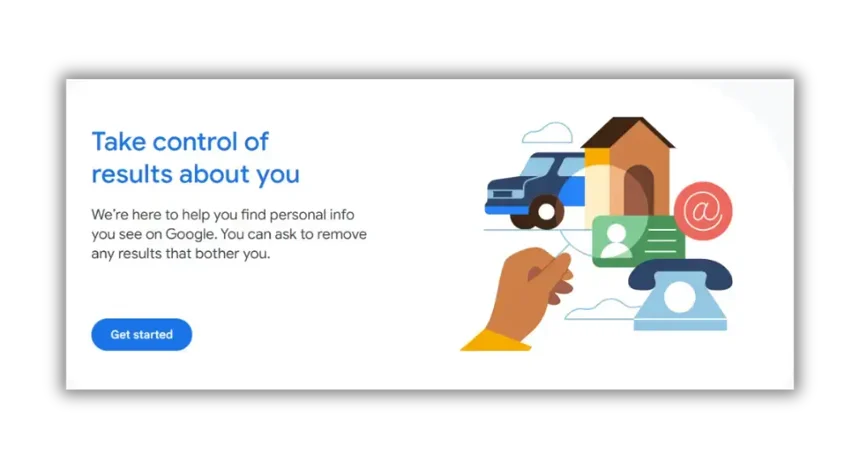
Table of Contents
What Results About You Actually Does
Results About You is a privacy dashboard inside your Google account. It monitors Google Search for your personal contact information and alerts you when it appears. When it finds a match, you can submit a removal request directly from the dashboard, without filing a legal form or contacting a website manually.
More than 10 million people have already used the tool, according to Ubergizmo. In February 2026, Google expanded it significantly. It can now flag results containing government-issued ID numbers such as passports, Social Security numbers, and driver’s license details, in addition to the contact information it already covered.
One important thing to understand upfront: removing a result from Google Search does not delete the information from the internet. It stops that result from appearing when someone searches for you on Google. The original page still exists on whatever website published it. If you want the data gone completely, you also need to contact the website owner or data broker directly.
Data brokers sell your personal information cheaply to anyone who wants it. Buyers can include telemarketers, scammers, identity thieves, and people who want to track or harass someone. Getting your address and phone number out of Google results reduces how easily you can be found.
What Can and Cannot Be Removed
Not everything qualifies for removal through this tool. Here is a clear breakdown.
| Type of Content | Eligible for Removal? |
|---|---|
| Home address | Yes |
| Phone number | Yes |
| Email address | Yes |
| Social Security number | Yes (added February 2026) |
| Passport or driver’s license number | Yes (added February 2026) |
| Bank account or credit card details | Yes |
| Medical records | Yes |
| Non-consensual explicit images | Yes, through a separate simplified process |
| News articles about you | Generally no |
| Court records | Generally no |
| True factual information on government or news sites | Generally no |
A removal request is most commonly denied when the content is still live and unchanged on the host website. Google will not de-index a page just because you asked. If the information is still published on that page, you generally need to get the site owner to remove it first. Our guide on removing content from Google Search covers the full set of options when a straightforward request does not work.
For non-consensual intimate images, the process was also simplified in February 2026. You can now click the three-dot menu on an image result, select “Remove result,” and submit the request with fewer steps than before.
How to Set It Up and Use It
The setup takes about five minutes. Here is how to do it.
- Go to myactivity.google.com/results-about-you, or tap your profile photo in the Google app and select “Results about you.”
- Sign in to your Google account if you are not already signed in.
- Click “Get Started” and enter the personal information you want monitored: your name, home address, phone number, email address, and any ID numbers you want flagged.
- Choose how you want to be notified when Google finds a match: by email, through the Google app, or both.
- Once set up, Google scans its search index regularly and alerts you when your information appears.
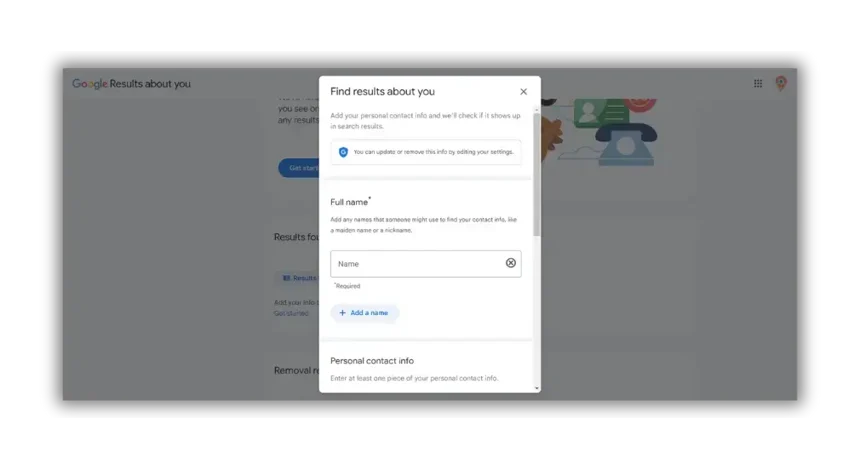
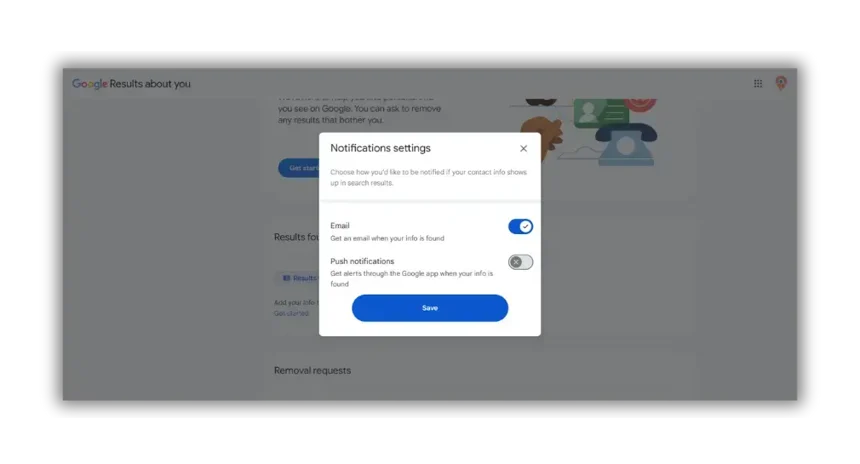
According to Google’s own support documentation, the personal information you enter is stored with advanced encryption and access controls. Google does not share it with third parties or use it to personalize your experience in other Google products. It is used only to check search results for matches and track the status of your removal requests over time.
If you later want to stop monitoring and remove your data from the tool entirely, go to Settings inside the dashboard and select “Remove all personal info.”
Google is working to expand it to additional regions. Users under 18 need to complete a more detailed removal request form rather than using this dashboard. Check Google’s support page for current availability in your region.
Want to Know Everything That Is Showing Up About You?
NewReputation’s free First Impression Report shows what appears across Google Search, data broker sites, and background check databases so you know exactly what others see when they search your name.
- See your personal data exposure across the major data broker platforms
- Find out what Google shows for your name, address, and phone number
- Get a clear picture of what needs to be addressed
How to Remove a Specific Search Result
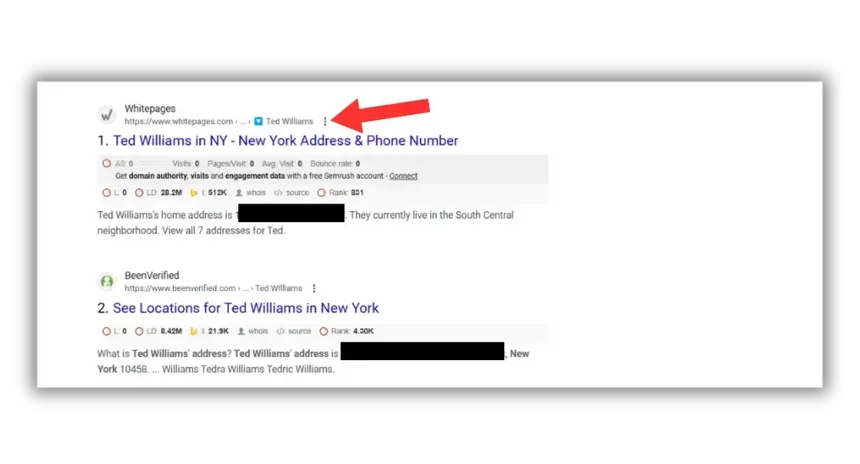
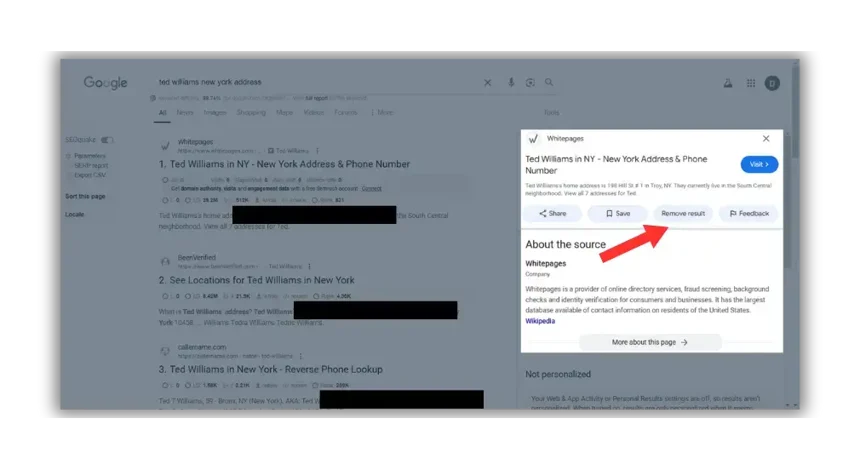
If you find a specific result in Google Search that shows your personal information and want it removed, you can submit a request directly from the results page. This works even if you have not set up the full monitoring dashboard.
- Search your name in Google.
- Find the result containing your personal information.
- Click the three dots in the top right corner of that result.
- Select “Remove result.”
- Choose “It shows my personal contact information.”
- Complete the form and submit it.
Google reviews each request and emails you when a decision is made. They may ask for additional documentation to confirm the information is yours. Approval is not guaranteed, but most requests for qualifying personal contact information are processed within a few days to two weeks.
If your request is denied and the information is still live on the original website, the next step is to contact the site owner directly. Our guide on how to remove your personal information from Google covers that escalation process in detail, including what to do when site owners do not respond.
What De-Indexing Actually Means
When Google approves a removal request, it de-indexes the result. This means the page no longer appears in Google Search results. It does not mean the page has been deleted from the internet.
The practical effect is significant for most people. The vast majority of individuals researching you will use Google. If the result does not appear there, most of them will never find it. But the original page still exists on the website that published it, and someone who knows the direct URL can still access it.
For example, if a data broker page with your address is de-indexed from Google, a person searching your name will not find it in their search results. But if that person types the data broker’s URL directly into their browser and searches within that site, your listing may still appear there.
This is why de-indexing from Google is a useful first step, but not always a complete solution. Getting the underlying data broker listing removed requires submitting opt-out requests directly to each platform. Our data broker opt-out guides cover the process for the major sites.
Using Google Alerts Alongside the Tool
Results About You monitors for existing results containing your information. Google Alerts is a separate free tool that notifies you when your name appears in newly published content across the web. Using both together gives you broader coverage.
Setting up Google Alerts takes two minutes:
- Go to google.com/alerts
- Type your name in quotes, for example “Jane Smith,” so Google tracks that exact phrase rather than each word separately
- Click “Show options” and set the frequency to “As it happens” for real-time alerts or “Once a day” to reduce inbox volume
- Set up a second alert combining your name with your city or employer for more targeted results
- Create a Gmail label to keep alerts organized
Together, Results About You handles the search result cleanup while Google Alerts handles ongoing monitoring of new mentions. Both are free, and both take only a few minutes to configure.
The Limits of This Tool
Results About You is genuinely useful, but it is important to understand what it does not do.
It only covers Google Search. Your information may also appear on Bing, Yahoo, or DuckDuckGo results. Each search engine has its own separate process for removal requests.
It does not contact data brokers on your behalf. Google’s tool removes the search result. The data broker listing itself remains live until you submit an opt-out to that specific platform. For a comprehensive approach, you need to address both. Our guide on removing your records from Radaris is a good example of what that process looks like site by site.
It does not cover news articles or court records. Content published by news organizations, government databases, and public interest sources generally stays visible even after a removal request. If old news articles or court records are your concern, those require different approaches entirely.
It is not a full privacy cleanup. As Cloudwards notes, this tool is focused specifically on Google’s search results and does not reach out to data brokers to remove your data at the source. If you want your personal information removed from the underlying databases, that requires a separate process.
If you want help with that broader cleanup, whether that means data broker opt-outs, Google removal requests, or an ongoing monitoring strategy, contact the NewReputation team for a free consultation. Our professionals know how to work through each layer of your digital footprint.
Frequently Asked Questions
Does removing a result from Google delete it from the internet?
No. De-indexing removes the result from Google Search so it no longer appears when someone searches for you. The original page still exists on the website that published it and can still be found by anyone who visits that site directly. To delete the underlying data, you need to contact the website owner or data broker separately.
How long does it take Google to process a removal request?
Most requests are reviewed within a few days to two weeks. Google will email you when a decision is made. They may ask for additional confirmation that the information belongs to you before approving.
What if Google denies my removal request?
The most common reason for denial is that the content is still live and unchanged on the host website. If that is the case, you need to contact the site owner and get the page updated or removed before resubmitting. Our guide on removing content from Google Search covers what to do when initial requests are rejected.
Can someone find my information on other search engines even after Google removes it?
Yes. Google’s tool only affects Google Search results. Bing, Yahoo, and other search engines have separate processes for removal requests. If your information appears across multiple search engines, you need to submit requests to each one individually.
Can I remove someone else’s information using this tool?
You can submit a request on behalf of a minor child. For adults, the person whose information it is generally needs to submit the request themselves, as Google requires confirmation that the information belongs to the person making the request.
Is my personal information safe once I enter it into Results About You?
According to Google’s support documentation, the information you enter is stored with advanced encryption and access controls. Google states it does not share this data with third parties or use it to personalize your experience across other Google products. It is used only to match against search results and track the status of removal requests.
What should I do if I have sensitive information showing up that I cannot remove myself?
If you are dealing with content that does not qualify for Google’s standard tool, content that keeps reappearing after removal, or personal information spread across dozens of data broker sites, that is where professional help makes a real difference. NewReputation handles removal requests, data broker opt-outs, and ongoing monitoring so the problem gets addressed at every layer, not just in Google Search.
Need Help Removing Personal Information From the Internet?
NewReputation handles Google removal requests, data broker opt-outs, and ongoing monitoring so your personal information stops showing up where it should not.
- Removal requests submitted to Google and 100+ data broker sites
- Ongoing monitoring and re-removal as listings reappear
- Free consultation to understand what is out there and what it will take