Last Updated on 4 months ago by Admin
To find out who owns a Gmail account, start with the free methods: check whether the name autofills when you start an email to that address, search the address in quotes on Google, and look it up on social media. If those come up empty, a reverse email lookup tool can often connect the address to a name, social profiles, or an employer. No single method works every time, so the trick is to try several.
The internet’s anonymity can be useful, but it has a downside. You might get an anonymous email with sensitive information, or a fake one-star review hurting your business. In those moments, knowing who is behind a Gmail address matters. Here are nine practical ways to find out, plus what to do about a fake review from an unknown account.
The techniques below are for legitimate purposes, like identifying who left a fake review, responding to harassment, or verifying a contact. Do not use them to stalk, harass, or intimidate anyone. If someone is threatening or blackmailing you, contact law enforcement rather than trying to handle it yourself.
Table of Contents
- 9 ways to find who owns a Gmail account
- 1. Check for an autofilled name
- 2. Check the email header
- 3. Search the address on Google
- 4. Search the address on social media
- 5. Use a reverse email lookup service
- 6. Try the Google Calendar trick
- 7. Use CRM or sales tools
- 8. Use email verification tools
- 9. Just ask
- Tracing a fake Google review
- Frequently asked questions
9 Ways to Find Who Owns a Gmail Account
The methods below run from the quickest free checks to paid tools. Here is how they compare so you can pick where to start.
| Method | What it can reveal | Cost |
|---|---|---|
| Autofilled name | The account’s display name, if linked or in your contacts | Free |
| Email header | The sender’s name if they did not anonymize it | Free |
| Google search | Profiles, posts, and public records tied to the address | Free |
| Social media search | Accounts registered with that email | Free |
| Reverse email lookup | Name, social profiles, employer, sometimes more | Free tiers and paid |
| Asking directly | The answer, if they choose to give it | Free |
1. Check for an Autofilled Name
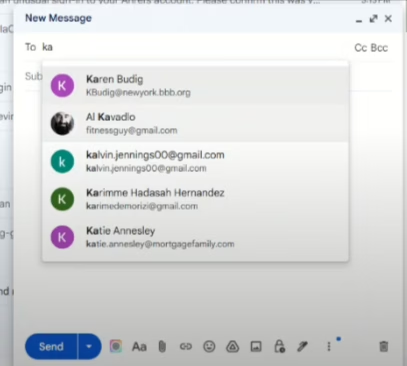
The fastest check takes seconds. Start composing a new email in Gmail and type the address into the “To” box. If the account has a display name and Google can match it, the name may appear next to the address. Hovering over the address once it is entered can show more detail.
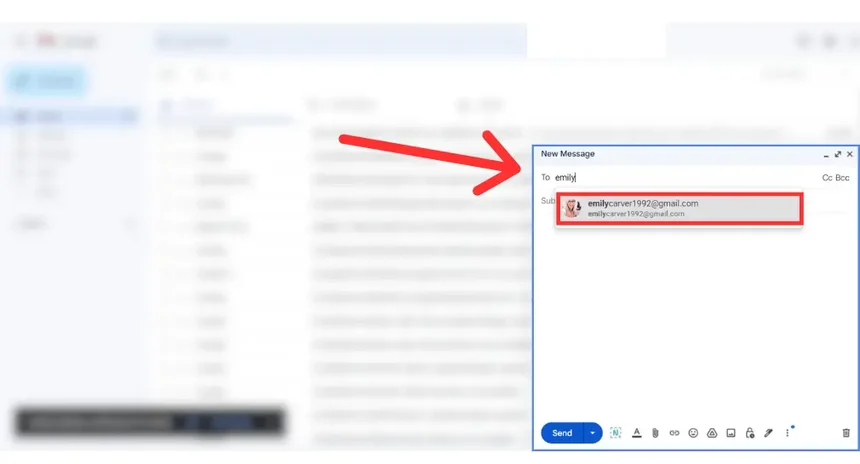
This works best when the address is already in your contacts or the owner has a public display name. If nothing appears, the person may have left their name blank or hidden it, so move on to the next method.
2. Check the Email Header
If the person emailed you, the message itself may carry their name. To check the full header in Gmail:
- Open the email.
- Click the three dots in the top-right corner and select “Show original.”
- Look at the “From” field, which can reveal the sender’s name if they did not anonymize it.
The header shows how the sender’s account is configured. Many people never change the default, so their real name is often sitting right there.
3. Search the Address on Google
Search the email address on Google, Bing, and other engines. Put the address in quotation marks, like “[email protected]”, which tells the engine to find that exact string and filters out unrelated results.
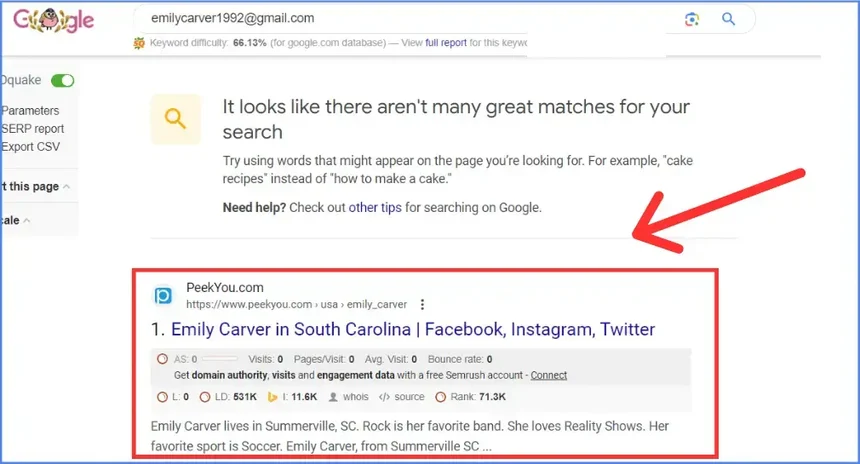
Email addresses often appear in comments, forum posts, resumes, and public records like professional licenses or announcements. If the person used this address anywhere public, a quoted search is the easiest free way to surface it.
4. Search the Address on Social Media
Many people register social accounts with the same email they use everywhere else. Enter the address into the search bar on Facebook, X, LinkedIn, and Instagram to see if anything connects.
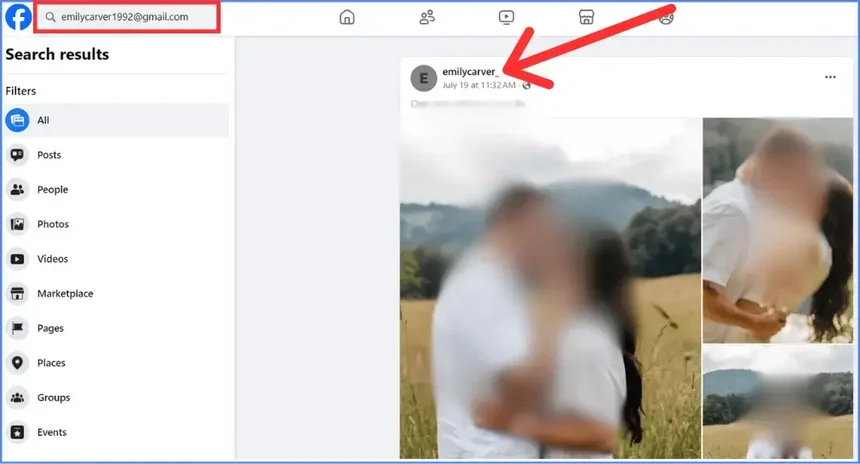
You can also use a “site:” search on Google to scan a specific platform. For example, searching “[email protected]” site:linkedin.com looks for that address only on LinkedIn. It is a quick way to check several platforms without logging into each one.
5. Use a Reverse Email Lookup Service
Reverse email lookup tools are built for exactly this. You enter an email address and the service returns whatever it can connect to it, which may include a name, social profiles, and an employer.
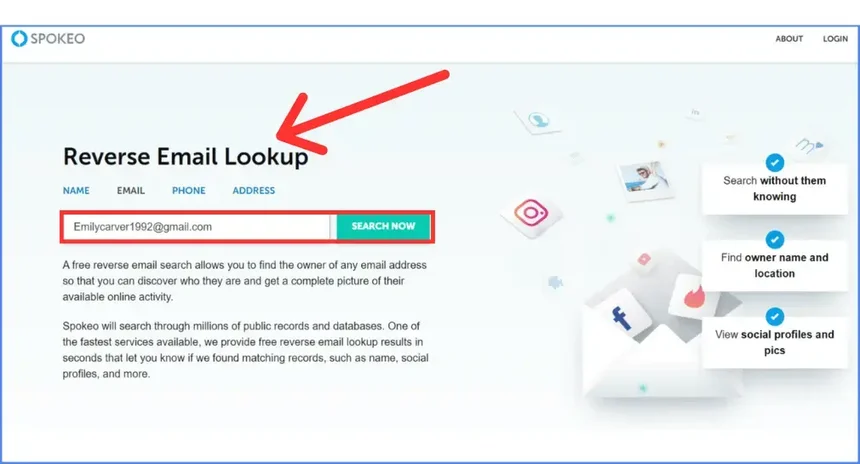
A quick note, because the tool landscape has shifted: some services that older guides recommend, like Pipl, are now enterprise-only with no consumer option, and Clearbit’s free lookup tools were discontinued. Tools that still work for individuals include Spokeo, EmailSherlock, and Epieos, several of which have free tiers. Results vary a lot by service and by how public the person’s footprint is, so it is worth trying more than one. Keep in mind these tools work best on addresses tied to a real-world identity, and a brand-new throwaway account may return nothing.
6. Try the Google Calendar Trick
Because Gmail connects to other Google services, you can sometimes surface a name through them. If you start to share a Google Calendar or a Google Drive file with the address and pause before actually sharing, Google may show the display name attached to that account.
To try it in Google Calendar:
- Open Google Calendar settings and find the option to share a calendar.
- Enter the email address in the person field.
- Watch whether a name appears next to the address before you add or save.
- Stop there. You do not need to actually share anything.
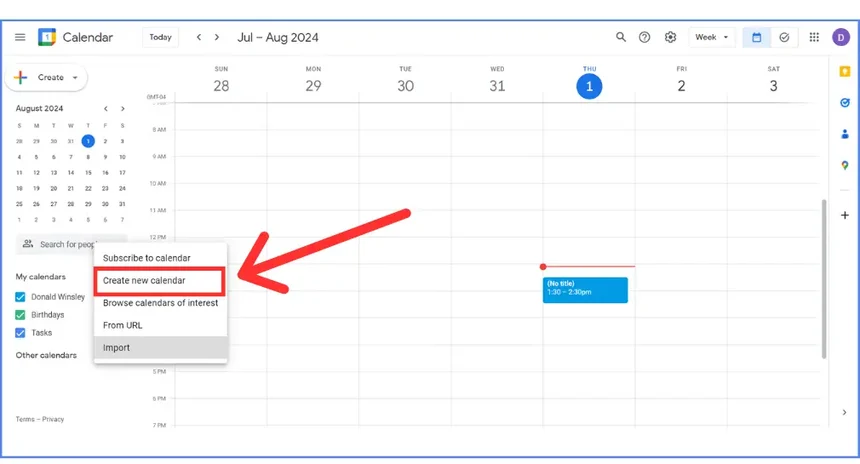
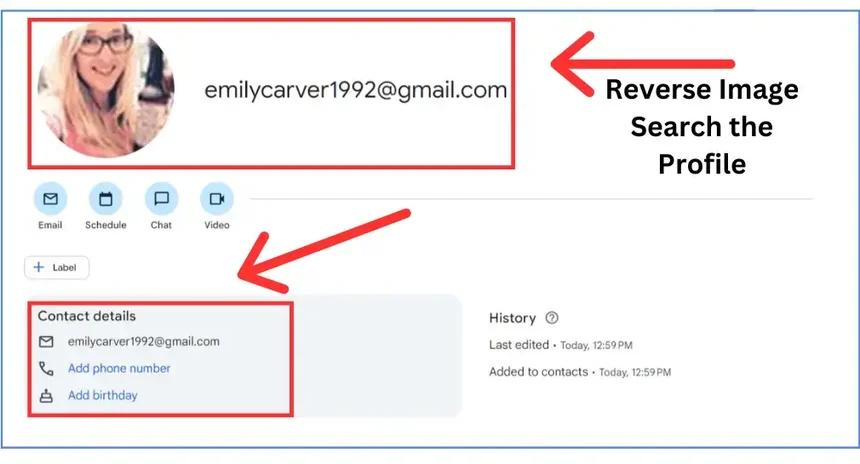
This one is hit or miss. Google has tightened how much it reveals, so it works mainly when the account has a public display name. If nothing shows, it does not mean you did anything wrong, just that the account did not surface a name this way.
Dealing With Fake Reviews or Anonymous Attacks?
NewReputation’s free scan shows what is being said about you or your business online, including fake reviews and anonymous content hurting your reputation.
- See the reviews and content affecting your reputation
- Find out what shows up when people search your name
- Free scan, no obligation
7. Use CRM or Sales Tools
CRM and sales-intelligence tools like Zoho, Salesforce, and HubSpot can sometimes identify an email owner. They are built to manage customer relationships, but many enrich a contact record with details pulled from public sources when you add an address.
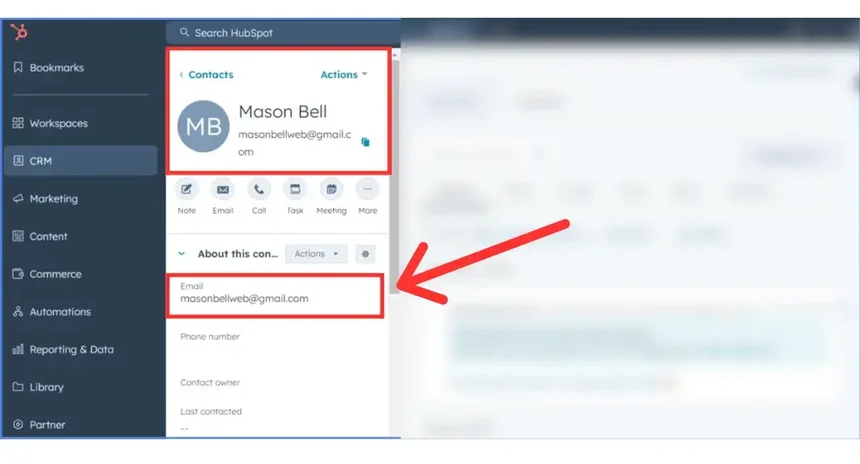
This approach makes the most sense if you already use one of these platforms, since they are built for business contacts rather than one-off personal lookups. For a single search, the free methods above are usually faster.
8. Use Email Verification Tools
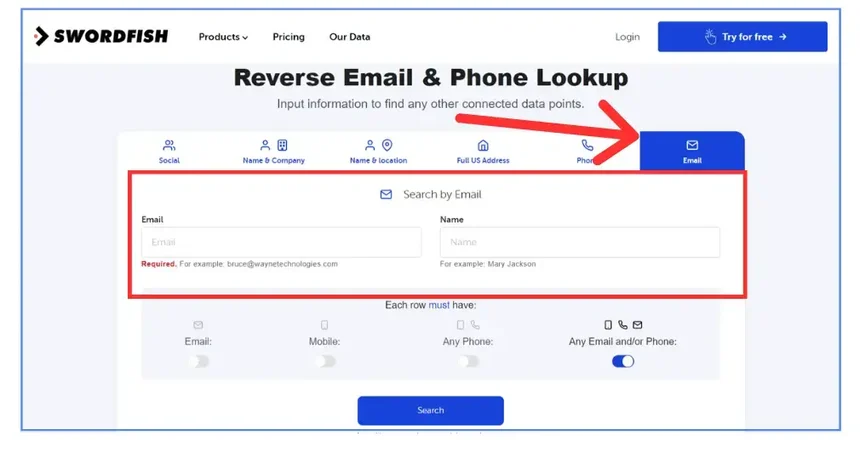
Email verification tools like Hunter.io and similar services can help confirm whether an address is real and, for business emails, connect it to a company and a name. AI-assisted tools like Swordfish AI cross-reference multiple data sources to return additional details linked to an address.
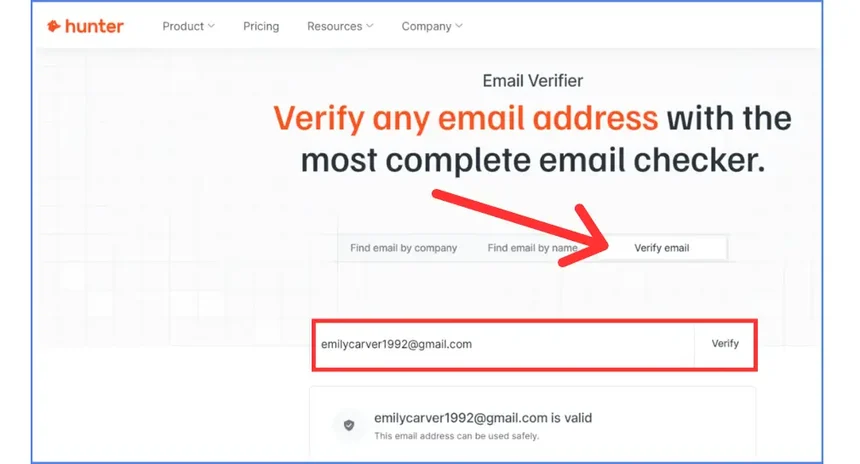
These tools are strongest on work emails tied to a company domain. For a personal Gmail address used anonymously, they may return less, but they are worth a try when the free methods come up short.
9. Just Ask
Sometimes the simplest method works. You can email the person and politely ask who they are. Be direct and courteous. People acting in good faith will often respond, while those with bad intentions usually will not, which itself tells you something. If you want to protect your own identity while reaching out, you can create a separate address with a privacy-focused provider like Proton Mail.
Tracing a Fake Google Review
A common reason people want to identify a Gmail account is a fake one-star review. Tracing the owner is genuinely hard here. Google does not let you look up a reviewer’s real name, and the person may use a fake name or be someone you do not recognize: a competitor, an unhappy customer, or a former employee or vendor trying to damage your reputation.
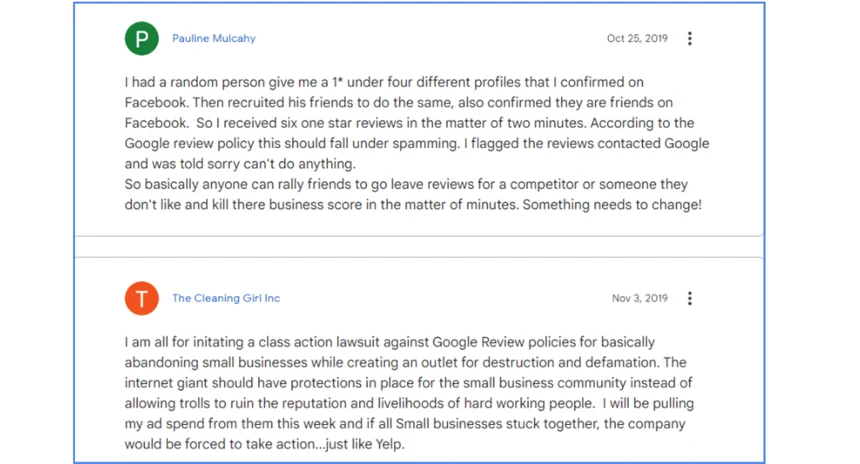
If you reply publicly and ask the reviewer to contact you, only a good-faith reviewer is likely to respond. That is a known weakness of unverified reviews: the reviewer does not have to prove they ever did business with you.
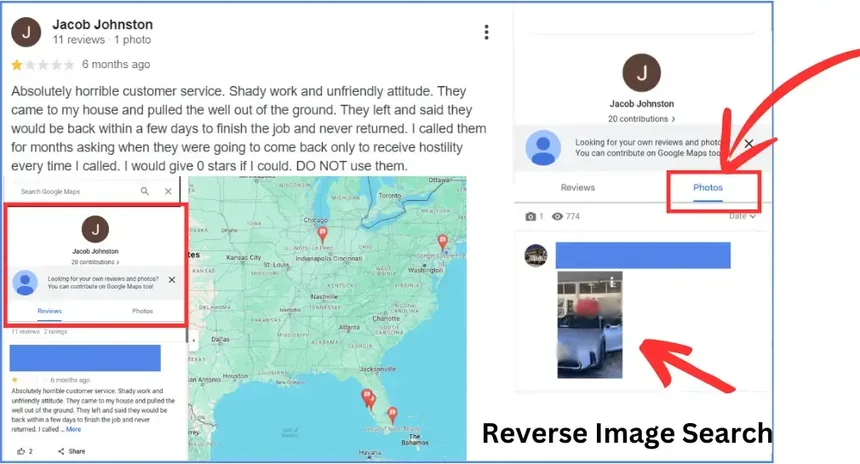
Google says its machine-learning systems scan millions of contributions a day to detect and remove fake reviews, looking for unusual patterns. For example, a brand-new account leaving negative reviews for unrelated businesses in far-apart cities can get flagged and removed. You can help by investigating the reviewer’s profile: check their other reviews and any photos they posted, and run a reverse image search on any images to learn more about the account. If the review violates Google’s policies, flag it for removal rather than trying to unmask the person yourself.
Frequently Asked Questions
Can you find out who owns a Gmail account?
Often, yes, though not always. Start with free methods: check whether a name autofills when you compose an email to the address, search the address in quotes on Google, and look it up on social media. If those fail, a reverse email lookup tool may connect it to a name or profiles. Success depends on how public the person’s footprint is. A brand-new, anonymous account may reveal nothing.
Can Google tell me who owns an email address?
Not directly. Google does not provide a tool to look up the real identity behind a Gmail address, and it does not reveal reviewer identities. You can sometimes surface a display name through Google services, such as when sharing a calendar or document, but Google has tightened this and it only works when the account has a public name. For anything beyond that, you rely on public searches and third-party tools.
How do I find out who left a fake Google review?
It is difficult, because Google does not reveal reviewer identities and reviewers can use fake names. Investigate the reviewer’s profile for other reviews and photos, and run a reverse image search on any images. Rather than trying to unmask the person, the more productive step is to flag the review for removal if it violates Google’s policies, since Google’s systems actively detect and remove fake reviews. A reputation service can help you handle persistent fake reviews.
Are reverse email lookup tools accurate?
Results vary widely. These tools are most accurate for business emails tied to a company domain and for people with a large public footprint. For an anonymous personal Gmail address, they often return little or nothing. The landscape also changes: some once-popular tools like Pipl are now enterprise-only, and Clearbit’s free lookups were discontinued. It is best to try more than one tool and treat the results as leads rather than confirmed facts.
Is it legal to look up who owns an email address?
Using public information and legitimate tools to identify an email owner is generally legal, especially for protecting yourself from fraud, fake reviews, or harassment. What matters is how you use the information. Using it to stalk, harass, threaten, or intimidate someone is illegal and harmful. If you are dealing with threats or blackmail, do not investigate on your own. Contact law enforcement, who have proper legal channels.
Anonymous Account Hurting Your Reputation?
NewReputation helps businesses and individuals deal with fake reviews, anonymous attacks, and harmful content, from flagging and removal to building a stronger online presence.
- Fake review identification, flagging, and removal support
- Help responding to anonymous attacks the right way
- Monitoring and content building to protect your reputation