Last Updated on 2 months ago by Admin
MyLife.com gives you a “reputation score” from 1 to 5, built from public records and data you never handed over. The catch is that you have no say in it, no real way to dispute it, and anyone who searches your name can see it. If a low or unwanted MyLife profile is showing up for your name, the good news is that you can remove it for free. This guide explains what the score actually is, the FTC action tied to it, and how to get your MyLife profile taken down step by step.
MyLife is a data aggregator. It pulls personal information from public records and other sources to automatically build a MyLife page about you, then makes that page easy to find across the web. A public page can show a wide range of personal details, including:
- Past and current addresses
- Your age
- Phone number
- Education
- Photographs
- A bio
- Email addresses
- Relatives
- And more
It also adds a review section that invites others to rate you, and it rolls everything together into a single reputation score. MyLife tends to pull in more of your data than many other people-search sites, which is part of why it shows up so prominently when someone looks you up.
Table of Contents
What Is the MyLife Reputation Score?
MyLife presents the reputation score as a quick numerical read on a person’s online image, the kind of thing a customer, employer, or competitor might glance at. It runs on a scale from 1 to 5, where 5 sits at the high end. MyLife suggests that a low score can hurt you personally and professionally.
Here is what matters, though. The score is not a credit, criminal, or official background metric. It is an algorithm running on the same public-records data your profile already displays. You have no input into it, no meaningful way to dispute it, and no control over what feeds into it. The number simply appears next to your name for anyone to see.

To see exactly what is supposedly dragging your score down, MyLife typically pushes you toward a paid report. That pattern, a worrying score paired with a prompt to pay, is exactly what got the company into trouble.
The FTC Action You Should Know About
This is the part most articles leave out. In 2020, the Federal Trade Commission charged MyLife and its CEO with deceptive practices, and the case was settled. Regulators alleged that MyLife used misleading “teaser” reports, often tied to those reputation scores, to scare people into buying subscriptions, and then made those subscriptions hard to cancel. The settlement included a stipulated judgment of roughly 34 million dollars.
The takeaway for you is simple: treat the MyLife reputation score with healthy skepticism. It is a marketing-driven number from a company with a documented history of regulatory trouble, not an objective measure of your character. You are not obligated to pay MyLife anything, and removal of your profile is always free.
If MyLife prompts you to buy a membership to improve or control your reputation score, you do not need it. Opting out of a data broker is your right, and it costs nothing. Keep profile removal separate from any paid product they try to sell you.
How MyLife Got Your Information
MyLife crawls public records and social media across the web, collecting the pieces of information that make up your online footprint, then assembles them into a background report. The main sources include court filings, property records, voter rolls, and similar government databases, plus public social media profiles and other data brokers.
None of this requires your permission, and you never get a notice that a profile has been built. Your customized report typically sits beside the reputation score and summarizes your addresses, property, current and previous jobs, phone numbers, education, age, bio, and social media profiles.

How Social Media Affects Your MyLife Score
Your social media presence feeds into the data MyLife uses, so it influences how your profile and score come together. Since the score is built from the data that makes up your online reputation, public social activity becomes part of the raw material. That is one reason tightening your social media privacy settings is a sensible companion step to opting out.
Keep in mind that MyLife compiles a lot of personal life detail from public records, including phone numbers, social media, age, bio, property, and current addresses. In a digital age, that kind of aggregated profile makes your online privacy more exposed than most people expect, which is why removing it is worth the effort.
How to Remove Your Info From MyLife
MyLife does not offer a simple one-click removal, but the opt-out process is documented and free. Here is how to do it in 2026.
First, find your profile URL. Go to mylife.com and search your name. When you see your listing in the results, right-click it and copy the link address rather than opening the profile. You will need this URL for your request.
Then use any of these three methods:
- Online form (recommended). Go to mylife.com/privacyrequest, also reachable through the “Do Not Sell My Personal Information” link at the bottom of the homepage. Enter your email, confirm the verification code MyLife sends you, paste your profile URL, complete the CAPTCHA, and submit. This works for residents of any state, not just California.
- Email. Send a removal request to [email protected]. State clearly that you want permanent deletion of your personal information and reputation profile under applicable privacy laws, including the CCPA, and ask for email confirmation once it is done.
- Phone. Call (888) 704-1900, Monday through Friday, 6 a.m. to 5 p.m. Pacific, and request removal. Be ready to verify your name, address, and date of birth so they remove the right profile.
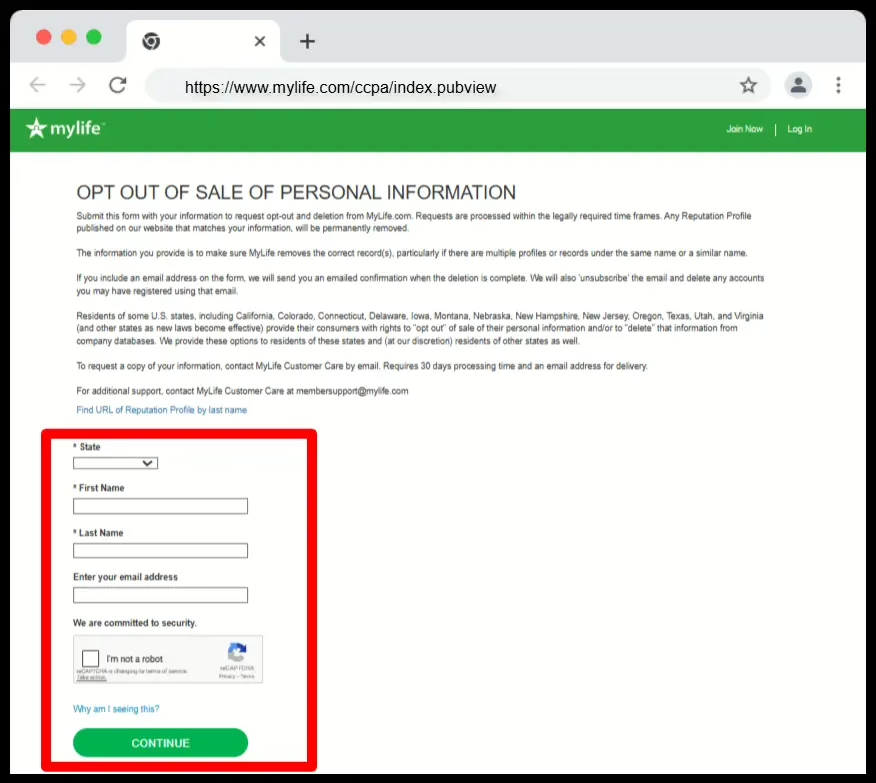
Include only what is needed to match your profile: your name, the profile URL, and the address details the form asks for. Never send your Social Security number, driver’s license, or financial details. MyLife does not need them, and including them creates a new privacy risk. If a representative tries to upsell a paid membership, decline. Removal is free.
One last thing: ask MyLife to remove your information from all sites it owns, not just the one listing you found, since the same data can appear under more than one profile.
What to Do After You Opt Out
MyLife’s stated timeline is roughly 10 to 15 business days, though it can run longer. Save your profile URL and check back after the window. If the page returns a “not found” error or a generic search page, you are off. If it still loads, follow up by email or phone with your original request and the date you submitted it.
Two realities are worth planning for. First, even after MyLife removes the page, it can linger in Google search results for a while until Google recrawls it. You can speed that up with Google’s Remove Outdated Content tool once the page actually returns an error. Our guide on the Remove Outdated Content tool walks through it. Second, MyLife continually re-scrapes public records, so a new profile can reappear weeks or months later. Recheck every few months and resubmit if needed.
The same name, address, and phone records that built your MyLife profile usually sit on other people-search sites too. Removing MyLife is a strong first step, but a full cleanup means opting out across many brokers and monitoring for reappearance.
Dealing With a Bad MyLife Score
Removing your profile is the most direct fix, since the score disappears with the profile. But if your wider search results are the real concern, a focused online reputation management effort helps by:
- Reducing the impact of negative reviews, articles, and public data that affect how you are seen.
- Creating and promoting positive, accurate content that strengthens your search presence.
- Building a more resilient online presence that holds up over time.
A clear reputation strategy puts you back in control of what people find when they search your name, rather than leaving that impression to a data broker’s algorithm. It will not literally erase your entire online identity, and you should be cautious of anyone who promises that, but it can meaningfully shift what ranks and what people see first.
See What Shows Up When People Search Your Name
MyLife is often just one of many sites exposing your information. NewReputation’s free scan shows where your personal data and reputation appear across the web.
- Find where your personal information is exposed online
- See what appears when employers or clients search you
- Free scan, no obligation
Frequently Asked Questions
What is the MyLife reputation score?
It is a number from 1 to 5 that MyLife generates with an algorithm using public records and other aggregated data, meant to suggest a person’s online image. It is not a credit, criminal, or official background metric, and you have no input into it or real way to dispute it. The score appears publicly next to your name. MyLife often uses it to prompt people to buy a paid report.
Is the MyLife reputation score accurate or legitimate?
Treat it with skepticism. The score is a marketing-driven number, not an objective measure of character, and it runs on the same public data your profile already shows. In 2020, the FTC charged MyLife and its CEO with deceptive practices tied to teaser reports and hard-to-cancel subscriptions, and the case settled for a stipulated judgment of about 34 million dollars. Given that history, the score should not be taken at face value.
How do I remove my information from MyLife?
First find your profile by searching your name on mylife.com and copying the listing URL. Then opt out using one of three free methods: the online form at mylife.com/privacyrequest, an email to [email protected], or a phone call to (888) 704-1900. State that you want permanent deletion under privacy laws like the CCPA, include only the details needed to match your profile, and ask for written confirmation. Removal is always free.
Does it cost money to remove yourself from MyLife?
No. Opting out of a data broker is your right and costs nothing. MyLife may prompt you to buy a membership to “control” or improve your reputation score, but you do not need to pay anything to have your profile removed. Keep profile removal completely separate from any paid product, and decline upsells if a representative offers one during a phone request.
Will my MyLife profile come back after I remove it?
It can. MyLife continually re-scrapes public records, so a new profile may appear weeks or months after removal. Save your profile URL, check back periodically, and resubmit your opt-out if the listing returns. Because the same data sits on many other people-search sites, lasting privacy usually means opting out across multiple brokers and monitoring regularly, not just removing MyLife once.
Want Your Personal Information Removed for Good?
NewReputation removes your data from MyLife and hundreds of other people-search sites, clears it from Google, and keeps monitoring so it stays gone.
- Removal handled across MyLife and hundreds of data brokers
- Search result cleanup and reputation building
- Ongoing monitoring so your information does not resurface