

Last Updated on 5 months ago by Admin
It’s easy to find information about anyone on WhitePages. The website has over 180 million public records. If you have ever searched your name online and found your address, phone number, or relatives listed on Whitepages, your next question is usually simple: how do I remove this?
That is where the whitepages opt out process comes in.
Whitepages collects and displays personal information pulled from public records and data aggregators. While the site is legal, many people are uncomfortable with how much personal detail appears in one place. The good news is that Whitepages does allow you to opt out. The process just is not always obvious.
This guide explains exactly how the Whitepages opt out process works in 2026, what to expect after submitting a request, and how to reduce the chances of your information reappearing.
Key Takeaways
- Whitepages allows individuals to remove their listings through a formal opt out process
- You must locate your exact profile and submit its unique URL for removal
- Phone verification is required to complete the request
- Removal can take anywhere from minutes to a full day or longer
- Your information may reappear over time, so periodic checks are important
What Is Whitepages and Why Do They Have Your Info
Whitepages is a people search website that aggregates data from public records, phone directories, and other sources. This can include:
• Full name
• Current and past addresses
• Phone numbers
• Relatives and associates
• Age range
Because the information is pulled from public and semi public records, it often appears without your consent. For many people, this creates privacy concerns, especially when home addresses and family connections are easy to find.
Opting out does not remove your data from public records themselves, but it does stop Whitepages from displaying it publicly.
How the Whitepages Opt Out Process Works
Whitepages requires a few specific steps to ensure the correct listing is removed and to prevent abuse of the system. Skipping or rushing any step can delay removal.
Below is a clear walkthrough of the process.
How to Opt-Out of Whitepages
If your personal information is on Whitepages, you can remove it by following a few simple steps. This process helps protect your privacy and reduces unwanted calls and mail.
Step by Step Guide to Whitepages Opt Out
Step 1: Find Your Listing on Whitepages
Start by visiting Whitepages.com and searching for your name. Including your city or state helps narrow results, especially if your name is common.
Scroll carefully through the results until you find the listing that matches your information. It is important to confirm details such as age range, addresses, or known relatives so you remove the correct profile.
Step 2: Copy Your Profile URL
Once you find your listing, click on it.
Then select the option to view details. This opens the full profile page that Whitepages has associated with your name.
Copy the full web address from your browser’s address bar. This URL is required for the opt out request. Without it, Whitepages cannot process your removal.
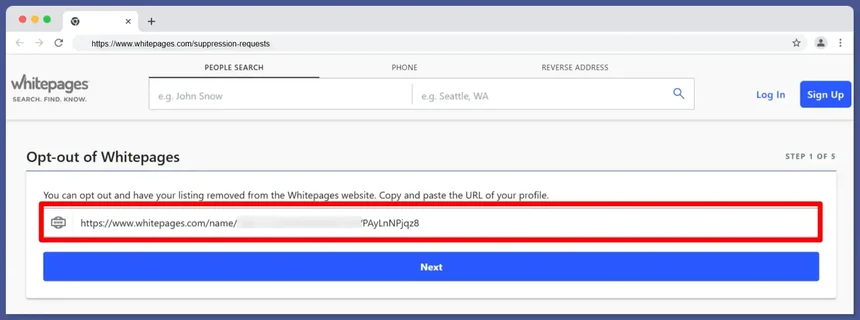
Step 3: Go to the Whitepages Opt Out Page
Next, navigate to the official suppression request page at:
www.whitepages.com/suppression-requests
This is the only place where Whitepages accepts opt out requests.
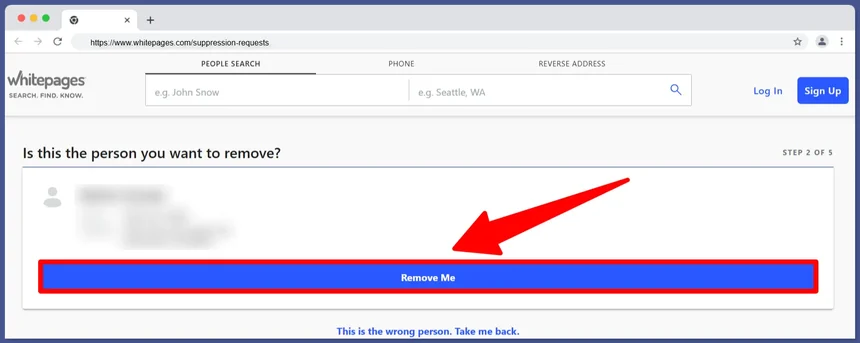
Step 4: Submit Your Profile URL
Paste the copied URL into the submission field on the opt out page.
After submitting the URL, Whitepages will show you a preview of the listing you are requesting to remove. Take a moment to confirm that it is the correct profile.
Step 5: Confirm and Request Removal
Once you confirm the listing, click the option to remove your information.
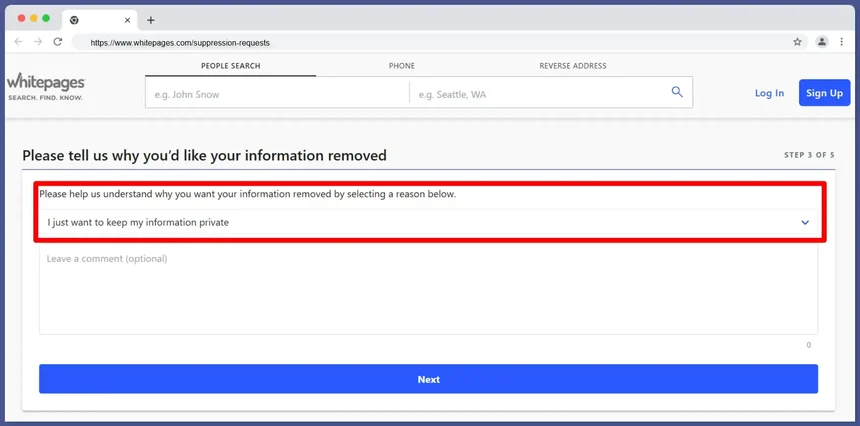
You may be asked to select a reason for removal. Privacy concerns are a valid and commonly used reason.
Step 6. Provide a Reason for Removal
Whitepages will ask why you want your data removed. You can choose from:
- Incorrect information
- Too much junk mail
- Unwanted telemarketing calls
- Cyberstalking or harassment
Select the option that best fits your situation and submit your request.
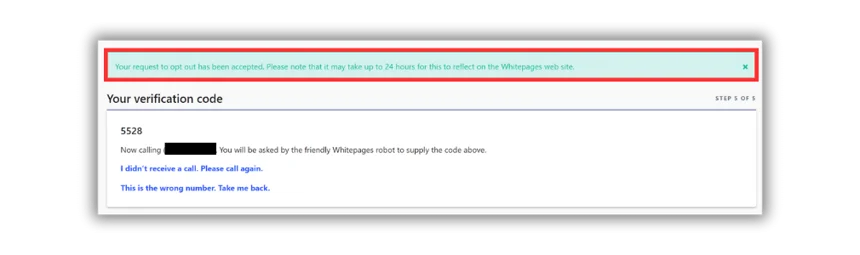
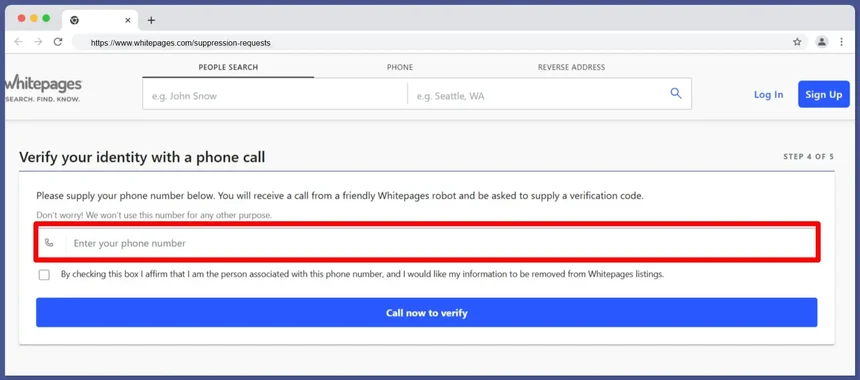
Step 7: Verify Your Identity by Phone
Whitepages requires phone verification to finalize the opt out.
You will need to enter a phone number where you can receive an automated call immediately. During the call, you will be given a verification code. Enter that code on the website to complete your request.
This step is mandatory. Without verification, the opt out will not be processed.
Once verified, your profile should be removed within a few days. If your information reappears later, repeat the process or consider using a data removal service for ongoing privacy protection.
How do I opt out of Whitepages Premium?
If you want to opt out of Whitepages Premium, the process is simple but slightly different from the standard Whitepages removal. Instead of searching on the free version, you’ll need to look up your name on Whitepages Premium.
Once you find your listing, visit the Whitepages Premium opt-out page and submit a removal request.
It typically takes up to three days for your information to be removed. If your listing still appears after that, you may need to contact Whitepages support for further assistance.
What Happens After You Submit a Whitepages Opt Out Request
Once your request is verified, Whitepages begins suppressing the listing.
In many cases, removal happens within an hour. In other cases, it can take a full day or longer for the listing to disappear completely from public view.
During this time, searching your name may still show the profile until the system finishes updating.
Important Things to Know Before Opting Out
Phone Verification Is Required
You must provide a working phone number that you can answer immediately. The verification call is automated and only lasts a few seconds, but skipping it will stop the process.
Removal Is Not Always Permanent
Whitepages regularly refreshes its data from public records and third party sources. This means your information can reappear over time, even after a successful opt out.
Periodic checks are important, especially after moving, changing phone numbers, or experiencing life events that update public records.
One Listing at a Time
If Whitepages shows multiple listings for you, such as old addresses or alternate name spellings, each profile must be removed individually. Each one requires its own URL and verification step.
How to Reduce the Chances of Reappearing Listings
While no opt out is guaranteed forever, there are ways to reduce recurrence.
Regularly check Whitepages for new listings under your name
Monitor changes to your public records
Repeat the opt out process if your data reappears
Address related listings tied to previous addresses or name variations
Consistency matters more than one time removal.
- See our related guide on how to opt out of LexisNexis
- See our related guide on how to opt out of 411.com
- See our related guide on how to opt out of AnyWho.com
- See our related guide on how to opt out of CheckPeople
- See our related guide on how to opt out of FreePeopleSearch
- See our related guide on how to opt out of Instant Checkmate
Common Mistakes People Make During Whitepages Opt Out
- Submitting the wrong profile URL
- Skipping the phone verification step
- Assuming removal is permanent
- Only removing one of several listings
Avoiding these mistakes saves time and frustration.
Frequently Asked Questions
Is the Whitepages opt out free?
Yes. Whitepages allows individuals to remove their information at no cost through the suppression request page.
How long does Whitepages opt out take?
Removal can happen in under an hour, but in some cases it may take a day or more to fully process.
Can my information come back after opting out?
Yes. Whitepages updates its database regularly, and new public records can cause listings to reappear.
Do I need to create an account to opt out?
No. You do not need a Whitepages account to submit an opt out request.
Why does Whitepages require phone verification?
Phone verification helps prevent unauthorized removal requests and ensures the person requesting removal has access to the listing’s associated contact information.
Final Thoughts
The whitepages opt out process works, but it requires attention to detail and occasional follow up.
Removing your information from Whitepages is an important step toward protecting your privacy and reducing unwanted exposure. While it does not erase public records, it does limit how easily your personal details can be found in a single search.
The most effective approach is not just opting out once, but staying aware of how your information appears online over time.
Privacy protection is not a one time action. It is an ongoing practice.

The NewReputation Help Center discusses brand reputation, online PR, search engine marketing, content marketing, and much more.