

Late one evening, you type your own name into Google. You are not trying to impress anyone. You just want to see what comes up. At first, everything looks familiar. You see a LinkedIn profile, maybe an old address listing, and a few harmless mentions.
Then one result catches your attention. It leads to UniCourt.
You click the link and recognize the case immediately. It might be something that was dismissed years ago, a situation that never went anywhere, or even a filing tied to someone with a similar name. Whatever the reason, you assumed it was behind you.
Seeing it online changes that assumption.
The details feel exposed and out of context, and you start to wonder who else might find this page. A potential employer could see it. A client might come across it. Even someone casually searching your name could misinterpret what they find.
At that point, most people start asking the same practical question.
How do you remove a court record from UniCourt?
This guide is written for that moment. It explains what UniCourt is, why these records appear online, when removal is possible, and what steps actually help when you want a court record taken down or made less visible.
First, Understand What UniCourt Is and What It Is Not
Before you try to remove anything, it helps to understand how UniCourt actually works.
UniCourt is not a government court and it does not decide what becomes public. Instead, it collects court records from official court systems and republishes that information in a searchable online database.
Because UniCourt pulls its data from public court sources, it usually argues that it has the right to display a case as long as the original court still allows public access. In other words, UniCourt sees itself as a mirror, not the source.
That distinction matters. It means UniCourt will not remove a record simply because it is embarrassing, old, or inconvenient. However, it does not mean removal is off the table.
When you can show that a record should no longer be public, or that its display causes legitimate harm, UniCourt may agree to redact or remove it. The key is giving them a clear, documented reason that goes beyond personal preference.
Understanding this upfront helps set realistic expectations and prevents wasted time during the removal process.
When UniCourt Will Consider Removing or Redacting a Record
UniCourt does remove or redact records in certain situations, but the reason always matters. They focus on whether the record should still be public or whether keeping it online causes a real issue.
For instance, UniCourt will often remove or redact a civil case if you were the plaintiff and can show that you chose to drop the case. They are also much more willing to act when a court has already sealed the record or granted an expungement.
Outside of those situations, UniCourt regularly reviews requests involving:
- Cases a court has sealed or expunged
- Records connected to identity theft or mistaken identity
- Cases that involve minors
- Records that expose highly sensitive personal information
- Situations where public access creates a clear and documented risk of harm
If your situation fits into one of these categories, you have a solid chance of getting some form of relief. If it does not, removal becomes harder, but it is not always off the table. In some cases, UniCourt will still act after a closer review, especially when you provide clear, well-organized documentation.
Step 1: Find the Exact Record on UniCourt
Before you submit anything, make sure you are looking at the right record.
Go to UniCourt and find the case that involves you. Open the case page and copy the full web address from your browser. This is the link UniCourt will review.
Double-check that it is actually your case. People with common names often run into trouble here. Submitting the wrong link slows everything down and can lead to an automatic denial.
Once you have the right page open, take a close look at what UniCourt is showing.
Is it the full case file with multiple documents?
Is it just a short summary?
Or is it a single docket entry pulled from a larger case?
Knowing this helps. UniCourt sometimes agrees to remove or redact parts of a record even when they will not take down the entire page. The clearer you are about what is visible, the better your request will be.
Step 2: Gather Your Documentation
This step matters more than any other.
UniCourt does not act on explanations alone. They want proof.
Depending on your situation, that proof might include:
- A court order showing the case was sealed or expunged
- Official dismissal paperwork
- Police reports or affidavits for identity theft
- Documentation showing the case involves a minor
- Evidence that sensitive information creates a real safety concern
If you do not have these documents yet, pause and get them first. Submitting a request without solid documentation often leads to denial.
And yes, this part can feel frustrating. But it also gives you leverage.
Step 3: Submit a Redaction Request to UniCourt
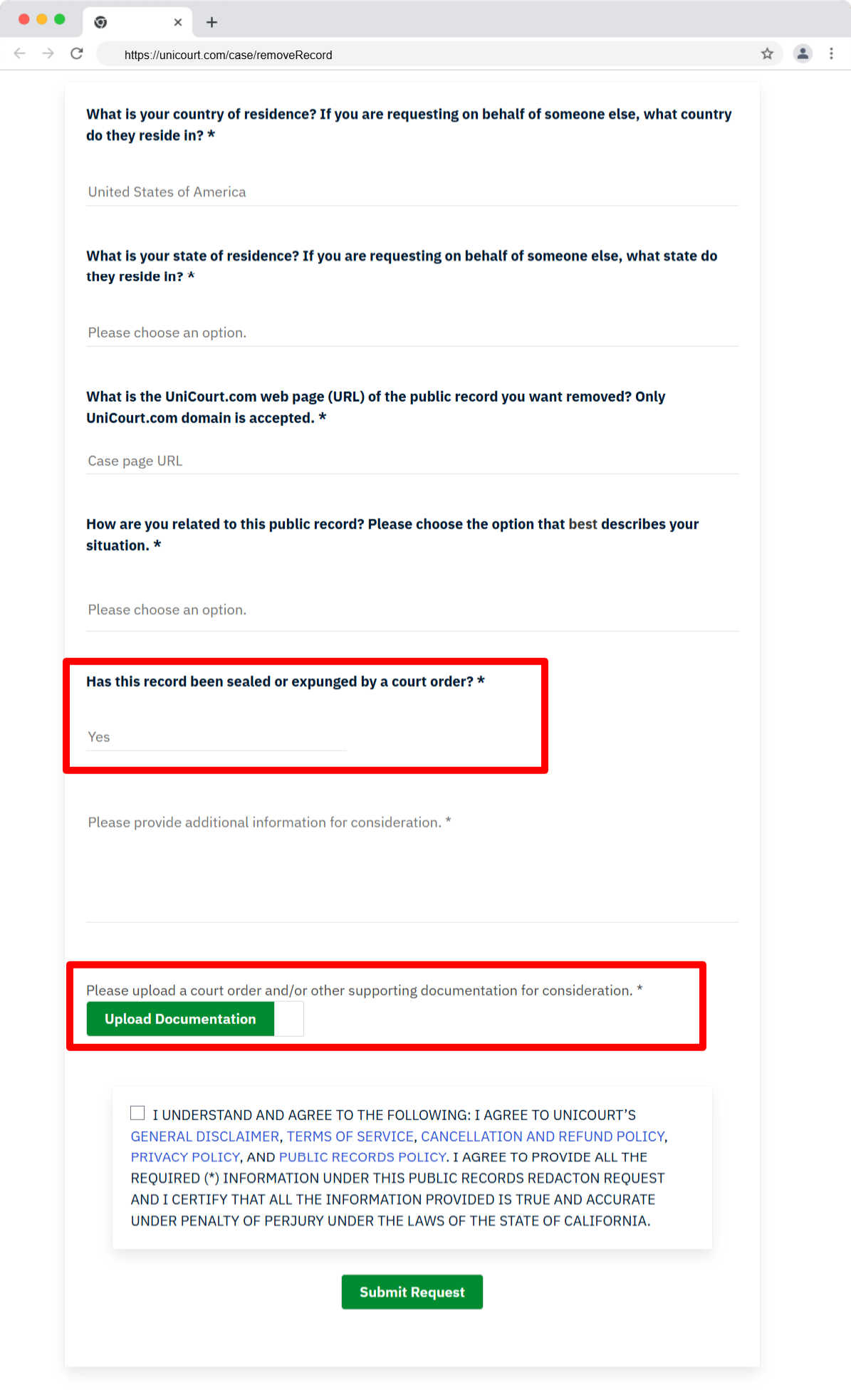
UniCourt has a redaction and removal request form on its website. This is the formal way to ask them to review a record.
When you fill out the form, keep your approach simple and factual. This is not the place to vent frustration or explain how unfair the situation feels. UniCourt responds best to clear reasons backed by documents.
The form will ask you to:
- Enter your contact information
- Paste the direct URL to the UniCourt record
- Explain why the record should be removed or redacted
- Upload any supporting documents
Be specific when you explain your reason. If the case was expunged, say when it happened and include the court order. If the record involves identity theft, explain that clearly and attach proof. The goal is to make it easy for the reviewer to understand the issue without guessing.
After you submit the request, UniCourt usually takes up to 30 days to respond. Sometimes they reply sooner. Other times they ask for additional information before making a decision.
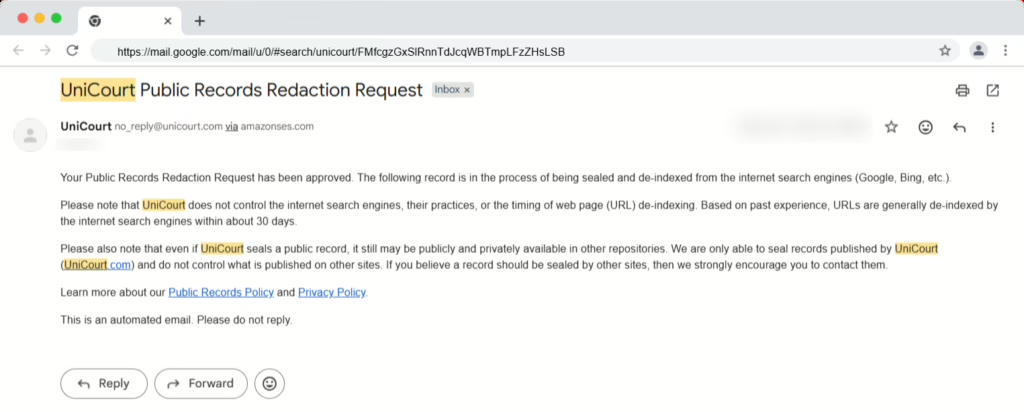
And sometimes they deny the request.
A denial does not always mean the process is over, but it does mean you will need to decide what to do next.
If UniCourt Denies Your Request
A denial from UniCourt can feel discouraging, but it does not automatically mean the process is over.
In many cases, UniCourt denies requests because the documentation was insufficient or because the case does not clearly meet their removal criteria. That response is common, especially on first attempts.
Start by reading their reply carefully. UniCourt will often explain why they denied the request or what information they still need. If they ask for additional proof, take the time to gather it and submit the request again. Many people get approval on a second attempt once they provide clearer or more complete documentation.
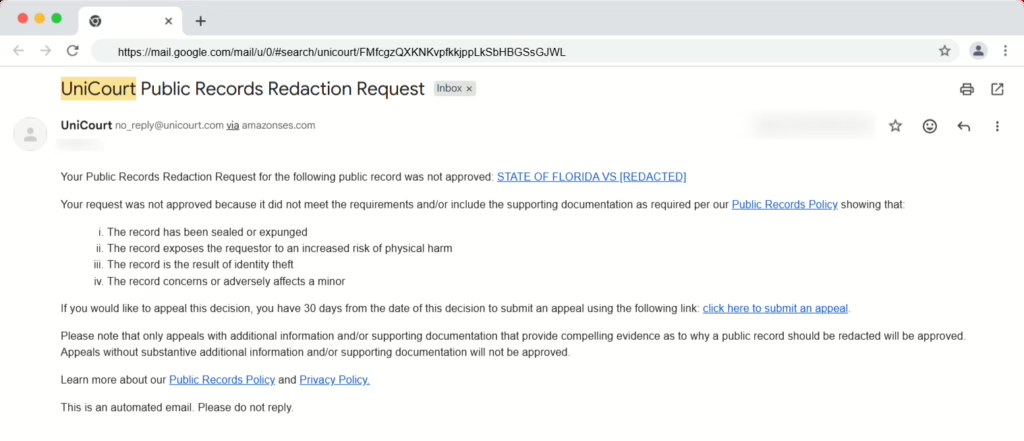
Sometimes the issue is not the paperwork at all. Instead, UniCourt may deny the request because the case is still considered public at the court level. When that happens, the problem sits with the original court record, not UniCourt itself.
When a Court Order Makes the Difference
If the case has not been sealed or expunged, UniCourt has very little reason to remove it. From their perspective, they are simply showing what the court still allows the public to see.
In that situation, the most effective next step is often legal. An attorney can help file a motion with the original court to seal or expunge the record. Once the court approves that request, your position with UniCourt changes significantly.
This step does take time, and it may involve legal fees. Still, for many people, this is the moment when things finally move forward.
What to Do After UniCourt Removes the Record
If UniCourt approves your request and removes or redacts the record, do not stop there.
Even after UniCourt updates its site, search engines may still show older versions of the page for a while. That happens because Google stores cached copies of content.
To speed things up, submit a request through Google’s Outdated Content Removal Tool. This tells Google that the page has changed and should be rechecked.
Using that tool often shortens the time it takes for the record to disappear from search results. It does not guarantee instant removal, but it helps clean things up faster and prevents outdated information from lingering longer than necessary.
When Removal Is Not Possible
Unicourt will deny a removal if it doesn’t meet its criteria. They can issue a ‘redaction’ which will block your name from public view, but search engines still pick up the metadata and will often display it in your search results.
When removal is not possible, your focus needs to shift to suppression. (Push down in search results)
This is where reputation management strategies are so effective. If done properly, you can reduce visibility to less than 1% of searches.
That often includes:
- Publishing well written, positive content that ranks higher in search results
- Suppressing outdated or irrelevant results that are not helpful
- Opting out of data brokers that copy court records
- Monitoring search results over time
This approach does not happen overnight. But it works, especially for older or low-interest cases.
Why UniCourt Records Feel So Damaging
Unicourt records rank well on Google because they focus solely on your name. And, for most people, this is the best option for search engines to show.
Most people who see these records don’t know the full story. For instance, they may not be aware that there was a misunderstanding. They also do not know the outcome. And most times, they don’t care… they only see a headline and a docket that makes an impression on your character.
This is why it is important to address court records, even if you have personal closure.
A Reality Check
Removing a court record from UniCourt is possible in most cases. Criminal court cases will often be rejected.
What is always possible is managing how your name appears when someone looks you up online. That first impression matters more than one link.
And yes, this process takes patience and consistency. Nothing built quickly will create long term results. That is the truth about your reputation… it takes time and effort to build.
But there is a path forward.
Related:
- See our related guide on how to remove your information from Docketbird
- See our related guide on how to remove your information from CourtCaseFinder.com
- See our related guide on how to remove your information from Casetext
- See our related guide: is it illegal to post criminal record on Facebook
- See our related guide on how to remove your information from Trellis.law
When to Get Professional Help
If you have contacted Unicourt and been rejected, or would rather get help removing a court record, you have options.
NewReputation can help you permanently remove Unicourt from your search results. There is no cost to learn more about our process. Contact us today to start managing your search results effectively.

Kevin Curran is the founder and CEO of NewReputation, a renowned online reputation management firm. He is also the co-founder of ReputationPrivacy, a platform designed to help individuals manage their digital footprint effectively. Kevin has worked with diverse clients, including Fortune 500 companies, high-profile executives, and small business owners, to establish an authentic online presence that accurately represents their brand.