How to Delete Your Plenty of Fish Account

How to Delete Your Plenty of Fish Account

Did you find the one and don’t want to converse with strangers anymore? Are just conversations not doing it for you anymore? Was your POF endeavor limited to lockdown boredom? Found a better dating site?

There are several reasons you might want to delete your Plenty of Fish account. Personal data stored on dating sites can pose risks like identity theft or unwanted exposure. If your profile data is mined, it could be used for doxxing or unauthorized access to other accounts. Personal information left on dating sites can also hurt your efforts to maintain a clean digital footprint, which matters for college recruiters or first job opportunities. Managing your online presence protects your privacy and professional reputation.

You’re in safe hands with NewReputation.com. As a company specializing in reputation management, we help remove unflattering content from dating sites like Plenty of Fish. We erase traces others cannot reach, ensuring your online presence is clean and professional. This boosts your reputation and fosters trust and peace of mind. Experience the difference with a clear digital footprint.

This article will detail the steps you need to follow to delete POF and other options you might have.

Plenty of Fish

delete pof account on iphone

Plenty of Fish, or POF, is an affordable dating app for single people. It allows you to message other single people and engage in multiple conversations. It’s one of the few dating apps where matching or subscribing is not required to connect with others. Since 2003, Plenty of Fish has been a simple, easy-to-use, and budget-friendly dating site.

So, why did Google’s search query “how to delete pof account” start trending? In 2019, the dating app, with about 150 million users on its database, suffered a severe data breach. This breach posed a significant risk, as quick action was required to mitigate potential damage. Users were required to update their apps once the patch was issued. Despite this, nearly 70% of users failed to update within the first 48 hours, underscoring the scale of risk and urgency of the breach. Consequently, many users chose to delete their accounts to secure their data. We understand if you’re one of them feeling unsafe on a dating site.

Read: Dating sites Tinder and Match.com: Do They Sell Your Information?

Fortunately, like other dating sites, POF allows you to delete or deactivate your account permanently. While deleting your account is permanent, if you wish to hide from the dating scene for a bit, you can temporarily deactivate it. If you reactivate, you will only find yourself; however, your data will continue to be on the POF database.

How to Delete POF Account Once and For All?
pof delete account

If you decide to delete your POF account, you are prepared to let go of your profile. You will lose all previous connections, conversations, and photos. Let’s get straight to the point. Simply deleting the app from your phone will not remove your data from the POF server.

To permanently delete your account and your personal information from the POF account on a web browser, follow these simple steps:

  1. Go to pof.com
  2. Log into your account if you still need to log in.
  3. Go directly to the POF account deletion page at https://ca.pof.com/deleteaccount.
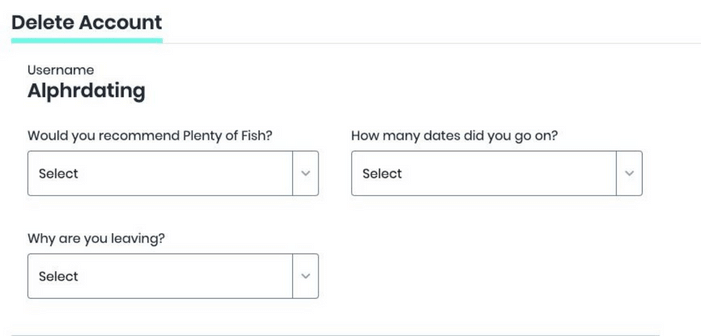
  4. Answer the questions required before clicking the ‘Delete Account’ option.
  5. Confirm that you wish to delete your account.
  6. That’s it! You’ve successfully deleted your plenty of fish account.

Once you delete your POF account, your information will be removed from their database. This includes your profile, account preferences, uploaded photos, connections, and conversations. Your subscription will also be canceled, and according to Plenty of Fish’s terms and conditions, refunds are not issued. Some general statistics, like age group or demographic details, might be retained by POF for analysis, but this data is anonymized. It cannot be traced back to you, ensuring your privacy.

Your general demographic or user behavior data might be retained, but it will be anonymized. The data will no longer be personally identifiable and will not be traced back to you. You can check out their Privacy Policy to learn more about what information POF collects and retains upon account deletion or how they protect the information.

How to Delete POF Account on iOS App?

If you use an iPhone and have the POF app, the above steps still apply for deleting your account. The app version does not have a delete account option. You need to delete it on your mobile device using a web browser like Chrome or Safari.

However, if you got a POF subscription through iTunes or AppStore, you must cancel it by following the steps below. Since POF does not handle third-party subscriptions, they cannot compensate you.

  1. Go to ‘Settings > iTunes & AppStore’ on your iPhone or iPad.
  2. Select Subscriptions.
  3. Select your POF subscription from the list.
  4. Cancel the subscription.

How to Delete POF Account on Android App?

Like the iOS app, the Android app does not have an option to delete an account. You need to log in through the web browser. Your subscription is managed by Google Play Store, so follow these steps to cancel it:

  1. Go to Google Play Store on your phone.
  2. From the menu, select subscriptions.
  3. Find your POF subscription from the list.
  4. Select the ‘Cancel Subscription’ option.

How to Hide your Plenty of Fish Profile?
plenty of fish delete account

Have you met someone but are not sure if they are the one and want to keep your options open? Do you want to take a break from POF or online dating? If you might want to return to your Plenty of Fish profile after a break, you can hide it instead of permanently deleting it.

Some people put effort into creating their dating profiles. Others may have memories on these profiles they want to preserve. Either way, you can follow these steps to hide your POF profile:

  1. Go to pof.com
  2. At the top of the webpage, click ‘Edit Profile.’
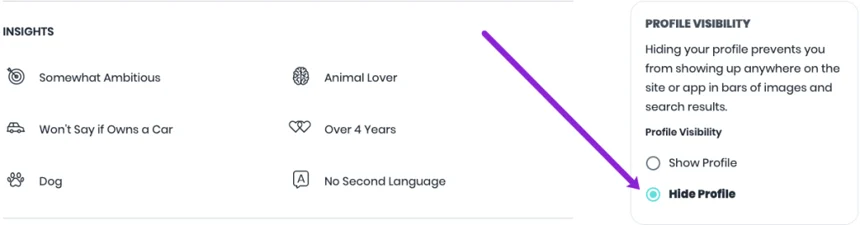
  3. Scroll down to ‘Profile Visibility’ and select ‘Hide Profile.’

No one can see your profile in search results or suggestions. When you decide to return and make your profile visible, follow the same steps to get back on the online dating market.

Read: 11 Things You Can Do To Protect Your Online Privacy

Why did POF delete my account?

Users have reported that their POF account has been suspended without warning. This could be due to several reasons:

  • Being disrespectful to others – If you post content about someone they find rude, they can report it to POF support for review. POF will delete your account if they see you have violated their community guidelines. Violations can include hate speech, discrimination, violence, or harmful language. 
  • Posting inappropriate images – If you have posted a violent or sexual image, your account will be terminated without warning. 
  • Fake or misleading profile photo – If you do not have an actual photo of yourself, your account may be deleted without warning.

Here are the guidelines for an appropriate photo on Plenty of Fish:

  • Using group photos – POF will delete your account if you are using a picture that does not identify who you are. They recommend using a photo of yourself alone. 
  • Using your pet as a profile photo– Your account may be deleted if you have a picture of your pet without you in the image. 
  • Filters – Filters are popular because they can enhance photos and completely change your appearance. POF may ban your account. 
  • Memes or Quotes – POF recommends using any memes or quotes in your profile but leaving them out of your main profile photo.

The most common reason that POF will delete your account has a misleading profile photo. However, if another user reports your account to contain misleading information, it can also be banned. Your account will be deleted if Plenty of Fish is used to scam, spam, or impersonate another. This applies to creating multiple accounts or trying to access a charge that isn’t yours.

Can You Reactivate a Deleted Account?

Did you change your mind? That happens. Sometimes people delete their accounts and wish to get them back. Unfortunately, once you delete your POF account, you cannot recover it. All your data is deleted from the database, so account recovery is impossible.

Read: How to delete your OnlyFans account.

However, now that you have experienced online dating for some time, you can develop a better profile and start afresh or find your people again. Suppose POF deleted your account due to being marked spam or violating community guidelines. In that case, you could send an email requesting reactivation.

You can edit your POF profile instead of deleting it.

You should delete your POF profile if you have trouble meeting people, getting visits, or have inaccurate information. A well-designed profile helps you make more connections and get more dates. For example, after updating their photos and refining their bio, Alex saw three times more matches in a week. These results show the power of profile revisions over complete deletions.

Plenty of Fish is a compatibility-focused site. Updating your profile to remain relevant and attractive to new people is essential.

You can’t change certain things, for example, your age or lifestyle choice (marriage, casual). You can also change your hobbies, interests, and photos. There is plenty of space to create an exciting and informative bio with Plenty of Fish.

Edit Your Plenty of Fish Profile with a Laptop or a Computer

How to update your POF profile from a computer or laptop.

  1. Log in to Plenty Of Fish. Tap My Profile in the upper right corner. Next, tap Edit Profile.
  2. Scroll down the list to see all available options and update as often as you like.
  3. After you are done, click Save at the bottom.

When creating your profile or other details, be creative and authentic. Plenty of Fish is home to thousands of people, so you must stand out. Be true to yourself when you fill out the questionnaire about what you want in a partner or the future. You might end up with a partner who is a better match.

Editing your Plenty of Fish Profile with iPhone or Android

  1. You can open your mobile browsers, like Opera, Firefox, Chrome, or the default browser.
  2. Log in to your POF.com account.
  3. Tap on My Profil at the top, and then choose Edit profile from the drop-down menu.
  4. Click Save Changes to update the options.

Frequently Asked Questions: Deleting Your Plenty of Fish (POF) Account

How long does Plenty of Fish retain anonymized data after account deletion?

When you delete your POF account, the company removes your profile and direct identifiers from public view. However, like most online platforms, POF may retain anonymized or aggregated data for a period of time. This data no longer identifies you personally and is typically kept for internal purposes such as analytics, security, fraud prevention, or legal compliance. POF does not publicly disclose an exact retention timeline for anonymized data.

Does Plenty of Fish share deleted user data with third parties or data brokers?

After account deletion, POF states that personal profile data is removed from its platform. However, data that was previously shared with third parties such as analytics providers, advertising partners, or service vendors may still exist in those systems, subject to their own retention policies.

Importantly, deleting your POF account does not automatically remove your information from data brokers or third-party sites that may have collected or republished it while your account was active. This is one reason many users pursue additional opt-out or privacy cleanup steps after deletion.

Can you recover a Plenty of Fish account after it has been deleted?

No. POF treats account deletion as permanent. Once you delete your account, you cannot recover your profile, messages, matches, or photos. If you later decide to return, you must create a new account from scratch using a new or existing email address.

For this reason, users should download or save any information they want before completing the deletion process.

How can users verify that their data has been fully deleted from POF servers?

POF does not provide a dashboard or confirmation report showing backend data deletion. After deleting your account, the most practical steps users can take include:

  • Attempting to log in (deleted accounts should not be accessible)
  • Searching for your username or profile in search engines after a few weeks
  • Reviewing POF’s privacy policy for current data handling practices

If you want stronger assurance, you can submit a data access or deletion request under applicable privacy laws (such as GDPR or CCPA, if eligible). These requests ask the company to confirm what data they hold and what has been deleted.

Protect Online Privacy

Whether you’re deleting your POF account because you found love or are tired of the app, removing your personal information from unused apps is important. Every year, data breaches spill essential information. Keep your information safe with NewReputation online privacy protection. Remove personal information from over 100 data brokers.

Next steps: As a proactive measure, update your passwords regularly, enable two-factor authentication for all critical accounts, and review the data brokers where your information might still be stored. These steps will further protect your digital presence and reinforce your privacy.

Ready to Take Control of Your Reputation?

Get your free reputation audit and discover what people are really saying about your business online.

Get Your Free Report Now